> ## Documentation Index
> Fetch the complete documentation index at: https://docs.lovable.dev/llms.txt
> Use this file to discover all available pages before exploring further.
# Change or cancel your subscription
> Upgrade or downgrade your plan or credit tier, switch between monthly and annual billing, or cancel your Lovable subscription, and see what happens to your credits and features afterward.
Workspace owners and admins change or cancel the subscription in [**Workspace settings → Plans & credit usage**](https://lovable.dev/settings/billing).
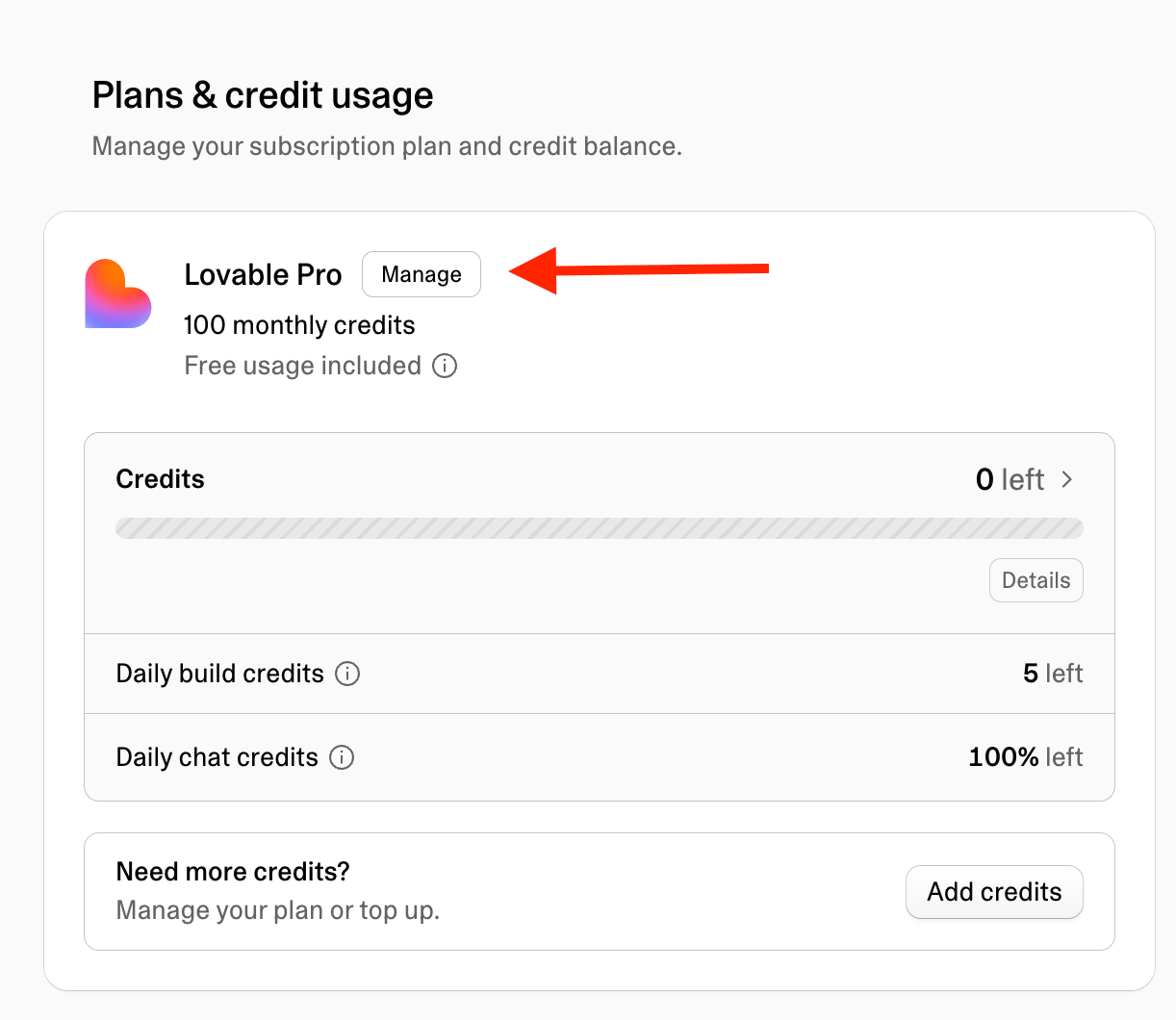
Select **Manage** on your plan card to open the **Manage plan** dialog.
 The dialog shows your current plan and daily credits, with **Upgrade plan**, **Downgrade to free**, **Edit billing information**, and **Invoices & payments**, and a **Gift card balance** card where you can redeem a gift card.
To check which plan your workspace is on, or whether a new subscription has activated, you can also [ask Lovable in the project chat](/introduction/credits-and-usage#tracking-credit-usage). Lovable can tell you your plan but cannot change it.
**Looking for something else?** For invoices, payment methods, and billing details, see [Invoices and billing](/introduction/invoices-and-billing). To compare plans and credit tiers, see [Subscription plans](/introduction/subscription-plans).
## Upgrade your plan or credit tier
Use these steps to move to a higher plan, or to a higher credit tier on Pro or Business. If you consistently run out of subscription credits before your renewal date, upgrading is usually more cost-effective than repeated top-ups. For one-time top-ups and auto top-up, see [Credit top-ups](/introduction/credits-and-usage#credit-top-ups). For how credits are spent, see [Usage costs](/introduction/credits-and-usage#usage-costs).
Go to [**Workspace settings → Plans & credit usage**](https://lovable.dev/settings/billing).
On the **Pro** or **Business** plan card, choose your desired credit amount from the credits dropdown.
Select **Upgrade current plan** for a higher credit tier on your current plan, or **Upgrade** for a higher plan. Then complete the upgrade in Stripe.
The upgrade takes effect when you complete it.
When you upgrade from Free, you receive the full monthly allocation of the plan you choose. When you upgrade from one paid plan or credit tier to a higher one, you do not receive a full new grant. Your monthly allocation is updated, and you receive the difference. For example, upgrading from 100 credits to 200 credits adds 100 credits, not 200. Your existing unused credits keep their original expiry date.
## Downgrade your plan or credit tier
Use these steps to move from Business to Pro, or to a lower credit tier on Pro or Business. To move to the Free plan instead, see [Cancel your subscription](#cancel-your-subscription).
Go to [**Workspace settings → Plans & credit usage**](https://lovable.dev/settings/billing).
On the **Pro** or **Business** plan card, choose your desired credit amount from the credits dropdown.
Select **Downgrade**, then complete the downgrade in Lovable and in the Stripe portal.
Your current plan remains active until the end of the current billing period. Until then, your plan card shows the pending change with a **Cancel changes** button.
**Downgrading to a lower plan or credit tier keeps your existing credits**
When you downgrade to a lower plan or credit tier, including from Business to Pro, your unused monthly plan credits and rollover credits stay available until their original expiry date. Your new monthly credit allocation applies from your next billing period.
## Switch between monthly and annual billing
You can switch a Pro or Business plan between monthly and annual billing. Annual billing gives you two months free compared with paying monthly, and your monthly plan credits stay valid until 1 month after the annual billing period ends.
Go to [**Workspace settings → Plans & credit usage**](https://lovable.dev/settings/billing).
Above the plan cards, select **Yearly**. The plan cards update to show the discounted monthly rate for annual billing.
On your current plan card, select **Switch to annual** and confirm the change in checkout.
The button appears only for the credit tier you are on. If you select a different credit tier from the dropdown at the same time, the button reads **Upgrade** or **Downgrade** instead, and the tier change and the switch to annual billing happen together.
When you switch to annual billing, you are charged for the annual plan at checkout. Monthly plan credits continue to be granted each month.
To return to monthly billing, select **Monthly** above the plan cards, then select **Switch to monthly** on your current plan card and confirm the change in checkout.
## Cancel your subscription
Canceling your paid subscription moves your workspace to the Free plan at the end of your current billing period. **Plans & credit usage** has no cancel button, and you do not need to contact support. You cancel by downgrading to Free yourself.
Go to [**Workspace settings → Plans & credit usage**](https://lovable.dev/settings/billing).
Select **Manage** on your plan card.
Select **Downgrade to free** and complete the downgrade flow.
The dialog shows your current plan and daily credits, with **Upgrade plan**, **Downgrade to free**, **Edit billing information**, and **Invoices & payments**, and a **Gift card balance** card where you can redeem a gift card.
To check which plan your workspace is on, or whether a new subscription has activated, you can also [ask Lovable in the project chat](/introduction/credits-and-usage#tracking-credit-usage). Lovable can tell you your plan but cannot change it.
**Looking for something else?** For invoices, payment methods, and billing details, see [Invoices and billing](/introduction/invoices-and-billing). To compare plans and credit tiers, see [Subscription plans](/introduction/subscription-plans).
## Upgrade your plan or credit tier
Use these steps to move to a higher plan, or to a higher credit tier on Pro or Business. If you consistently run out of subscription credits before your renewal date, upgrading is usually more cost-effective than repeated top-ups. For one-time top-ups and auto top-up, see [Credit top-ups](/introduction/credits-and-usage#credit-top-ups). For how credits are spent, see [Usage costs](/introduction/credits-and-usage#usage-costs).
Go to [**Workspace settings → Plans & credit usage**](https://lovable.dev/settings/billing).
On the **Pro** or **Business** plan card, choose your desired credit amount from the credits dropdown.
Select **Upgrade current plan** for a higher credit tier on your current plan, or **Upgrade** for a higher plan. Then complete the upgrade in Stripe.
The upgrade takes effect when you complete it.
When you upgrade from Free, you receive the full monthly allocation of the plan you choose. When you upgrade from one paid plan or credit tier to a higher one, you do not receive a full new grant. Your monthly allocation is updated, and you receive the difference. For example, upgrading from 100 credits to 200 credits adds 100 credits, not 200. Your existing unused credits keep their original expiry date.
## Downgrade your plan or credit tier
Use these steps to move from Business to Pro, or to a lower credit tier on Pro or Business. To move to the Free plan instead, see [Cancel your subscription](#cancel-your-subscription).
Go to [**Workspace settings → Plans & credit usage**](https://lovable.dev/settings/billing).
On the **Pro** or **Business** plan card, choose your desired credit amount from the credits dropdown.
Select **Downgrade**, then complete the downgrade in Lovable and in the Stripe portal.
Your current plan remains active until the end of the current billing period. Until then, your plan card shows the pending change with a **Cancel changes** button.
**Downgrading to a lower plan or credit tier keeps your existing credits**
When you downgrade to a lower plan or credit tier, including from Business to Pro, your unused monthly plan credits and rollover credits stay available until their original expiry date. Your new monthly credit allocation applies from your next billing period.
## Switch between monthly and annual billing
You can switch a Pro or Business plan between monthly and annual billing. Annual billing gives you two months free compared with paying monthly, and your monthly plan credits stay valid until 1 month after the annual billing period ends.
Go to [**Workspace settings → Plans & credit usage**](https://lovable.dev/settings/billing).
Above the plan cards, select **Yearly**. The plan cards update to show the discounted monthly rate for annual billing.
On your current plan card, select **Switch to annual** and confirm the change in checkout.
The button appears only for the credit tier you are on. If you select a different credit tier from the dropdown at the same time, the button reads **Upgrade** or **Downgrade** instead, and the tier change and the switch to annual billing happen together.
When you switch to annual billing, you are charged for the annual plan at checkout. Monthly plan credits continue to be granted each month.
To return to monthly billing, select **Monthly** above the plan cards, then select **Switch to monthly** on your current plan card and confirm the change in checkout.
## Cancel your subscription
Canceling your paid subscription moves your workspace to the Free plan at the end of your current billing period. **Plans & credit usage** has no cancel button, and you do not need to contact support. You cancel by downgrading to Free yourself.
Go to [**Workspace settings → Plans & credit usage**](https://lovable.dev/settings/billing).
Select **Manage** on your plan card.
Select **Downgrade to free** and complete the downgrade flow.
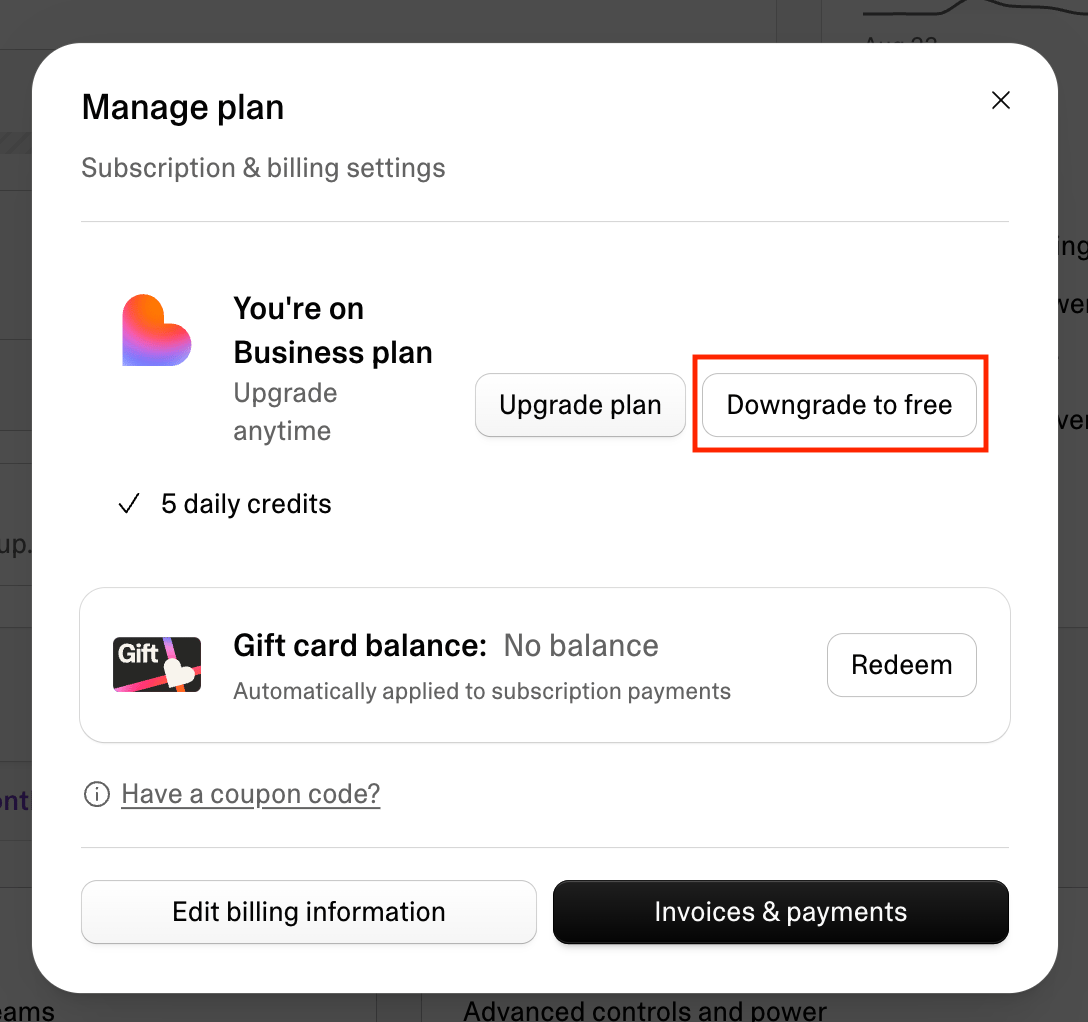 Your current plan remains active until the end of the current billing period. After that, your workspace moves to Free.
**Downgrading to Free freezes subscription credits**
If you downgrade to the Free plan, unexpired credits granted through your paid subscription cannot be used while your workspace is on Free. This includes monthly plan credits and rollover credits.
If you upgrade to a paid plan again before those credits expire, you can continue using them until their original expiry date.
Top-up credits you purchased while subscribed and any bonus credits can still be used on Free until they expire.
Until the period ends, the **Manage plan** dialog shows **Cancel downgrade** in place of **Downgrade to free**. Select it to keep your current plan.
The credits dropdown on the plan card only lists credit tiers, so it cannot be used to move to Free. Use **Manage → Downgrade to free** instead.
### Cancel from your phone
The [Lovable mobile app](/integrations/lovable-mobile-app) has no cancel option, so on a phone you cancel in the browser. Open **lovable.dev** in your phone's browser, go to [**Workspace settings → Plans & credit usage**](https://lovable.dev/settings/billing), and follow the same steps. This applies on both iOS and Android.
**Subscribed through the iOS app?**
Plans purchased inside the iOS app go through the App Store and work differently: each purchase covers one month and does not renew automatically, so you have nothing to cancel. Your plan card in **Workspace settings → Plans & credit usage** shows **Managed by App Store** in place of the **Manage** button, along with the date your plan runs until. When that date passes, your workspace moves to the Free plan on its own, and you are not charged again unless you make a new purchase.
Because these plans do not renew, they also do not appear under **Settings → \[Your name] → Subscriptions** on your iPhone or iPad. See [Lovable mobile app](/integrations/lovable-mobile-app#buying-credits-and-upgrading-plans-on-mobile) for more on iOS and Android billing differences.
## What happens when you change or cancel
This table shows when each change takes effect and what happens to your monthly plan credits and rollover credits. Top-up credits and bonus credits are not affected by any plan change.
| Change | When it takes effect | What happens to your credits |
| :- | :- | :- |
| Upgrade to a higher plan or credit tier | When you complete the upgrade |
Your current plan remains active until the end of the current billing period. After that, your workspace moves to Free.
**Downgrading to Free freezes subscription credits**
If you downgrade to the Free plan, unexpired credits granted through your paid subscription cannot be used while your workspace is on Free. This includes monthly plan credits and rollover credits.
If you upgrade to a paid plan again before those credits expire, you can continue using them until their original expiry date.
Top-up credits you purchased while subscribed and any bonus credits can still be used on Free until they expire.
Until the period ends, the **Manage plan** dialog shows **Cancel downgrade** in place of **Downgrade to free**. Select it to keep your current plan.
The credits dropdown on the plan card only lists credit tiers, so it cannot be used to move to Free. Use **Manage → Downgrade to free** instead.
### Cancel from your phone
The [Lovable mobile app](/integrations/lovable-mobile-app) has no cancel option, so on a phone you cancel in the browser. Open **lovable.dev** in your phone's browser, go to [**Workspace settings → Plans & credit usage**](https://lovable.dev/settings/billing), and follow the same steps. This applies on both iOS and Android.
**Subscribed through the iOS app?**
Plans purchased inside the iOS app go through the App Store and work differently: each purchase covers one month and does not renew automatically, so you have nothing to cancel. Your plan card in **Workspace settings → Plans & credit usage** shows **Managed by App Store** in place of the **Manage** button, along with the date your plan runs until. When that date passes, your workspace moves to the Free plan on its own, and you are not charged again unless you make a new purchase.
Because these plans do not renew, they also do not appear under **Settings → \[Your name] → Subscriptions** on your iPhone or iPad. See [Lovable mobile app](/integrations/lovable-mobile-app#buying-credits-and-upgrading-plans-on-mobile) for more on iOS and Android billing differences.
## What happens when you change or cancel
This table shows when each change takes effect and what happens to your monthly plan credits and rollover credits. Top-up credits and bonus credits are not affected by any plan change.
| Change | When it takes effect | What happens to your credits |
| :- | :- | :- |
| Upgrade to a higher plan or credit tier | When you complete the upgrade | - From Free, you receive the full monthly allocation of the plan you choose.
- From a paid plan, you receive the difference between your previous and new monthly allocation. For example, upgrading from 100 to 200 credits adds 100 credits, not 200.
- Your existing unused credits keep their original expiry date.
|
| Downgrade to a lower plan or credit tier | End of the current billing period | - Your unused monthly plan credits and rollover credits stay available until their original expiry date.
- Your new monthly allocation applies from the next billing period.
|
| Switch to annual billing | At checkout, when you are charged for the annual plan | - Monthly plan credits are still issued monthly.
- They stay valid until 1 month after the annual billing period ends.
|
| Cancel (downgrade to Free) | End of the current billing period | - Your unused monthly plan credits and rollover credits are frozen. You cannot use them on Free, and Lovable does not refund them.
- If you upgrade to a paid plan again before they expire, you can use them until their original expiry date.
- Top-up credits you purchased while subscribed and any bonus credits stay usable on Free until they expire.
|
For credit expiry and rollover rules, see [Credits and usage](/introduction/credits-and-usage#general-credits).
### Features that stop working when you downgrade
When your workspace moves to a lower plan, features that are not included in the new plan stop working. Examples include:
* **Scheduled security scans** and **scheduled data exports** (Enterprise) stop running. Stopped scans no longer use credits.
* **Verified email sign-up** (Business and Enterprise) stops automatically adding new sign-ups to your workspace. Existing members keep their access.
* **Announcement banners** (Business and Enterprise) stop showing to workspace members.
* **Publishing to your workspace** (Business and Enterprise): an app that is published to workspace members or to a custom audience stays live, but Lovable does not publish new changes to it until you change its website access to public or upgrade again. See [What happens to my published app if I downgrade or cancel my plan?](/features/publish#what-happens-to-my-published-app-if-i-downgrade-or-cancel-my-plan).
* **Hiding the Lovable badge** (paid plans): if you hid the **Edit with Lovable** badge on a published project, your live site keeps it hidden until you publish again. On that next publish, Lovable warns you, then brings the badge back and disables the project's **Hide Lovable badge** setting. To hide the badge again after upgrading, enable the setting again in **Project settings → Publishing**.
For most features, Lovable keeps your configuration, so they resume automatically if you upgrade again. Plan-dependent workspace defaults, such as default project visibility and publishing permissions, reset to the new plan's defaults and are not restored by a later upgrade.
## FAQ
Go to [**Workspace settings → Plans & credit usage**](https://lovable.dev/settings/billing), select **Manage** on your plan card, then select **Downgrade to free** and complete the downgrade flow. Your plan stays active until the end of the current billing period, then your workspace moves to Free. See [Cancel your subscription](#cancel-your-subscription).
Upgrades take effect when you complete the upgrade. If you upgrade to a higher credit allocation, you receive the difference between your previous allocation and your new allocation.
Downgrades and cancellations take effect at the end of your current billing period. Your current plan remains active until then. See [What happens when you change or cancel](#what-happens-when-you-change-or-cancel).
Your current plan remains active until the end of the current billing period. After that, your workspace moves to the Free plan and your unused monthly plan credits and rollover credits are frozen. You cannot use them on Free, and Lovable does not refund them. If you upgrade again before they expire, you can use them until their original expiry date.
Top-up credits you purchased while subscribed and any bonus credits stay usable on Free until they expire.
For more about credit expiry and rollover behavior, see [Credits and usage](/introduction/credits-and-usage#general-credits).
Your unused monthly plan credits and rollover credits stay available until their original expiry date when you move between paid plans or credit tiers, in either direction. Switching between Pro and Business, or to a different Pro or Business tier, only changes your monthly credit allocation: immediately when you upgrade, and from the next billing period when you downgrade.
For a full overview of credit expiry and rollover, see [Credits and usage](/introduction/credits-and-usage#general-credits).
Yes. You can switch from monthly to annual billing on Pro and Business plans from [**Workspace settings → Plans & credit usage**](https://lovable.dev/settings/billing). Select **Yearly** above the plan cards, then select **Switch to annual** on your current plan card.
Annual billing gives you two months free compared with paying monthly. Monthly plan credits on annual billing are still issued monthly and expire 1 month after the annual billing period ends. See [Switch between monthly and annual billing](#switch-between-monthly-and-annual-billing).
No. The mobile app has no cancel option. Open **lovable.dev** in your phone's browser and cancel from [**Workspace settings → Plans & credit usage**](https://lovable.dev/settings/billing). Plans purchased inside the iOS app cover one month and do not renew, so you have nothing to cancel. See [Cancel from your phone](#cancel-from-your-phone).
No. When you cancel, Lovable stops future charges but does not refund the current billing period. Your plan runs until the period ends. Unused monthly plan credits and rollover credits are frozen rather than refunded, while top-up and bonus credits stay usable until they expire. If you believe you were charged in error, contact the support team. See the [Billing and subscription FAQ](/introduction/support-policy#billing-and-subscription) in the Support policy.
## Troubleshooting
You receive additional credits only if you upgrade to a plan or tier with more included credits, and you receive the difference between the two allocations, not a full new grant.
If you upgraded and still have not received the additional credits, contact support at [support@lovable.dev](mailto:support@lovable.dev).
If you downgrade to the Free plan, unexpired credits granted through your paid subscription are frozen. This means you cannot use monthly plan credits or rollover credits while your workspace is on Free.
If you upgrade to a paid plan again before those credits expire, you can continue using them until their original expiry date.
Top-up credits you purchased while subscribed and any bonus credits can still be used on Free until they expire.
## Related topics
- [Subscription plans](/introduction/subscription-plans.md)
- [Credits and usage](/introduction/credits-and-usage.md)
- [Invoices, payments, and billing details](/introduction/invoices-and-billing.md)
- [Add payments to your app](/features/payments.md)
- [FAQ](/introduction/faq.md)