

Understand how Lovable credits work: where credits come from, when they expire, what building, chat, Cloud, and AI usage cost, and how to check your balance.
Lovable uses one credit balance for building your app, chatting with Lovable, hosting your app and running its built-in backend (Cloud), and powering AI features in your deployed app.Use Workspace settings → Plans & credit usage to understand your credit balance, track credit usage, add credits, and manage top-ups.
Looking for how to cancel your subscription? Go to Workspace settings → Plans & credit usage, select Manage on your plan card, then select Downgrade to free in the Manage plan dialog and complete the downgrade flow. Your current plan remains active until the end of the current billing period. After that, your workspace moves to the Free plan. See Cancel your subscription.Looking for billing details or invoices? Go to Workspace settings → Plans & credit usage, select Manage on your plan card, then choose Edit billing information to update your billing name, address, and tax details, or Invoices & payments to download past invoices and manage your payment method. Both open the Stripe billing portal. See Invoices and billing.
A credit is the unit Lovable uses to measure and pay for usage across your workspace. Credits let you build apps, chat with Lovable, run deployed apps, and power AI features from one balance.Your credits cover five types of usage:
Usage type
What credits pay for
Build usage
Plan mode and Build mode messages in the project chat, work a chat sends to a project, and the images and videos Lovable generates, in a project or in a chat
Chat usage
Messages in Chats and Chat mode, including Lovable in Slack and Telegram. Chat usage follows its own pricing model, including a per-message price and a daily chat allowance. See Chat costs
Cloud usage
Hosting your app and running its built-in backend (Cloud), including database, network, storage, compute, and realtime usage in deployed apps
AI gateway usage
AI features your deployed app uses, such as calls your app makes to AI models
Connector usage
Requests through connectors whose Managed by Lovable option bills through Lovable credits, such as Perplexity, Firecrawl, and Parallel. See Connector costs
In Usage details, build and chat usage appear together under Build credits, and Cloud, AI gateway, and connector usage under Run credits. These are reporting views, not separate credit balances.
General credits, which can be used to build your app, chat with Lovable, host your app and run its built-in backend (Cloud), and power AI features in deployed apps.
Lovable always uses usage-specific grants before general credits. After usage-specific grants run out, Lovable uses the general credits closest to expiry first.
Usage-specific grants are included credits that apply to one type of usage. Each grant belongs to the workspace, so everyone in the workspace draws on the same pool. Lovable always uses them before general credits.For example, the daily chat allowance applies only to chat usage. Daily build credits cover build usage and, after the daily chat allowance is used up, chat usage. The monthly Cloud grant applies only to Cloud usage, and the monthly AI grant applies only to AI gateway usage.Usage-specific grants refresh automatically, but their refresh schedule depends on the grant and plan type. Unused usage-specific grants do not roll over.Usage-specific grants and general credits are not separate pools. When a grant runs out, the usage it covers draws from your general credits, so you can keep building, chatting, and running your deployed apps as long as your workspace has credits available.
Monthly Cloud, AI, and connector grants are a temporary offering and subject to change. The current chat pricing model, including the per-message price and the daily chat allowance, is also temporary and subject to change. See Chat costs.
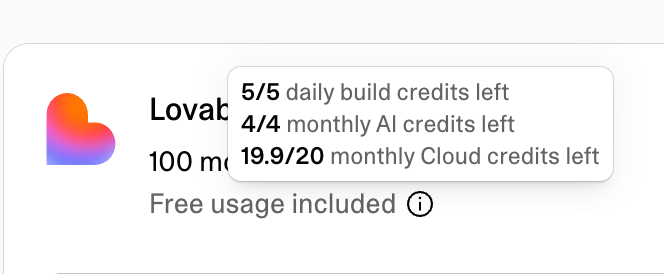
To see what is left of your daily build credits, monthly Cloud grant, and monthly AI grant, hold the pointer over the info icon next to Free usage included above the credit bar.
The daily chat allowance is not part of that breakdown or of the credit bar. The Daily chat credits row on the same page shows the percentage of today’s allowance left. See View your credit balance.For the full plan comparison and paid subscription tiers, see Subscription plans.
General credits can be used after usage-specific grants run out to build your app, chat with Lovable, host your app and run its built-in backend (Cloud), and power AI features in deployed apps.
Credit source
When it is added
Expiry
Monthly plan credits
Start of billing period
Monthly plans: 2 months from issue date
Annual plans: 1 month after the annual billing period ends
You can see a breakdown of your general credit types and their expiry dates in the Credit balance dialog.All unused monthly plan credits automatically roll over at the end of each billing cycle, as long as your subscription remains active. Rollover credits still expire on the schedule in the table above: 2 months after they were issued on monthly plans, and 1 month after the annual billing period ends on annual plans.
Credits are used across four areas: building your app, chatting with Lovable, hosting your app and running its built-in backend (Cloud), and powering AI features in deployed apps. Each area uses credits differently, based on the type of work performed or resources consumed.To see where your credits are going over time, use Usage details.
Build usage covers Plan mode and Build mode messages in the project chat, work a chat sends to a project, and the images and videos Lovable generates, in a project or in a chat. Messages in Chat mode, the third mode in the project chat, are chat usage and follow the chat pricing model. See Chat costs.
Mode
How credits are charged
Plan mode
1 credit per message, plus the cost of any subagent research Lovable runs while planning
Build mode
Cost depends on the complexity of the request and the work completed
Use Plan mode to think through an idea, investigate a problem, compare approaches, or create a plan before changing code. Plan mode never modifies your code. A Plan mode message costs 1 credit, plus the cost of any subagent research Lovable runs while planning, so a message that needs deep research costs more than 1 credit. See How Plan mode messages are priced.Use Build mode when you want Lovable to implement changes directly in your project. Build mode pricing is usage-based. Small, focused edits usually cost less than larger generations, multi-step changes, or requests that require more codebase exploration, verification, browser checks, web search, or image and video generation.Here are some illustrative Build mode examples:
User prompt
Work done
Credits used
Make the button gray
Changes the button styles
0.50
Remove the footer
Removes the footer component
0.90
Add authentication
Adds login and authentication logic
1.20
Build a landing page with images
Creates a landing page with generated images, a theme, and sections
2.00
Credit costs shown are illustrative examples. Actual credits used vary depending on the complexity and scope of your specific project.
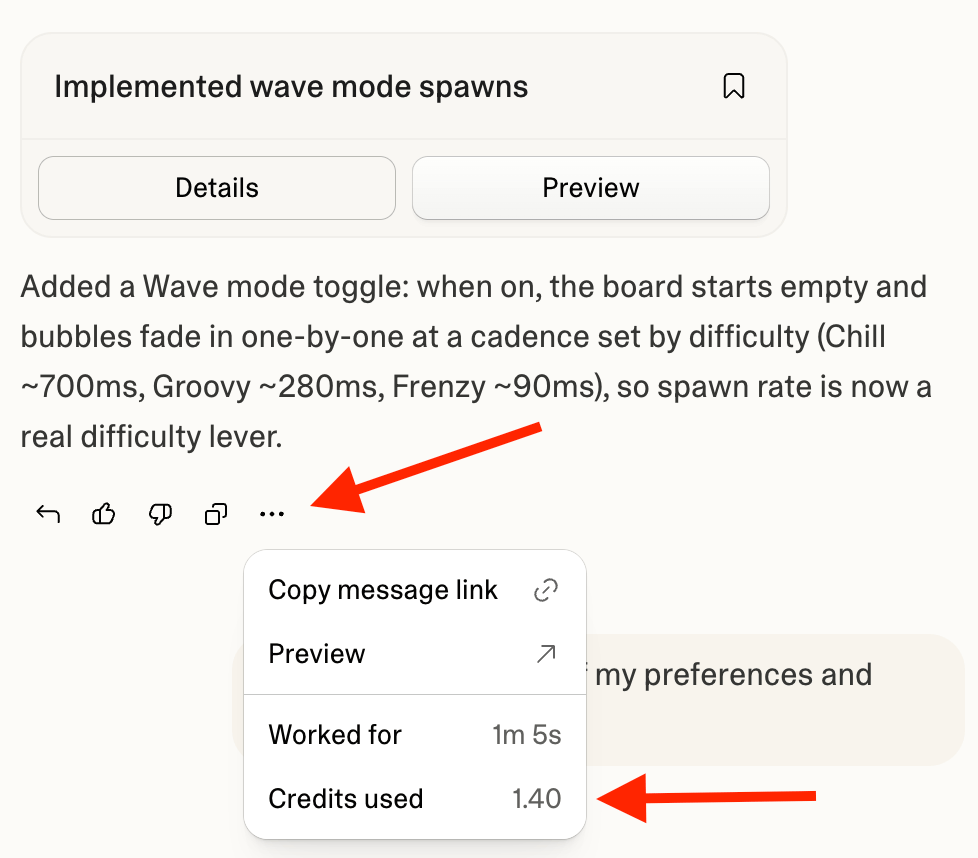
Open the More options menu below any Lovable response in the project chat to see its exact cost under Credits used. The menu is available while Lovable is still working as well as after it finishes, so you can follow the cost of a long message as it runs. Stopped Build mode requests are charged based on the work completed so far. A request you stop before Lovable has made any change to your project is not charged.To review build usage over time, go to Workspace settings → Plans & credit usage → Usage details and select Build credits. You can filter by time range and view usage by project or person. The chart splits the view into four groups: Build for Plan mode and Build mode messages and other work in your projects, Chat for chat usage, and Image generation and Video generation for the images and videos Lovable generates while it works. See Reading the chart.For long-running Build mode messages, Lovable checks in when a single message crosses your credit check-in level, 20 credits by default. The run pauses with a card showing what the message has cost so far. Choose Continue to keep going, optionally typing a new check-in level first (it becomes your default), or Finish up to have Lovable finish the work in progress and stop. If the message keeps running after you continue, Lovable checks in again each time it costs another level’s worth of credits. A check-in is a notification threshold, not a hard cap: a run can go slightly past the level before pausing, and sending a new message resets the count. A single message can run for up to 10 hours, so a long run can check in several times along the way.Manage check-ins in account settings: set the level (a whole number between 20 and 100,000 credits, applied to your account in every workspace) or disable them, either with Don’t ask again on the check-in card or with the Long-running credit check-ins setting. Wrapping up itself uses credits like any other work. The feature is in beta.If your workspace balance reaches zero while Lovable is working, the message pauses regardless of your check-in settings, and you can add credits to resume or have Lovable wrap up. See Low credit balance and out-of-credits recovery.A Build mode message you set as a goal with the /goal command is also billed on the work Lovable does, but costs noticeably more: the same work uses more credits, and Lovable keeps working until the goal is achieved.Build costs are the same wherever you build. A Build mode message you send in a draft costs the same as one in the main version of your project, and creating, updating, accepting, and deleting a draft don’t use credits.
Chat usage follows its own pricing model, including a per-message price and a daily chat allowance. It covers messages in Chats, in Chat mode inside a project, and to Lovable in Slack or Telegram, including each request you make in a voice conversation. Lovable prices each message on the work it does to answer, typically a fraction of a credit.Chat usage draws from the daily chat allowance first, then from your daily build credits, then from your general credits, at the same per-message price. Enterprise plans do not include a daily chat allowance, so chat usage in an Enterprise workspace uses the workspace’s credits from the first message.
Temporary offering, subject to change. The current chat pricing model, including the per-message price and the daily chat allowance, applies through October 31, 2026. Pro and Business workspaces receive a larger daily chat allowance than Free workspaces. This pricing applies to messages in Chats and Chat mode, including messages sent through Slack or Telegram and requests made by voice.Build mode, Plan mode, image and video generation, and Cloud and AI usage follow their standard pricing and are not part of this offer.
Work that starts in a chat but runs in a project is build usage. A project Lovable creates or edits from a chat, the messages you send after switching from Chat mode to Build mode, and images and videos Lovable generates in a chat all use build credits at standard pricing. Lovable shows a card before a chat edits or creates a project. See Chat pricing and daily chat allowance and How Chat mode messages are priced.To see what a message cost, open the More options menu on Lovable’s reply. The row reads Chat credits used in Chats and Credits used in Chat mode, and a Free badge replaces the amount when the daily chat allowance covered the message.To follow chat usage and the allowance:
Allowance left today: The Daily chat credits row on Plans & credit usage shows the percentage of today’s allowance left. See View your credit balance.
Inside Chats: The mode picker, a chat’s title menu, and the menu on each reply also show the allowance state. See Track your allowance and usage for each place, with screenshots.
Cloud usage is measured based on the hosting and built-in backend resources your deployed app consumes. It draws from your available credits, starting with any monthly Cloud grant included in your plan.
Usage driver
What affects cost
Database server
The instance size your database runs on, how long it stays active, and how much traffic or querying it handles. Larger instances support more users, traffic, queries, and data, but use more credits. Paid plan users can choose a larger instance size from More → Database → Manage → Settings. The Manage instance dialog shows an estimated monthly cost for each size to help you compare. Free plan users can upgrade their plan to move beyond the default instance. See Database size for more information.
Database storage
The amount of data your database stores, such as users, orders, messages, and app records
Network
Data sent or received by your app, such as API responses, downloads, uploads, images, and media
Storage
The amount of uploaded or generated files your app stores, such as images, documents, and videos
Compute
Your app’s code running behind the scenes, such as processing payments or sending emails
Realtime
Live updates sent through your app, such as chat messages, notifications, or collaborative updates
Images Lovable generates or edits for you while building, such as changing an image’s style or removing its background, are build usage and appear under Image generation. Image files your app stores and serves are Cloud usage: they count toward Storage while stored and toward Network when your app sends them to visitors.Cloud usage usually increases when more people visit your app, your app stores more data or files, users upload or download larger files, your app sends more API responses or media, your app runs more code behind the scenes, or Realtime features send more messages. For more information, see the built-in backend (Cloud).To reduce a project’s usage, work through the checklist in Reduce a project’s usage: pausing, right-sizing the instance, fixing slow queries, cleaning up storage, or removing the built-in backend entirely.To review Cloud usage, go to Workspace settings → Plans & credit usage → Usage details, then select Run credits. You can filter by time range and view usage by project. The More → Usage view inside a project shows the same breakdown, already filtered to that project, so you can see which categories drive its usage while you work on it.The Run credits view includes Cloud, AI gateway, and connector usage. The usage chart breaks Cloud usage into categories such as Database, Network, Storage, Compute, and Realtime. Database usage includes both database server and database storage.
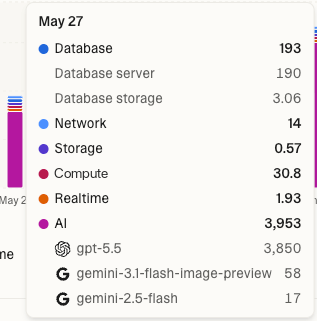
AI gateway usage is measured when AI features inside your deployed app make model calls. These requests are separate from the Lovable agent that helps you plan, build, and edit your project.The built-in AI connector runs on a usage-based pricing model, so credit usage scales with how much your app uses AI features. Each model call deducts credits based on the model used and the amount of work performed, such as text tokens, generated images, or seconds of generated video or voice conversation.On Free, Pro, and Business plans, AI gateway usage draws from the monthly AI grant first. After that, it draws from general credits if available.AI gateway usage rates are based on the underlying provider model costs. To estimate relative model costs, refer to the official provider pricing sources linked from the model tables on AI features for your app.
Usage driver
What affects cost
Model choice
More capable models usually cost more than smaller or faster models
Input tokens
Longer prompts, documents, chat history, or retrieved context increase usage
Output tokens
Longer AI responses increase usage
Call volume
More users or more frequent AI actions create more model calls
Feature type
Chatbots, document question answering, image generation, embeddings, and automations can have different usage patterns
For more information, see AI features for your app.To review AI gateway usage, go to Workspace settings → Plans & credit usage → Usage details and select Run credits. You can filter by time range and view usage by project.The Run credits view includes Cloud, AI gateway, and connector usage. The usage chart shows the top models used (see image in Cloud costs).
Some connectors, such as Perplexity, Firecrawl, and Parallel, offer a Managed by Lovable option that bills usage through Lovable credits instead of a provider account. Lovable charges requests through such a connection to the workspace the connection belongs to, at the rate on the connector’s page.Connector usage draws from the monthly connector grant included in your plan first, then from your general credits. The monthly Cloud and AI grants do not cover it.To review connector usage, go to Workspace settings → Plans & credit usage → Usage details and select Run credits. The usage chart breaks connector usage down by connector.
You can check your credit balance from the dashboard, the project editor, or Workspace settings → Plans & credit usage. You can also ask Lovable in the project chat.
To quickly check your credit balance, click your workspace name at the top of the sidebar, on the dashboard or inside the project editor. The workspace menu shows a credit bar with your remaining credits. The bar empties as you use credits.Click the credit bar to open Plans & credit usage for more details.Lovable shows the sidebar only in a wide enough window. In a narrow window, and on a phone, reach the credit bar this way instead:
In the project editor, select the project name at the top. The menu that opens shows the credit bar.
On the dashboard, select your workspace name at the top, then the credits row. The bar opens at the bottom of the screen.
The credit bar shows your remaining daily build credits, monthly credits, personal credits, team credits, or commitment credits, depending on your plan. The filled part of the bar is what you have left, so the bar gets shorter as you use credits.On Enterprise plans, the credit balance panel on Plans & credit usage shows numbers in place of a bar. Workspace admins and owners see how many workspace credits remain and the workspace total, for example 6,400 remaining of 10,000. When the workspace has used more than its commitment, the panel shows a Limit reached warning and an Overage credits row. Other members see only their own personal credits.The daily chat allowance is not part of the credit bar. On Plans & credit usage, the Daily chat credits row at the bottom of the credit balance panel shows the percentage of today’s allowance left, and its info tip shows when it resets. Once the allowance is used up, the row reads Used up for today. Chats now use your build credits., which means chat usage now draws on your daily build credits, then your general credits. The row can also note that no build credits are left or that a credit limit paused chats. The row does not appear on Enterprise plans.
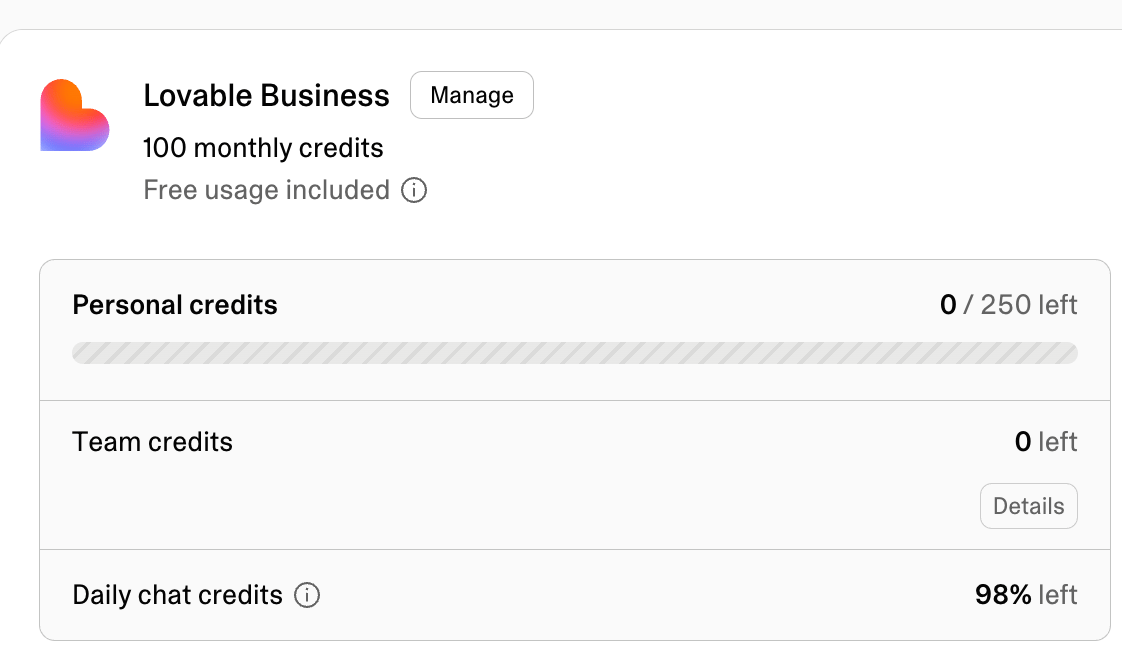
Workspace admins and owners on paid plans can also open the Credit balance dialog for a detailed view of workspace credits, including credit types, expiry dates, and recent credit activity.Select Details to open the Credit balance dialog. On Pro and Business plans, the dialog has two tabs: Breakdown and History. On Enterprise plans, the dialog is titled Credit history and shows the history only.
Available on Pro and Business plans. Not shown for Enterprise.The Breakdown tab lists your general credit grants, including each grant’s type, expiry date, and remaining amount. Grants expiring soonest appear first.A note at the top of the tab confirms that Lovable uses the general credits closest to expiry first.
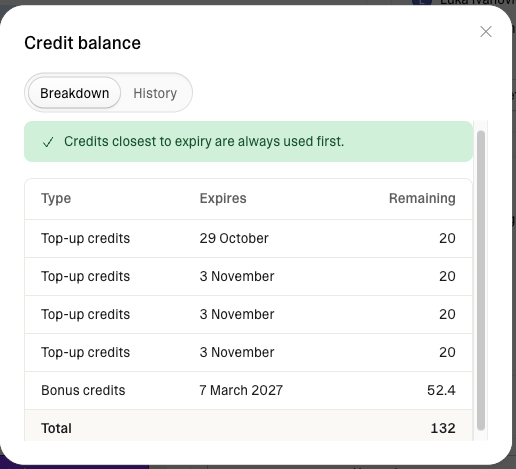
Credit type*
Description
Monthly credits
General credits included with your plan. Issued at each billing cycle renewal.
Rollover credits
Unused monthly plan credits carried forward from a previous billing period. They keep their original expiry date.
Bonus credits
One-off promotional credits from Lovable support, a referral, or an affiliate program.
Top-up credits
Credits purchased through one-time top-ups or auto top-ups.
Available on Pro, Business, and Enterprise plans.The History tab shows credit activity for up to the past 12 months, sorted newest first.
Because credit history recording started on March 8, 2026, early history may show less than 12 months of activity. Over time, the tab will show a full 12 months of credit history.
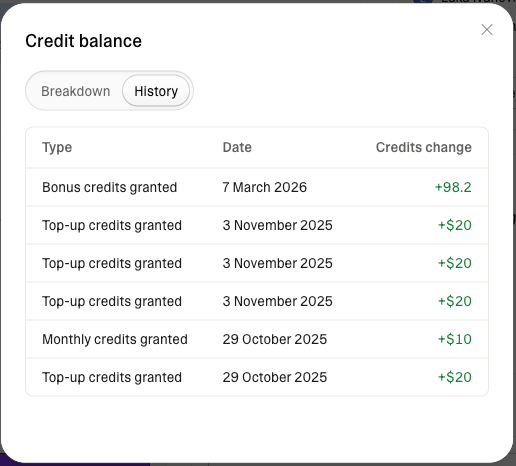
Each row shows the event type, date, and credit change. Positive values mean credits were added, and negative values mean credits were removed or expired.
Event type
Description
Monthly credits granted
Monthly plan credits were issued at renewal or plan start.
Monthly credits expired
Unused monthly plan credits expired at the end of their validity window.
Bonus credits granted
Promotional credits were added to your account, for example from Lovable support, a referral, or an affiliate program.
Bonus credits expired
Promotional credits expired unused.
Top-up credits granted
Credits purchased through a one-time top-up or auto top-up were added to your account.
Top-up credits expired
Purchased top-up credits expired unused.
Commitment credits granted
Enterprise only. Your committed credit balance was issued or renewed.
Converted balance
A one-time entry created during the transition to credits as the single balance, reflecting the conversion of your previous Cloud and AI balance into credits.
Go to Workspace settings → Plans & credit usage → Usage details to see a detailed breakdown of where your credits go across build, chat, Cloud, and AI gateway usage.The Usage card on the Plans & credit usage page shows recent usage at a glance. Select More usage details to open the full Usage details page.
Ask Lovable about your workspace’s credit usage, plan, and subscription directly in the project chat.Ask a question about credits, spend, cost, or your plan, and Lovable looks up the answer and replies in the conversation, using the same information shown in Workspace settings → Plans & credit usage.For example, ask How many credits did this workspace use this month?, How many credits have I used?, Which project used the most Run credits?, What’s driving my Run credit usage?, What plan are we on?, or Has my subscription activated?Everyone can ask about their own usage. Workspace-wide totals and breakdowns by project or member are available to admins and owners. Plan and subscription answers are available to editors, admins, and owners. Asking is treated as standard build usage and consumes credits.Lovable can tell you which plan you are on, but it cannot change it. To upgrade, downgrade, or cancel, see Change or cancel your subscription.To find out what drives a project’s or workspace’s run credit usage, see Ask Lovable what drives your run credit usage.
Usage visibility depends on your workspace plan, workspace role, the usage type, and whether you have access to the project.
View
Who can see it
Notes
Your own usage
Editors, admins, and owners
You can see your own usage under Build credits.
Total usage
Admins and owners
Shows total workspace usage across the selected filters. Editors see a narrower view: usage in the projects they own, plus their own usage anywhere in the workspace.
Project usage
Editors, admins, and owners
Admins and owners see every project. Editors see only the projects they own, in a My projects tab.
Other members’ usage
Admins and owners
Only admins and owners can view usage under Build credits for other workspace members.
On Enterprise workspaces, editors see usage for the projects they can edit, plus their own usage. Workspace totals, other members’ usage, and projects they cannot edit are visible to admins and owners only.
Credit type: switch between All credits, Build credits for build and chat usage, or Run credits for Cloud, AI gateway, and connector usage.
Project: see usage per project across All credits, Build credits, or Run credits. Admins and owners see every project. Editors see the projects they own, or on Enterprise the projects they can edit. Selecting a project updates the chart to show that project’s usage for the selected credit type. Clear the selected project to return to the full view.
People: see your own usage under Build credits, or, if you are an admin or owner, see it per workspace member. This filter is only available when viewing Build credits. Selecting a person updates the chart to show that person’s usage. Select View details to open User insights for that member. Clear the selected person to return to the full view.
Group: admins and owners can see usage under Build credits per group. This filter is only available when viewing Build credits, and is available to Business and Enterprise workspaces. Selecting a group updates the chart to show that group’s usage. Clear the selected group to return to the full view.
Time range: view the last 30 days, last 90 days, all time, or a custom range of up to 90 days.
The heading above the chart shows your total credits for the current filter and time range, such as 5,352 credits in last 30 days. The chart shows daily credit consumption. Hover over a bar to see the details for that day.Usage data may be up to a minute behind your most recent activity. New Run credit usage can take up to 24 hours to appear.Each bar breaks down by the credit type you selected:
All credits shows usage under Build credits and Run credits.
Build credits shows Build, which covers Plan mode and Build mode messages and other work in your projects, Chat, which covers chat usage, and Image generation and Video generation, which cover images and videos Lovable generates while it works. Chat usage covered entirely by the daily chat allowance or your daily build credits does not appear. Only chat usage that drew on your general credits counts. Images and videos that your published app generates through its AI features are AI gateway usage and appear under Run credits instead.
Run credits shows Cloud usage, AI gateway usage, and connector usage. Cloud usage breaks down into Database (server and storage), Network, Storage, Compute, and Realtime. AI gateway usage shows a breakdown by the top three models used. Connector usage shows a breakdown by connector.
Select a category in the legend below the chart to hide or show it. In the Build credits and Run credits views, a table below the chart lists each category’s total for the selected time range.
Usage history under Run credits, which includes Cloud, AI gateway, and connector usage, starts on the date your workspace switched to the unified credit balance (June 1, 2026 at the earliest). Dates before then show usage under Build credits only.
This helps you answer questions such as Which project is driving my hosting costs? or Which member used the most credits this month? directly from Usage details.
Next to the total above the chart, Usage details shows how many of those credits your free allowances covered, for example 42 credits covered by free allowance. The free allowances are your plan’s usage-specific grants: the daily chat allowance, daily build credits, and the monthly Cloud, AI, and connector grants. The covered total appears only when the free allowances covered some usage in the selected time range.The chart has two views:
By category (default): each bar is split by usage category. Hover over a bar to see how many credits the free allowances covered in each category.
By coverage: each bar is split into Covered by free allowance and Other usage, so you can see when your usage drew on your general credits.
The covered total also appears in a project’s Usage view. Enterprise plans do not include these grants, so Enterprise workspaces do not see free allowance coverage.
Below the chart, usage is broken down in two tabs:
Projects (My projects for editors): credits used per project across the selected credit type. Search and sort projects by usage, then select a project to apply the filter and update the chart.
People: usage under Build credits per workspace member, including chat usage. This tab is available when viewing Build credits. Search and sort members by usage, then select a person to apply the filter and update the chart.
Admins and owners see every project. Editors see the projects they own, or on Enterprise the projects they can edit.Editors, admins, and owners can view their own usage under Build credits. Usage for other workspace members is visible to admins and owners only.On Enterprise workspaces, workspace totals and other members’ usage are visible to admins and owners only.
If a project or workspace uses more run credits than you expect, ask Lovable in the project chat or in Chats what drives the usage. Lovable reads the recorded usage, investigates the app’s scheduled jobs, functions, database, storage, network, realtime, and AI activity, traces what it finds to the project’s code, and suggests fixes.For example, ask Why is this project using so many credits?, How do my scheduled jobs affect my Cloud usage?, or Which projects use the most run credits in this workspace?Workspace admins and owners can also start the investigation from the usage chart. In Workspace settings → Plans & credit usage → Usage details, Optimize your usage appears below the chart when the workspace used more than 5 run credits in the last 7 days. Select it to start a workspace-wide investigation in Chats.In a project, the same button in More → Usage starts the investigation in the project chat, in Chat mode, where Lovable does not edit your project’s code.
Scope
When Lovable uses it
Project
When you ask in the project chat, or when you select a project in Chats. Lovable reads usage for that project only.
Workspace
When you ask for a workspace-wide view in the project chat, or when you ask in Chats without selecting a project.
Workspace editors can ask about a project they can edit. Workspace admins and owners can ask about any project, and only they can ask about the whole workspace.In Chats, Lovable ranks the projects and usage categories that drive your workspace’s run credit usage. Lovable does not read project code from Chats during an investigation. To trace a project’s usage to its code, continue in that project’s chat.By default, Lovable looks at the last 14 days of recorded usage. You can ask for a longer period, up to 30 days.Lovable counts days in UTC. New run credit usage can take up to 24 hours to appear, so the latest activity may be missing.Asking for an investigation lets Lovable inspect your usage, code, logs, and database diagnostics. It does not change your plan or your credit balance. Lovable proposes changes such as deleting old data, resizing your instance, or changing job schedules, and makes them only when you ask for them.In the project chat, Lovable inspects the project’s code and the relevant runtime diagnostics before it recommends anything. When a measurement is unavailable, Lovable says which one. A question such as Why is this project using so many credits? gets a diagnosis and proposed fixes, not code changes.To have Lovable apply a fix, ask for that specific fix in Build mode. Lovable still diagnoses first, then makes the change, subject to any approvals the change needs. To investigate without code changes, ask in Chat mode.
On Pro and Business plans, workspace admins and owners can add credits with a one-time top-up or let Lovable add them automatically with auto top-up. See Credit top-ups.When your workspace has no credits left, building stops, AI features in deployed apps stop working, and apps that use the built-in backend (Cloud) pause. See Low credit balance and out-of-credits recovery for what stops, how to get running again, and how Lovable warns you before the balance reaches zero.
Go to Workspace settings → Plans & credit usage. From there you can upgrade your plan or, on Pro and Business plans, buy credit top-ups without changing your subscription. The low-credits alert in the project chat opens the same options. Workspace admins and owners can top up in one of two ways:
One-time top-up: select Add credits, then Buy once, and choose an amount. The credits are added to your workspace when the payment is confirmed, usually within a minute.
Auto top-up: Lovable buys credits automatically when your balance reaches or falls below a threshold you set, up to an optional monthly limit.
Top-up credits are billed separately from your subscription and are valid for 12 months. You can also earn bonus credits by inviting people to Lovable. See Credit top-ups, Share Lovable, and Subscription plans.
How were Cloud and AI balances converted into credits?
Previous Cloud and AI balances were converted using each workspace’s plan credit rate.Pro and Business use different plan credit rates because Business plans include additional functionality, such as advanced controls and governance features. For the full feature comparison, see Subscription plans.
Plan
Plan credit rate
Example conversion
Pro
$0.25 per credit
$10 converts to 40 credits
Business
$0.50 per credit
$10 converts to 20 credits
Because Pro and Business use different plan credit rates, the same previous Cloud and AI balance can convert into a different number of credits depending on the workspace plan.This does not mean Cloud or AI gateway usage is cheaper on Business. It means fewer credits are deducted because each Business credit represents more dollars.The number of credits is different, but the Cloud and AI gateway value is the same.
Do my credits expire?
Yes. Different credit types expire at different times:
Monthly plan credits expire 2 months after issue on monthly plans. On annual plans, monthly plan credits are issued monthly and expire 1 month after the annual billing period ends.
Top-up credits expire 12 months after purchase.
Monthly Cloud grants expire at the end of the calendar month on Free plans, and at the end of the billing cycle on Pro and Business plans.
Monthly AI grants expire at the end of the calendar month on Free plans, and at the end of the billing cycle on Pro and Business plans.
The daily chat allowance expires at the end of the day.
Daily build credits expire at the end of the day.
Your balance breakdown shows the expiry date of each general credit grant. Lovable spends soonest-expiring general credits first to minimize what you lose.
Do unused monthly plan credits roll over?
Yes. Unused monthly plan credits roll over at the end of each billing cycle, as long as your subscription remains active. Rollover credits stay available until their original expiry date: 2 months after issue on monthly plans, and 1 month after the annual billing period ends on annual plans.Rollover applies to monthly plan credits only. Usage-specific grants, such as the daily chat allowance, daily build credits, and the monthly Cloud and AI grants, expire on their own schedule instead. See Do usage-specific grants roll over? for details.
Do usage-specific grants roll over?
No. Unused usage-specific grants do not roll over.
The daily chat allowance refreshes every day at 00:00 UTC.
Daily build credits refresh every day at 00:00 UTC.
On Free plans, monthly Cloud and AI grants refresh on the 1st of each calendar month at 00:00 UTC.
On Pro and Business plans, monthly Cloud and AI grants refresh with the subscription billing cycle.
Which plans include a monthly AI grant?
Free, Pro, and Business plans all include a 4-credit monthly AI grant for AI gateway usage in deployed apps. On Free, the grant refreshes on the 1st of each calendar month at 00:00 UTC. On Pro and Business, it refreshes with the subscription billing cycle. Unused AI grant credits do not roll over.Enterprise plans do not include the monthly AI grant. Contact your account team for account-specific details.
Which plans include a daily chat allowance?
Free, Pro, and Business plans include a daily chat allowance, part of the chat pricing model, for chat usage: messages in Chats, Chat mode, and Lovable in Slack and Telegram. Pro and Business workspaces receive a larger daily chat allowance than Free workspaces. The allowance refreshes every day at 00:00 UTC and does not roll over.Enterprise plans do not include a daily chat allowance. Chat usage in an Enterprise workspace uses the workspace’s credits from the first message.
Do messages in Chats and Chat mode use credits?
Yes. Messages in Chats and Chat mode, like messages to Lovable in Slack and Telegram, are chat usage, which follows its own pricing model, including a per-message price and a daily chat allowance. Each message is priced on the work Lovable does to answer it, typically a fraction of a credit. The daily chat allowance covers chat usage first. When it is used up for the day, chat usage draws on your daily build credits, then your general credits, at the same per-message price. Work a chat sends to a project, and Build mode messages, are build usage. See Chat costs.
Why doesn't my chat usage appear in Usage details?
Usage details shows credits your workspace spent from its balance. Chat usage covered entirely by the daily chat allowance or your daily build credits does not appear. Chat usage that drew on your general credits appears under Chat in the Build credits view. To check a single message, open the More options menu on Lovable’s reply. See Chat costs.
When do monthly plan credits reset?
Monthly plan credits are granted at the start of each billing period. This happens every month on the same date your subscription started.On annual billing, monthly plan credits are still issued monthly and expire 1 month after the annual billing period ends.To see your billing period, go to Workspace settings → Plans & credit usage.
Can I see my balance without opening Settings?
Yes. You can quickly check your credit balance from the dashboard or from a project.From the dashboard, click your workspace name in the top-left. In the project editor, click your workspace name at the top of the sidebar, or the project name at the top when the window is too narrow to show the sidebar. See View your credit balance for the steps in a narrow window.The credit bar does not include the daily chat allowance. To see how much of it is left, hold the pointer over the Free badge on the Chat option in the mode picker, on the dashboard or in the project chat, or select a chat’s title inside the chat.
Does the credit bar show credits used or credits left?
Credits left. The filled part of the bar is what you have left, and it empties as you use credits. On Enterprise plans, Plans & credit usage shows the credits remaining as a number instead of a bar.
Can I see which project or member is using the most credits?
Yes. Open Usage details from Plans & credit usage.You can filter by project across All credits, Build credits, and Run credits. You can filter by member or group (on Business and Enterprise) when viewing Build credits.Workspace admins and owners can also ask Lovable in Chats which projects use the most run credits. See Ask Lovable what drives your run credit usage.
Can I limit how many credits members can spend?
Yes. Workspace owners and admins can set monthly credit limits for workspace members. Member credit limits apply to usage shown under Build credits: build usage, chat usage, and image and video generation. Usage shown under Run credits (Cloud, AI gateway, and connector usage) does not count against a member’s monthly limit.Create limits from Workspace settings → Usage limits & alerts: a default limit for all members, limits for specific members, and limits for groups, projects, or the whole workspace. Each limit can send an alert or block further usage when the threshold is reached. See Usage limits and alerts.You can also set a monthly credit limit for a specific member directly from Workspace settings → People:
Click the three-dot menu at the end of the member’s row.
Select Set credit limit.
Enter the monthly credit limit and save.
Both places manage the same limit. Saving it in the People tab updates the member’s limit in Usage limits & alerts, and a change there shows in the People tab as long as the limit blocks usage.Member credit limits reset on the 1st of each month at 00:00 UTC, independent of your workspace billing cycle.When a member reaches their limit, Lovable pauses their build usage and chat usage until the limit resets or an owner or admin raises it. Chats show Credit limit reached, even while the daily chat allowance has credits left.
How do I cancel my subscription?
Go to Workspace settings → Plans & credit usage, select Manage on your plan card, then select Downgrade to free in the Manage plan dialog and complete the downgrade flow. Your current plan remains active until the end of the current billing period. After that, your workspace moves to the Free plan. See Cancel your subscription.
I stopped receiving daily build credits. What happened?
You may have reached your monthly cap for daily build credits.Daily build credits are capped per calendar month on Free plans only. Free workspaces receive 5 daily build credits, up to 30 per calendar month. After a Free workspace reaches the cap, the daily 5 credits stop being granted for the rest of that calendar month. Daily build credits resume on the 1st of the next calendar month at 00:00 UTC. For example, on Free, you receive daily build credits for the first 6 days each month (6 × 5 = 30), then none until the next month starts.Pro and Business workspaces receive 5 daily build credits every day at 00:00 UTC, with no monthly cap.If you need more credits before then, upgrade your plan or add credits with a one-time top-up on a Pro or Business plan.
Was this page helpful?
{"docsConfig":{"theme":"mint","$schema":"https://mintlify.com/docs.json","name":"Lovable Documentation","description":"Lovable Documentation — Build full-stack websites with AI using natural language. Explore Lovable features, integrations, tutorials, and best practices.","colors":{"primary":"#0095FF","light":"#1AA3FF","dark":"#0084E6"},"logo":{"light":"https://mintcdn.com/lovable-f9060f1e/lZT1ihBcprll2Agr/assets/logo/logoblack.svg?fit=max\u0026auto=format\u0026n=lZT1ihBcprll2Agr\u0026q=85\u0026s=8d9eafaf19f94e27f0d13ac160d54f54","dark":"https://mintcdn.com/lovable-f9060f1e/lZT1ihBcprll2Agr/assets/logo/logowhite.svg?fit=max\u0026auto=format\u0026n=lZT1ihBcprll2Agr\u0026q=85\u0026s=fed1a7a9be6502f49d06a55cec77288c","href":"https://lovable.dev/"},"favicon":"https://mintcdn.com/lovable-f9060f1e/b_1_IEcMDh-0NUDG/assets/logo/favicon.svg?fit=max\u0026auto=format\u0026n=b_1_IEcMDh-0NUDG\u0026q=85\u0026s=a439abba3defb47beabd3f6e7d318cb5","api":{"playground":{"display":"interactive"},"examples":{"defaults":"required","languages":["curl"],"prefill":true,"autogenerate":true},"url":"full"},"navbar":{"links":[{"icon":"message","href":"https://lovable.dev/support","label":"Support"},{"icon":"blog","href":"https://lovable.dev/blog","label":"Blog"}],"primary":{"type":"button","label":"Start building for free","href":"https://lovable.dev/signup?utm_source=lovable_docs\u0026utm_medium=navigation"}},"footer":{"socials":{"x":"https://x.com/Lovable","github":"https://github.com/lovablelabs","linkedin":"https://linkedin.com/company/lovable-dev","youtube":"https://youtube.com/@lovable","discord":"https://discord.gg/lovable-dev","reddit":"https://www.reddit.com/r/lovable"}},"seo":{"metatags":{"og:image":"/assets/logo/opengraph-image.png","canonical":"https://docs.lovable.dev"},"indexing":"all"},"contextual":{"options":["copy","assistant","download-pdf","download-spec"],"display":"header"},"styling":{"latex":true},"navigation":{"pages":[]}},"deployment":{"deploymentMetadataValue":{"subdomain":"lovable-f9060f1e","hasAudioNarration":false,"actualSubdomain":"lovable-f9060f1e","customDomains":["docs.lovable.dev"],"gitSource":{"type":"github","owner":"lovablelabs","repo":"docs","deployBranch":"main","contentDirectory":"","isPrivate":true,"mountPath":"","label":""},"chroma":{"liveDeploymentHistoryId":"6ae4ba7e39bc6f1b8c5083c4","collectionId":"be62575e-7d4d-4f47-8039-e68eba8e6629","schemaVersion":"v3","latestBuiltDeploymentHistoryId":"6ae4ba7e39bc6f1b8c5083c4"},"feedback":{"thumbs":true,"issues":true,"agentFeedback":true},"entitlements":{"AI_CHAT":{"status":"ENABLED"},"REMOVE_BRANDING":{"status":"ENABLED"},"CONTEXTUAL_FEEDBACK":{"status":"ENABLED"},"CODE_SNIPPET_FEEDBACK":{"status":"ENABLED"},"WEB_MCP":{"status":"ENABLED"},"NARRATION":{"status":"ENABLED"}},"buildId":"6ae4ba7e39bc6f1b8c5083c4","clientVersion":"0.0.4044","searchFilterCounts":[{"language":"default","tag":"Documentation","count":273},{"language":"default","tag":"Connect","count":125},{"language":"default","tag":"Connector catalog","count":113},{"language":"default","tag":"Build","count":69},{"language":"default","tag":"API Reference","count":33},{"language":"default","tag":"Workspace \u0026 account","count":29},{"language":"default","tag":"Lovable API","count":27},{"language":"default","tag":"Endpoints","count":25},{"language":"default","tag":"Data \u0026 databases","count":21},{"language":"default","tag":"Backend","count":19}]},"assistantConfig":{"enableStarterQuestions":true,"enableContextualStarterQuestions":true,"deflection":{"enabled":true,"type":"link","email":"support@lovable.dev","url":"https://lovable.dev/support"}},"basePath":"","hasChatPermissions":true,"hasWebMcpPermissions":true,"toggles":[{"name":"kill-isr","enabled":true,"variant":{"name":"disabled","enabled":false,"feature_enabled":true},"impressionData":false},{"name":"agent-mintlify-slack","enabled":true,"variant":{"name":"disabled","enabled":false,"feature_enabled":true},"impressionData":false},{"name":"agent-integrations-settings","enabled":true,"variant":{"name":"disabled","enabled":false,"feature_enabled":true},"impressionData":false},{"name":"automations-pr-grouping","enabled":true,"variant":{"name":"disabled","enabled":false,"feature_enabled":true},"impressionData":false},{"name":"custom-prefix","enabled":true,"variant":{"name":"disabled","enabled":false,"feature_enabled":true},"impressionData":false},{"name":"analytics-v7","enabled":true,"variant":{"name":"disabled","enabled":false,"feature_enabled":true},"impressionData":false},{"name":"user-flows-analytics","enabled":true,"variant":{"name":"disabled","enabled":false,"feature_enabled":true},"impressionData":false},{"name":"no-publish-flow","enabled":true,"variant":{"name":"disabled","enabled":false,"feature_enabled":true},"impressionData":false},{"name":"workos-onboarding","enabled":true,"variant":{"name":"disabled","enabled":false,"feature_enabled":true},"impressionData":false},{"name":"llms-txt-v2","enabled":true,"variant":{"name":"disabled","enabled":false,"feature_enabled":true},"impressionData":false},{"name":"snapshot-serving-live","enabled":true,"variant":{"name":"disabled","enabled":false,"feature_enabled":true},"impressionData":false},{"name":"stripTemperatureMiddleware","enabled":true,"variant":{"name":"disabled","enabled":false,"feature_enabled":true},"impressionData":false},{"name":"support-platform-pylon-zendesk","enabled":true,"variant":{"name":"disabled","enabled":false,"feature_enabled":true},"impressionData":false},{"name":"snapshot-serving","enabled":true,"variant":{"name":"disabled","enabled":false,"feature_enabled":true},"impressionData":false},{"name":"instant-rollback","enabled":true,"variant":{"name":"disabled","enabled":false,"feature_enabled":true},"impressionData":false},{"name":"granular-notifications-server","enabled":true,"variant":{"name":"disabled","enabled":false,"feature_enabled":true},"impressionData":false},{"name":"granular-notifications","enabled":true,"variant":{"name":"disabled","enabled":false,"feature_enabled":true},"impressionData":false},{"name":"automations-fable","enabled":true,"variant":{"name":"disabled","enabled":false,"feature_enabled":true},"impressionData":false},{"name":"fixed-ai-action-pricing","enabled":true,"variant":{"name":"disabled","enabled":false,"feature_enabled":true},"impressionData":false},{"name":"automation-resolve-merge-conflict","enabled":true,"variant":{"name":"disabled","enabled":false,"feature_enabled":true},"impressionData":false},{"name":"scoped-publishing","enabled":true,"variant":{"name":"disabled","enabled":false,"feature_enabled":true},"impressionData":false},{"name":"mintql","enabled":true,"variant":{"name":"disabled","enabled":false,"feature_enabled":true},"impressionData":false},{"name":"page-level-analytics","enabled":true,"variant":{"name":"disabled","enabled":false,"feature_enabled":true},"impressionData":false},{"name":"editor-version-history-v2","enabled":true,"variant":{"name":"disabled","enabled":false,"feature_enabled":true},"impressionData":false},{"name":"instinct-self-updating-docs","enabled":true,"variant":{"name":"disabled","enabled":false,"feature_enabled":true},"impressionData":false},{"name":"billing-page-v2","enabled":true,"variant":{"name":"disabled","enabled":false,"feature_enabled":true},"impressionData":false},{"name":"full-page-search","enabled":true,"variant":{"name":"disabled","enabled":false,"feature_enabled":true},"impressionData":false},{"name":"workspace-projects","enabled":true,"variant":{"name":"disabled","enabled":false,"feature_enabled":true},"impressionData":false},{"name":"assistant-v5","enabled":true,"variant":{"name":"disabled","enabled":false,"feature_enabled":true},"impressionData":false},{"name":"byok-sep-25","enabled":true,"variant":{"name":"disabled","enabled":false,"feature_enabled":true},"impressionData":false},{"name":"fork-pr-previews","enabled":true,"variant":{"name":"disabled","enabled":false,"feature_enabled":true},"impressionData":false},{"name":"revalidation-jwt","enabled":true,"variant":{"name":"disabled","enabled":false,"feature_enabled":true},"impressionData":false},{"name":"vite-origin","enabled":true,"variant":{"name":"disabled","enabled":false,"feature_enabled":true},"impressionData":false},{"name":"billing-updated-9-15","enabled":true,"variant":{"name":"disabled","enabled":false,"feature_enabled":true},"impressionData":false},{"name":"workos-sso-scim","enabled":true,"variant":{"name":"disabled","enabled":false,"feature_enabled":true},"impressionData":false},{"name":"hobby-abuse-scan","enabled":true,"variant":{"name":"disabled","enabled":false,"feature_enabled":true},"impressionData":false},{"name":"dashboard-inbox","enabled":true,"variant":{"name":"disabled","enabled":false,"feature_enabled":true},"impressionData":false},{"name":"workos-signup","enabled":true,"variant":{"name":"disabled","enabled":false,"feature_enabled":true},"impressionData":false},{"name":"turbopuffer-dual-write","enabled":true,"variant":{"name":"disabled","enabled":false,"feature_enabled":true},"impressionData":false},{"name":"workos-enabled","enabled":true,"variant":{"name":"disabled","enabled":false,"feature_enabled":true},"impressionData":false},{"name":"approve-review-flow","enabled":true,"variant":{"name":"disabled","enabled":false,"feature_enabled":true},"impressionData":false},{"name":"sso-setup-deadline-banner","enabled":true,"variant":{"name":"disabled","enabled":false,"feature_enabled":true},"impressionData":false}],"googleFontsInlined":false},"customCss":[{"filePath":"assets/css/styles.css","content":".supabase{color:#59cf8c}"}],"page":{"pagePath":"introduction/credits-and-usage","slug":"/introduction/credits-and-usage","pageMetadata":{"title":"Credits and usage","description":"Understand how Lovable credits work: where credits come from, when they expire, what building, chat, Cloud, and AI usage cost, and how to check your balance.","keywords":["daily chat allowance","chat credits","daily chat credits","chat usage","chat pricing","chats pricing","chat mode pricing","chat messages","credit balance","usage details","build credits","run credits","Cloud usage","AI usage","credit expiry","rollover credits","monthly credits"],"href":"/introduction/credits-and-usage"},"description":{"compiledSource":"\"use strict\";\nconst {jsx: _jsx} = arguments[0];\nconst {useMDXComponents: _provideComponents} = arguments[0];\nfunction _createMdxContent(props) {\n const _components = {\n p: \"p\",\n ..._provideComponents(),\n ...props.components\n };\n return _jsx(_components.p, {\n children: \"Understand how Lovable credits work: where credits come from, when they expire, what building, chat, Cloud, and AI usage cost, and how to check your balance.\"\n });\n}\nfunction MDXContent(props = {}) {\n const {wrapper: MDXLayout} = {\n ..._provideComponents(),\n ...props.components\n };\n return MDXLayout ? _jsx(MDXLayout, {\n ...props,\n children: _jsx(_createMdxContent, {\n ...props\n })\n }) : _createMdxContent(props);\n}\nreturn {\n default: MDXContent\n};\n","frontmatter":{},"scope":{}},"pageType":"default","mdx":{"mdxSource":{"compiledSource":"\"use strict\";const{Fragment:_Fragment,jsx:_jsx,jsxs:_jsxs}=arguments[0];const{useMDXComponents:_provideComponents}=arguments[0];function _createMdxContent(props){const _components={a:`a`,code:`code`,em:`em`,li:`li`,ol:`ol`,p:`p`,strong:`strong`,tbody:`tbody`,td:`td`,th:`th`,thead:`thead`,tr:`tr`,ul:`ul`,..._provideComponents(),...props.components},{Accordion,AccordionGroup,Frame,Heading,Note,OptimizedImage,Table,Tip}=_components;if(!Accordion)_missingMdxReference(`Accordion`,true);if(!AccordionGroup)_missingMdxReference(`AccordionGroup`,true);if(!Frame)_missingMdxReference(`Frame`,true);if(!Heading)_missingMdxReference(`Heading`,true);if(!Note)_missingMdxReference(`Note`,true);if(!OptimizedImage)_missingMdxReference(`OptimizedImage`,true);if(!Table)_missingMdxReference(`Table`,true);if(!Tip)_missingMdxReference(`Tip`,true);return _jsxs(_Fragment,{children:[_jsx(_components.p,{children:`Lovable uses one credit balance for building your app, chatting with Lovable, hosting your app and running its built-in backend (Cloud), and powering AI features in your deployed app.`}),`\n`,_jsxs(_components.p,{children:[`Use `,_jsx(_components.a,{href:`https://lovable.dev/settings/billing`,children:_jsx(_components.strong,{children:`Workspace settings → Plans \u0026 credit usage`})}),` to understand your credit balance, track credit usage, add credits, and manage top-ups.`]}),`\n`,_jsxs(Tip,{children:[_jsxs(_components.p,{children:[_jsx(_components.strong,{children:`Looking for how to cancel your subscription?`}),` Go to `,_jsx(_components.a,{href:`https://lovable.dev/settings/billing`,children:_jsx(_components.strong,{children:`Workspace settings → Plans \u0026 credit usage`})}),`, select `,_jsx(_components.strong,{children:`Manage`}),` on your plan card, then select `,_jsx(_components.strong,{children:`Downgrade to free`}),` in the `,_jsx(_components.strong,{children:`Manage plan`}),` dialog and complete the downgrade flow. Your current plan remains active until the end of the current billing period. After that, your workspace moves to the Free plan. See `,_jsx(_components.a,{href:`/introduction/manage-subscription#cancel-your-subscription`,children:`Cancel your subscription`}),`.`]}),_jsxs(_components.p,{children:[_jsx(_components.strong,{children:`Looking for billing details or invoices?`}),` Go to `,_jsx(_components.a,{href:`https://lovable.dev/settings/billing`,children:_jsx(_components.strong,{children:`Workspace settings → Plans \u0026 credit usage`})}),`, select `,_jsx(_components.strong,{children:`Manage`}),` on your plan card, then choose `,_jsx(_components.strong,{children:`Edit billing information`}),` to update your billing name, address, and tax details, or `,_jsx(_components.strong,{children:`Invoices \u0026 payments`}),` to download past invoices and manage your payment method. Both open the Stripe billing portal. See `,_jsx(_components.a,{href:`/introduction/invoices-and-billing`,children:`Invoices and billing`}),`.`]})]}),`\n`,_jsxs(_components.p,{children:[`For the plan comparison and subscription tiers, see `,_jsx(_components.a,{href:`/introduction/subscription-plans`,children:`Subscription plans`}),`. To upgrade, downgrade, or cancel, see `,_jsx(_components.a,{href:`/introduction/manage-subscription`,children:`Change or cancel your subscription`}),`. For invoices and payment methods, see `,_jsx(_components.a,{href:`/introduction/invoices-and-billing`,children:`Invoices and billing`}),`.`]}),`\n`,_jsxs(_components.p,{children:[`To control spend before it happens, workspace owners and admins can cap how many credits a member, project, or the whole workspace can use, and get alerted when usage or the remaining balance crosses a threshold. You find these controls in `,_jsx(_components.a,{href:`https://lovable.dev/settings/alerts-limits`,children:_jsx(_components.strong,{children:`Workspace settings → Usage limits \u0026 alerts`})}),`, available on all paid plans. See `,_jsx(_components.a,{href:`/features/usage-limits-and-alerts`,children:`Usage limits and alerts`}),`.`]}),`\n`,_jsx(Heading,{level:`2`,id:`what-is-a-credit`,children:`What is a credit?`}),`\n`,_jsx(_components.p,{children:`A credit is the unit Lovable uses to measure and pay for usage across your workspace. Credits let you build apps, chat with Lovable, run deployed apps, and power AI features from one balance.`}),`\n`,_jsx(_components.p,{children:`Your credits cover five types of usage:`}),`\n`,_jsxs(Table,{children:[_jsx(_components.thead,{children:_jsxs(_components.tr,{children:[_jsx(_components.th,{children:`Usage type`}),_jsx(_components.th,{children:`What credits pay for`})]})}),_jsxs(_components.tbody,{children:[_jsxs(_components.tr,{children:[_jsx(_components.td,{children:`Build usage`}),_jsx(_components.td,{children:`Plan mode and Build mode messages in the project chat, work a chat sends to a project, and the images and videos Lovable generates, in a project or in a chat`})]}),_jsxs(_components.tr,{children:[_jsx(_components.td,{children:`Chat usage`}),_jsxs(_components.td,{children:[`Messages in `,_jsx(_components.a,{href:`/features/chats`,children:`Chats`}),` and `,_jsx(_components.a,{href:`/features/chat-mode`,children:`Chat mode`}),`, including Lovable in Slack and Telegram. Chat usage follows its own pricing model, including a per-message price and a daily chat allowance. See `,_jsx(_components.a,{href:`#chat-costs`,children:`Chat costs`})]})]}),_jsxs(_components.tr,{children:[_jsx(_components.td,{children:`Cloud usage`}),_jsxs(_components.td,{children:[`Hosting your app and running its `,_jsx(_components.a,{href:`/features/cloud`,children:`built-in backend (Cloud)`}),`, including database, network, storage, compute, and realtime usage in deployed apps`]})]}),_jsxs(_components.tr,{children:[_jsx(_components.td,{children:`AI gateway usage`}),_jsxs(_components.td,{children:[_jsx(_components.a,{href:`/features/ai`,children:`AI features`}),` your deployed app uses, such as calls your app makes to AI models`]})]}),_jsxs(_components.tr,{children:[_jsx(_components.td,{children:`Connector usage`}),_jsxs(_components.td,{children:[`Requests through connectors whose `,_jsx(_components.strong,{children:`Managed by Lovable`}),` option bills through Lovable credits, such as Perplexity, Firecrawl, and Parallel. See `,_jsx(_components.a,{href:`#connector-costs`,children:`Connector costs`})]})]})]})]}),`\n`,_jsxs(_components.p,{children:[`In `,_jsx(_components.strong,{children:`Usage details`}),`, build and chat usage appear together under `,_jsx(_components.strong,{children:`Build credits`}),`, and Cloud, AI gateway, and connector usage under `,_jsx(_components.strong,{children:`Run credits`}),`. These are reporting views, not separate credit balances.`]}),`\n`,_jsx(Heading,{level:`2`,id:`where-credits-come-from`,children:`Where credits come from`}),`\n`,_jsx(_components.p,{children:`Your workspace receives credits from two kinds of sources:`}),`\n`,_jsxs(_components.ol,{children:[`\n`,_jsxs(_components.li,{children:[_jsx(_components.a,{href:`#usage-specific-grants`,children:`Usage-specific grants`}),`, which apply only to one type of usage.`]}),`\n`,_jsxs(_components.li,{children:[_jsx(_components.a,{href:`#general-credits`,children:`General credits`}),`, which can be used to build your app, chat with Lovable, host your app and run its built-in backend (Cloud), and power AI features in deployed apps.`]}),`\n`]}),`\n`,_jsx(Note,{children:_jsx(_components.p,{children:`Lovable always uses usage-specific grants before general credits. After usage-specific grants run out, Lovable uses the general credits closest to expiry first.`})}),`\n`,_jsx(Heading,{level:`3`,id:`usage-specific-grants`,children:`Usage-specific grants`}),`\n`,_jsx(_components.p,{children:`Usage-specific grants are included credits that apply to one type of usage. Each grant belongs to the workspace, so everyone in the workspace draws on the same pool. Lovable always uses them before general credits.`}),`\n`,_jsx(_components.p,{children:`For example, the daily chat allowance applies only to chat usage. Daily build credits cover build usage and, after the daily chat allowance is used up, chat usage. The monthly Cloud grant applies only to Cloud usage, and the monthly AI grant applies only to AI gateway usage.`}),`\n`,_jsx(_components.p,{children:`Usage-specific grants refresh automatically, but their refresh schedule depends on the grant and plan type. Unused usage-specific grants do not roll over.`}),`\n`,_jsx(_components.p,{children:`Usage-specific grants and general credits are not separate pools. When a grant runs out, the usage it covers draws from your general credits, so you can keep building, chatting, and running your deployed apps as long as your workspace has credits available.`}),`\n`,_jsxs(Table,{children:[_jsx(_components.thead,{children:_jsxs(_components.tr,{children:[_jsx(_components.th,{style:{textAlign:`left`},children:`Grant`}),_jsx(_components.th,{style:{textAlign:`left`},children:`What it covers`}),_jsx(_components.th,{style:{textAlign:`left`},children:`When it refreshes`}),_jsx(_components.th,{style:{textAlign:`left`},children:`Expiry`})]})}),_jsxs(_components.tbody,{children:[_jsxs(_components.tr,{children:[_jsx(_components.td,{style:{textAlign:`left`},children:`Daily chat allowance`}),_jsxs(_components.td,{style:{textAlign:`left`},children:[_jsx(_components.a,{href:`#chat-costs`,children:`Chat usage`}),` only`]}),_jsx(_components.td,{style:{textAlign:`left`},children:`Every day at 00:00 UTC`}),_jsx(_components.td,{style:{textAlign:`left`},children:`End of day`})]}),_jsxs(_components.tr,{children:[_jsx(_components.td,{style:{textAlign:`left`},children:`Daily build credits`}),_jsx(_components.td,{style:{textAlign:`left`},children:`Build usage, plus chat usage after the daily chat allowance is used up`}),_jsx(_components.td,{style:{textAlign:`left`},children:`Every day at 00:00 UTC`}),_jsx(_components.td,{style:{textAlign:`left`},children:`End of day`})]}),_jsxs(_components.tr,{children:[_jsx(_components.td,{style:{textAlign:`left`},children:`Monthly Cloud grant`}),_jsx(_components.td,{style:{textAlign:`left`},children:`Cloud usage only`}),_jsx(_components.td,{style:{textAlign:`left`},children:_jsxs(`ul`,{children:[_jsx(`li`,{children:`Free: 1st of each calendar month at 00:00 UTC`}),_jsx(`li`,{children:`Pro and Business: subscription billing cycle`})]})}),_jsx(_components.td,{style:{textAlign:`left`},children:_jsxs(`ul`,{children:[_jsx(`li`,{children:`Free: end of calendar month`}),_jsx(`li`,{children:`Pro and Business: end of billing cycle`})]})})]}),_jsxs(_components.tr,{children:[_jsx(_components.td,{style:{textAlign:`left`},children:`Monthly AI grant`}),_jsx(_components.td,{style:{textAlign:`left`},children:`AI features in deployed apps only`}),_jsx(_components.td,{style:{textAlign:`left`},children:_jsxs(`ul`,{children:[_jsx(`li`,{children:`Free: 1st of each calendar month at 00:00 UTC`}),_jsx(`li`,{children:`Pro and Business: subscription billing cycle`})]})}),_jsx(_components.td,{style:{textAlign:`left`},children:_jsxs(`ul`,{children:[_jsx(`li`,{children:`Free: end of calendar month`}),_jsx(`li`,{children:`Pro and Business: end of billing cycle`})]})})]}),_jsxs(_components.tr,{children:[_jsx(_components.td,{style:{textAlign:`left`},children:`Monthly connector grant`}),_jsxs(_components.td,{style:{textAlign:`left`},children:[_jsx(_components.a,{href:`#connector-costs`,children:`Connector usage`}),` only`]}),_jsx(_components.td,{style:{textAlign:`left`},children:_jsxs(`ul`,{children:[_jsx(`li`,{children:`Free: 1st of each calendar month at 00:00 UTC`}),_jsx(`li`,{children:`Pro and Business: subscription billing cycle`})]})}),_jsx(_components.td,{style:{textAlign:`left`},children:_jsxs(`ul`,{children:[_jsx(`li`,{children:`Free: end of calendar month`}),_jsx(`li`,{children:`Pro and Business: end of billing cycle`})]})})]})]})]}),`\n`,_jsx(_components.p,{children:`Included usage-specific grants by plan:`}),`\n`,_jsxs(Table,{children:[_jsx(_components.thead,{children:_jsxs(_components.tr,{children:[_jsx(_components.th,{style:{textAlign:`left`},children:`Plan`}),_jsx(_components.th,{style:{textAlign:`left`},children:`Daily chat allowance`}),_jsx(_components.th,{style:{textAlign:`left`},children:`Daily build credits`}),_jsx(_components.th,{style:{textAlign:`left`},children:`Monthly Cloud grant`}),_jsx(_components.th,{style:{textAlign:`left`},children:`Monthly AI grant`}),_jsx(_components.th,{style:{textAlign:`left`},children:`Monthly connector grant`})]})}),_jsxs(_components.tbody,{children:[_jsxs(_components.tr,{children:[_jsx(_components.td,{style:{textAlign:`left`},children:`Free`}),_jsx(_components.td,{style:{textAlign:`left`},children:`Included`}),_jsx(_components.td,{style:{textAlign:`left`},children:`5 per day, up to 30 per month`}),_jsx(_components.td,{style:{textAlign:`left`},children:`20 credits per month`}),_jsx(_components.td,{style:{textAlign:`left`},children:`4 credits per month`}),_jsx(_components.td,{style:{textAlign:`left`},children:`1 credit per month`})]}),_jsxs(_components.tr,{children:[_jsx(_components.td,{style:{textAlign:`left`},children:`Pro`}),_jsx(_components.td,{style:{textAlign:`left`},children:`Included, larger than Free`}),_jsx(_components.td,{style:{textAlign:`left`},children:`5 per day`}),_jsx(_components.td,{style:{textAlign:`left`},children:`20 credits per month`}),_jsx(_components.td,{style:{textAlign:`left`},children:`4 credits per month`}),_jsx(_components.td,{style:{textAlign:`left`},children:`1 credit per month`})]}),_jsxs(_components.tr,{children:[_jsx(_components.td,{style:{textAlign:`left`},children:`Business`}),_jsx(_components.td,{style:{textAlign:`left`},children:`Included, larger than Free`}),_jsx(_components.td,{style:{textAlign:`left`},children:`5 per day`}),_jsx(_components.td,{style:{textAlign:`left`},children:`20 credits per month`}),_jsx(_components.td,{style:{textAlign:`left`},children:`4 credits per month`}),_jsx(_components.td,{style:{textAlign:`left`},children:`1 credit per month`})]})]})]}),`\n`,_jsx(Note,{children:_jsxs(_components.p,{children:[`Monthly Cloud, AI, and connector grants are a temporary offering and subject to change. The current chat pricing model, including the per-message price and the daily chat allowance, is also temporary and subject to change. See `,_jsx(_components.a,{href:`#chat-costs`,children:`Chat costs`}),`.`]})}),`\n`,_jsxs(_components.p,{children:[`To see what is left of your daily build credits, monthly Cloud grant, and monthly AI grant, hold the pointer over the `,_jsx(_components.strong,{children:`info`}),` icon next to `,_jsx(_components.strong,{children:`Free usage included`}),` above the credit bar.`]}),`\n`,_jsx(Frame,{children:_jsx(OptimizedImage,{src:`https://mintcdn.com/lovable-f9060f1e/T3OMLZ3D9k10122P/images/free-usage-included-tooltip.png?fit=max\u0026auto=format\u0026n=T3OMLZ3D9k10122P\u0026q=85\u0026s=7217baad107c938f99ae113dced246b4`,alt:`The Free usage included tooltip listing daily build credits, monthly AI credits, and monthly Cloud credits left`,\"data-og-width\":`664`,width:`664`,\"data-og-height\":`274`,height:`274`,\"data-path\":`images/free-usage-included-tooltip.png`,\"data-optimize\":`true`,\"data-opv\":`3`,srcset:`https://mintcdn.com/lovable-f9060f1e/T3OMLZ3D9k10122P/images/free-usage-included-tooltip.png?w=280\u0026fit=max\u0026auto=format\u0026n=T3OMLZ3D9k10122P\u0026q=85\u0026s=5f2ba18ad5e4a3ff3ccff6aa2b74a08a 280w, https://mintcdn.com/lovable-f9060f1e/T3OMLZ3D9k10122P/images/free-usage-included-tooltip.png?w=560\u0026fit=max\u0026auto=format\u0026n=T3OMLZ3D9k10122P\u0026q=85\u0026s=a0e9629daff3ffb273226b8d17a982c3 560w, https://mintcdn.com/lovable-f9060f1e/T3OMLZ3D9k10122P/images/free-usage-included-tooltip.png?w=840\u0026fit=max\u0026auto=format\u0026n=T3OMLZ3D9k10122P\u0026q=85\u0026s=b8c76c1c0059c208e5f0be31328ad0ee 840w, https://mintcdn.com/lovable-f9060f1e/T3OMLZ3D9k10122P/images/free-usage-included-tooltip.png?w=1100\u0026fit=max\u0026auto=format\u0026n=T3OMLZ3D9k10122P\u0026q=85\u0026s=d2c1b56759b9635c62dc8b673f7d9c40 1100w, https://mintcdn.com/lovable-f9060f1e/T3OMLZ3D9k10122P/images/free-usage-included-tooltip.png?w=1650\u0026fit=max\u0026auto=format\u0026n=T3OMLZ3D9k10122P\u0026q=85\u0026s=88b67a1c217ade7451e8308ea14d34fe 1650w, https://mintcdn.com/lovable-f9060f1e/T3OMLZ3D9k10122P/images/free-usage-included-tooltip.png?w=2500\u0026fit=max\u0026auto=format\u0026n=T3OMLZ3D9k10122P\u0026q=85\u0026s=4fa398e55d9e554ff1f8ae97a5bf5831 2500w`})}),`\n`,_jsxs(_components.p,{children:[`The daily chat allowance is not part of that breakdown or of the credit bar. The `,_jsx(_components.strong,{children:`Daily chat credits`}),` row on the same page shows the percentage of today’s allowance left. See `,_jsx(_components.a,{href:`#view-your-credit-balance`,children:`View your credit balance`}),`.`]}),`\n`,_jsxs(_components.p,{children:[`For the full plan comparison and paid subscription tiers, see `,_jsx(_components.a,{href:`/introduction/subscription-plans`,children:`Subscription plans`}),`.`]}),`\n`,_jsx(Heading,{level:`3`,id:`general-credits`,children:`General credits`}),`\n`,_jsx(_components.p,{children:`General credits can be used after usage-specific grants run out to build your app, chat with Lovable, host your app and run its built-in backend (Cloud), and power AI features in deployed apps.`}),`\n`,_jsxs(Table,{children:[_jsx(_components.thead,{children:_jsxs(_components.tr,{children:[_jsx(_components.th,{style:{textAlign:`left`},children:`Credit source`}),_jsx(_components.th,{style:{textAlign:`left`},children:`When it is added`}),_jsx(_components.th,{style:{textAlign:`left`},children:`Expiry`})]})}),_jsxs(_components.tbody,{children:[_jsxs(_components.tr,{children:[_jsx(_components.td,{style:{textAlign:`left`},children:`Monthly plan credits`}),_jsx(_components.td,{style:{textAlign:`left`},children:`Start of billing period`}),_jsx(_components.td,{style:{textAlign:`left`},children:_jsxs(`ul`,{children:[_jsx(`li`,{children:`Monthly plans: 2 months from issue date`}),_jsx(`li`,{children:`Annual plans: 1 month after the annual billing period ends`})]})})]}),_jsxs(_components.tr,{children:[_jsxs(_components.td,{style:{textAlign:`left`},children:[_jsx(_components.a,{href:`/introduction/credit-top-ups`,children:`Top-up credits`}),` (Pro and Business)`]}),_jsx(_components.td,{style:{textAlign:`left`},children:`On one-time top-up purchase or auto top-up`}),_jsx(_components.td,{style:{textAlign:`left`},children:`12 months from purchase`})]}),_jsxs(_components.tr,{children:[_jsx(_components.td,{style:{textAlign:`left`},children:`Bonus credits`}),_jsxs(_components.td,{style:{textAlign:`left`},children:[`When granted (gifts, promotions, and `,_jsx(_components.a,{href:`/introduction/dashboard-overview#share-lovable`,children:`referrals`}),`)`]}),_jsx(_components.td,{style:{textAlign:`left`},children:_jsxs(`ul`,{children:[_jsx(`li`,{children:`Referral credits: 12 months after they are granted`}),_jsxs(`li`,{children:[`Other bonus credits: depends on the grant, shown in `,_jsx(_components.a,{href:`#view-your-credit-balance`,children:`Credit balance details`})]})]})})]})]})]}),`\n`,_jsxs(_components.p,{children:[`You can see a breakdown of your general credit types and their expiry dates in the `,_jsx(_components.a,{href:`#view-your-credit-balance`,children:`Credit balance`}),` dialog.`]}),`\n`,_jsx(_components.p,{children:`All unused monthly plan credits automatically roll over at the end of each billing cycle, as long as your subscription remains active. Rollover credits still expire on the schedule in the table above: 2 months after they were issued on monthly plans, and 1 month after the annual billing period ends on annual plans.`}),`\n`,_jsx(Heading,{level:`2`,id:`usage-costs`,children:`Usage costs`}),`\n`,_jsx(_components.p,{children:`Credits are used across four areas: building your app, chatting with Lovable, hosting your app and running its built-in backend (Cloud), and powering AI features in deployed apps. Each area uses credits differently, based on the type of work performed or resources consumed.`}),`\n`,_jsxs(_components.p,{children:[`To see where your credits are going over time, use `,_jsx(_components.a,{href:`#tracking-credit-usage`,children:`Usage details`}),`.`]}),`\n`,_jsx(Heading,{level:`3`,id:`build-costs`,children:`Build costs`}),`\n`,_jsxs(_components.p,{children:[`Build usage covers Plan mode and Build mode messages in the project chat, work a `,_jsx(_components.a,{href:`/features/chats`,children:`chat`}),` sends to a project, and the images and videos Lovable generates, in a project or in a chat. Messages in `,_jsx(_components.a,{href:`/features/chat-mode`,children:`Chat mode`}),`, the third mode in the project chat, are chat usage and follow the chat pricing model. See `,_jsx(_components.a,{href:`#chat-costs`,children:`Chat costs`}),`.`]}),`\n`,_jsxs(Table,{children:[_jsx(_components.thead,{children:_jsxs(_components.tr,{children:[_jsx(_components.th,{style:{textAlign:`left`},children:`Mode`}),_jsx(_components.th,{style:{textAlign:`left`},children:`How credits are charged`})]})}),_jsxs(_components.tbody,{children:[_jsxs(_components.tr,{children:[_jsx(_components.td,{style:{textAlign:`left`},children:`Plan mode`}),_jsx(_components.td,{style:{textAlign:`left`},children:`1 credit per message, plus the cost of any subagent research Lovable runs while planning`})]}),_jsxs(_components.tr,{children:[_jsx(_components.td,{style:{textAlign:`left`},children:`Build mode`}),_jsx(_components.td,{style:{textAlign:`left`},children:`Cost depends on the complexity of the request and the work completed`})]})]})]}),`\n`,_jsxs(_components.p,{children:[`Use `,_jsx(_components.a,{href:`/features/plan-mode`,children:`Plan mode`}),` to think through an idea, investigate a problem, compare approaches, or create a plan before changing code. Plan mode never modifies your code. A Plan mode message costs `,_jsxs(_components.strong,{children:[`1 credit, plus the cost of any `,_jsx(_components.a,{href:`/features/subagents`,children:`subagent`}),` research`]}),` Lovable runs while planning, so a message that needs deep research costs more than 1 credit. See `,_jsx(_components.a,{href:`/features/plan-mode#how-plan-mode-messages-are-priced`,children:`How Plan mode messages are priced`}),`.`]}),`\n`,_jsxs(_components.p,{children:[`Use `,_jsx(_components.a,{href:`/features/agent-mode`,children:`Build mode`}),` when you want Lovable to implement changes directly in your project. Build mode pricing is usage-based. Small, focused edits usually cost less than larger generations, multi-step changes, or requests that require more codebase exploration, verification, browser checks, web search, or image and video generation.`]}),`\n`,_jsx(_components.p,{children:`Here are some illustrative Build mode examples:`}),`\n`,_jsxs(Table,{children:[_jsx(_components.thead,{children:_jsxs(_components.tr,{children:[_jsx(_components.th,{style:{textAlign:`left`},children:`User prompt`}),_jsx(_components.th,{style:{textAlign:`left`},children:`Work done`}),_jsx(_components.th,{style:{textAlign:`left`},children:`Credits used`})]})}),_jsxs(_components.tbody,{children:[_jsxs(_components.tr,{children:[_jsx(_components.td,{style:{textAlign:`left`},children:`Make the button gray`}),_jsx(_components.td,{style:{textAlign:`left`},children:`Changes the button styles`}),_jsx(_components.td,{\"data-numeric\":`true`,style:{textAlign:`left`},children:`0.50`})]}),_jsxs(_components.tr,{children:[_jsx(_components.td,{style:{textAlign:`left`},children:`Remove the footer`}),_jsx(_components.td,{style:{textAlign:`left`},children:`Removes the footer component`}),_jsx(_components.td,{\"data-numeric\":`true`,style:{textAlign:`left`},children:`0.90`})]}),_jsxs(_components.tr,{children:[_jsx(_components.td,{style:{textAlign:`left`},children:`Add authentication`}),_jsx(_components.td,{style:{textAlign:`left`},children:`Adds login and authentication logic`}),_jsx(_components.td,{\"data-numeric\":`true`,style:{textAlign:`left`},children:`1.20`})]}),_jsxs(_components.tr,{children:[_jsx(_components.td,{style:{textAlign:`left`},children:`Build a landing page with images`}),_jsx(_components.td,{style:{textAlign:`left`},children:`Creates a landing page with generated images, a theme, and sections`}),_jsx(_components.td,{\"data-numeric\":`true`,style:{textAlign:`left`},children:`2.00`})]})]})]}),`\n`,_jsx(Note,{children:_jsx(_components.p,{children:`Credit costs shown are illustrative examples. Actual credits used vary depending on the complexity and scope of your specific project.`})}),`\n`,_jsxs(_components.p,{children:[`Open the `,_jsx(_components.strong,{children:`More options`}),` menu below any Lovable response in the project chat to see its exact cost under `,_jsx(_components.strong,{children:`Credits used`}),`. The menu is available while Lovable is still working as well as after it finishes, so you can `,_jsx(_components.a,{href:`/features/projects/chat#see-time-and-cost-while-lovable-works`,children:`follow the cost of a long message as it runs`}),`. Stopped Build mode requests are charged based on the work completed so far. A request you stop before Lovable has made any change to your project is not charged.`]}),`\n`,_jsx(OptimizedImage,{src:`https://mintcdn.com/lovable-f9060f1e/aKANBa3zauHImQcC/images/view-message-cost-1.png?fit=max\u0026auto=format\u0026n=aKANBa3zauHImQcC\u0026q=85\u0026s=acf176f0a2a50403b839ecff4a92297c`,alt:`View Message Cost`,title:`View Message Cost`,className:`mint-mx-auto`,style:{width:`64%`},\"data-og-width\":`978`,width:`978`,\"data-og-height\":`858`,height:`858`,\"data-path\":`images/view-message-cost-1.png`,\"data-optimize\":`true`,\"data-opv\":`3`,srcset:`https://mintcdn.com/lovable-f9060f1e/aKANBa3zauHImQcC/images/view-message-cost-1.png?w=280\u0026fit=max\u0026auto=format\u0026n=aKANBa3zauHImQcC\u0026q=85\u0026s=f3e7217a4a45b816409d094c5b0ac043 280w, https://mintcdn.com/lovable-f9060f1e/aKANBa3zauHImQcC/images/view-message-cost-1.png?w=560\u0026fit=max\u0026auto=format\u0026n=aKANBa3zauHImQcC\u0026q=85\u0026s=531e4ac1acd47de80d7c64880758851b 560w, https://mintcdn.com/lovable-f9060f1e/aKANBa3zauHImQcC/images/view-message-cost-1.png?w=840\u0026fit=max\u0026auto=format\u0026n=aKANBa3zauHImQcC\u0026q=85\u0026s=bfb566c02d8b125468a580b8aa400df6 840w, https://mintcdn.com/lovable-f9060f1e/aKANBa3zauHImQcC/images/view-message-cost-1.png?w=1100\u0026fit=max\u0026auto=format\u0026n=aKANBa3zauHImQcC\u0026q=85\u0026s=eb6c2cc975d517fb52fd5438ee3f2077 1100w, https://mintcdn.com/lovable-f9060f1e/aKANBa3zauHImQcC/images/view-message-cost-1.png?w=1650\u0026fit=max\u0026auto=format\u0026n=aKANBa3zauHImQcC\u0026q=85\u0026s=9a0080aee3284a6b7fd21e0c42926c9b 1650w, https://mintcdn.com/lovable-f9060f1e/aKANBa3zauHImQcC/images/view-message-cost-1.png?w=2500\u0026fit=max\u0026auto=format\u0026n=aKANBa3zauHImQcC\u0026q=85\u0026s=e3e86c79014aa8dab539e4c7b1c5b0bb 2500w`}),`\n`,_jsxs(_components.p,{children:[`To review build usage over time, go to `,_jsx(_components.a,{href:`https://lovable.dev/settings/billing`,children:_jsx(_components.strong,{children:`Workspace settings → Plans \u0026 credit usage → Usage details`})}),` and select `,_jsx(_components.strong,{children:`Build credits`}),`. You can filter by time range and view usage by project or person. The chart splits the view into four groups: `,_jsx(_components.strong,{children:`Build`}),` for Plan mode and Build mode messages and other work in your projects, `,_jsx(_components.strong,{children:`Chat`}),` for chat usage, and `,_jsx(_components.strong,{children:`Image generation`}),` and `,_jsx(_components.strong,{children:`Video generation`}),` for the images and videos Lovable generates while it works. See `,_jsx(_components.a,{href:`#reading-the-chart`,children:`Reading the chart`}),`.`]}),`\n`,_jsxs(_components.p,{children:[`For long-running Build mode messages, Lovable checks in when a single message crosses your credit check-in level, 20 credits by default. The run pauses with a card showing what the message has cost so far. Choose `,_jsx(_components.strong,{children:`Continue`}),` to keep going, optionally typing a new check-in level first (it becomes your default), or `,_jsx(_components.strong,{children:`Finish up`}),` to have Lovable finish the work in progress and stop. If the message keeps running after you continue, Lovable checks in again each time it costs another level’s worth of credits. A check-in is a notification threshold, not a hard cap: a run can go slightly past the level before pausing, and sending a new message resets the count. A single message can run for `,_jsx(_components.a,{href:`/features/agent-mode#how-long-lovable-works-on-one-message`,children:`up to 10 hours`}),`, so a long run can check in several times along the way.`]}),`\n`,_jsxs(_components.p,{children:[`Manage check-ins in `,_jsx(_components.a,{href:`/introduction/lovable-account-settings#preferences`,children:`account settings`}),`: set the level (a whole number between 20 and 100,000 credits, applied to your account in every workspace) or disable them, either with `,_jsx(_components.strong,{children:`Don’t ask again`}),` on the check-in card or with the `,_jsx(_components.strong,{children:`Long-running credit check-ins`}),` setting. Wrapping up itself uses credits like any other work. The feature is in beta.`]}),`\n`,_jsxs(_components.p,{children:[`If your workspace balance reaches zero while Lovable is working, the message pauses regardless of your check-in settings, and you can add credits to resume or have Lovable wrap up. See `,_jsx(_components.a,{href:`/introduction/out-of-credits`,children:`Low credit balance and out-of-credits recovery`}),`.`]}),`\n`,_jsxs(_components.p,{children:[`A Build mode message you `,_jsx(_components.a,{href:`/features/goal-runs`,children:`set as a goal`}),` with the `,_jsx(_components.code,{children:`/goal`}),` command is also billed on the work Lovable does, but costs noticeably more: the same work uses more credits, and Lovable keeps working until the goal is achieved.`]}),`\n`,_jsxs(_components.p,{children:[`Build costs are the same wherever you build. A Build mode message you send in a `,_jsx(_components.a,{href:`/features/drafts`,children:`draft`}),` costs the same as one in the main version of your project, and creating, updating, accepting, and deleting a draft don’t use credits.`]}),`\n`,_jsx(Heading,{level:`3`,id:`chat-costs`,children:`Chat costs`}),`\n`,_jsxs(_components.p,{children:[`Chat usage follows its own pricing model, including a per-message price and a daily chat allowance. It covers messages in `,_jsx(_components.a,{href:`/features/chats`,children:`Chats`}),`, in `,_jsx(_components.a,{href:`/features/chat-mode`,children:`Chat mode`}),` inside a project, and to Lovable in `,_jsx(_components.a,{href:`/integrations/lovable-for-slack`,children:`Slack`}),` or `,_jsx(_components.a,{href:`/tips-tricks/lovable-telegram-bot`,children:`Telegram`}),`, including each request you make in a `,_jsx(_components.a,{href:`/features/chats#have-a-live-voice-conversation`,children:`voice conversation`}),`. Lovable prices each message on the work it does to answer, typically a fraction of a credit.`]}),`\n`,_jsx(_components.p,{children:`Chat usage draws from the daily chat allowance first, then from your daily build credits, then from your general credits, at the same per-message price. Enterprise plans do not include a daily chat allowance, so chat usage in an Enterprise workspace uses the workspace’s credits from the first message.`}),`\n`,_jsxs(Note,{children:[_jsxs(_components.p,{children:[_jsx(_components.strong,{children:`Temporary offering, subject to change.`}),` The current chat pricing model, including the per-message price and the daily chat allowance, applies through `,_jsx(_components.strong,{children:`October 31, 2026`}),`. Pro and Business workspaces receive a larger daily chat allowance than Free workspaces. This pricing applies to messages in Chats and Chat mode, including messages sent through Slack or Telegram and requests made by voice.`]}),_jsx(_components.p,{children:`Build mode, Plan mode, image and video generation, and Cloud and AI usage follow their standard pricing and are not part of this offer.`})]}),`\n`,_jsxs(_components.p,{children:[`Work that starts in a chat but runs in a project is build usage. A project Lovable creates or edits from a chat, the messages you send after switching from Chat mode to Build mode, and images and videos Lovable generates in a chat all use build credits at standard pricing. Lovable shows a card before a chat edits or creates a project. See `,_jsx(_components.a,{href:`/features/chats#chat-pricing-and-daily-chat-allowance`,children:`Chat pricing and daily chat allowance`}),` and `,_jsx(_components.a,{href:`/features/chat-mode#how-chat-mode-messages-are-priced`,children:`How Chat mode messages are priced`}),`.`]}),`\n`,_jsxs(_components.p,{children:[`To see what a message cost, open the `,_jsx(_components.strong,{children:`More options`}),` menu on Lovable’s reply. The row reads `,_jsx(_components.strong,{children:`Chat credits used`}),` in Chats and `,_jsx(_components.strong,{children:`Credits used`}),` in Chat mode, and a `,_jsx(_components.strong,{children:`Free`}),` badge replaces the amount when the daily chat allowance covered the message.`]}),`\n`,_jsx(_components.p,{children:`To follow chat usage and the allowance:`}),`\n`,_jsxs(_components.ul,{children:[`\n`,_jsxs(_components.li,{children:[_jsx(_components.strong,{children:`Chat usage over time`}),`: Go to `,_jsx(_components.a,{href:`https://lovable.dev/settings/usage-breakdown`,children:_jsx(_components.strong,{children:`Workspace settings → Plans \u0026 credit usage → Usage details`})}),`, select `,_jsx(_components.strong,{children:`Build credits`}),`, and read the `,_jsx(_components.strong,{children:`Chat`}),` group. See `,_jsx(_components.a,{href:`#reading-the-chart`,children:`Reading the chart`}),`.`]}),`\n`,_jsxs(_components.li,{children:[_jsx(_components.strong,{children:`Allowance left today`}),`: The `,_jsx(_components.strong,{children:`Daily chat credits`}),` row on `,_jsx(_components.strong,{children:`Plans \u0026 credit usage`}),` shows the percentage of today’s allowance left. See `,_jsx(_components.a,{href:`#view-your-credit-balance`,children:`View your credit balance`}),`.`]}),`\n`,_jsxs(_components.li,{children:[_jsx(_components.strong,{children:`Inside Chats`}),`: The mode picker, a chat’s title menu, and the menu on each reply also show the allowance state. See `,_jsx(_components.a,{href:`/features/chats#track-your-allowance-and-usage`,children:`Track your allowance and usage`}),` for each place, with screenshots.`]}),`\n`]}),`\n`,_jsx(Heading,{level:`3`,id:`cloud-costs`,children:`Cloud costs`}),`\n`,_jsx(_components.p,{children:`Cloud usage is measured based on the hosting and built-in backend resources your deployed app consumes. It draws from your available credits, starting with any monthly Cloud grant included in your plan.`}),`\n`,_jsxs(Table,{children:[_jsx(_components.thead,{children:_jsxs(_components.tr,{children:[_jsx(_components.th,{style:{textAlign:`left`},children:`Usage driver`}),_jsx(_components.th,{style:{textAlign:`left`},children:`What affects cost`})]})}),_jsxs(_components.tbody,{children:[_jsxs(_components.tr,{children:[_jsx(_components.td,{style:{textAlign:`left`},children:`Database server`}),_jsxs(_components.td,{style:{textAlign:`left`},children:[`The instance size your database runs on, how long it stays active, and how much traffic or querying it handles. Larger instances support more users, traffic, queries, and data, but use more credits. Paid plan users can choose a larger instance size from `,_jsx(_components.strong,{children:`More → Database → Manage → Settings`}),`. The `,_jsx(_components.strong,{children:`Manage instance`}),` dialog shows an `,_jsx(_components.a,{href:`/features/database-performance#estimated-monthly-cost`,children:`estimated monthly cost`}),` for each size to help you compare. Free plan users can upgrade their plan to move beyond the default instance. See `,_jsx(_components.a,{href:`/features/database-performance#database-size`,children:`Database size`}),` for more information.`]})]}),_jsxs(_components.tr,{children:[_jsx(_components.td,{style:{textAlign:`left`},children:`Database storage`}),_jsx(_components.td,{style:{textAlign:`left`},children:`The amount of data your database stores, such as users, orders, messages, and app records`})]}),_jsxs(_components.tr,{children:[_jsx(_components.td,{style:{textAlign:`left`},children:`Network`}),_jsx(_components.td,{style:{textAlign:`left`},children:`Data sent or received by your app, such as API responses, downloads, uploads, images, and media`})]}),_jsxs(_components.tr,{children:[_jsx(_components.td,{style:{textAlign:`left`},children:`Storage`}),_jsx(_components.td,{style:{textAlign:`left`},children:`The amount of uploaded or generated files your app stores, such as images, documents, and videos`})]}),_jsxs(_components.tr,{children:[_jsx(_components.td,{style:{textAlign:`left`},children:`Compute`}),_jsx(_components.td,{style:{textAlign:`left`},children:`Your app’s code running behind the scenes, such as processing payments or sending emails`})]}),_jsxs(_components.tr,{children:[_jsx(_components.td,{style:{textAlign:`left`},children:`Realtime`}),_jsx(_components.td,{style:{textAlign:`left`},children:`Live updates sent through your app, such as chat messages, notifications, or collaborative updates`})]})]})]}),`\n`,_jsxs(_components.p,{children:[`Images Lovable generates or edits for you while building, such as changing an image’s style or removing its background, are build usage and appear under `,_jsx(_components.strong,{children:`Image generation`}),`. Image files your app stores and serves are Cloud usage: they count toward Storage while stored and toward Network when your app sends them to visitors.`]}),`\n`,_jsxs(_components.p,{children:[`Cloud usage usually increases when more people visit your app, your app stores more data or files, users upload or download larger files, your app sends more API responses or media, your app runs more code behind the scenes, or Realtime features send more messages. For more information, see `,_jsx(_components.a,{href:`/features/cloud`,children:`the built-in backend (Cloud)`}),`.`]}),`\n`,_jsxs(_components.p,{children:[`To reduce a project’s usage, work through the checklist in `,_jsx(_components.a,{href:`/features/project-usage#reduce-a-project%E2%80%99s-usage`,children:`Reduce a project’s usage`}),`: pausing, right-sizing the instance, fixing slow queries, cleaning up storage, or removing the built-in backend entirely.`]}),`\n`,_jsxs(_components.p,{children:[`To review Cloud usage, go to `,_jsx(_components.strong,{children:`Workspace settings → Plans \u0026 credit usage → Usage details`}),`, then select `,_jsx(_components.strong,{children:`Run credits`}),`. You can filter by time range and view usage by project. The `,_jsx(_components.strong,{children:`More → Usage`}),` view inside a project shows the same breakdown, already filtered to that project, so you can see which categories drive its usage while you work on it.`]}),`\n`,_jsxs(_components.p,{children:[`The `,_jsx(_components.strong,{children:`Run credits`}),` view includes Cloud, AI gateway, and connector usage. The usage chart breaks Cloud usage into categories such as Database, Network, Storage, Compute, and Realtime. Database usage includes both database server and database storage.`]}),`\n`,_jsx(Frame,{children:_jsx(OptimizedImage,{src:`https://mintcdn.com/lovable-f9060f1e/jYa9JaOLdesBFow9/images/run-credits-breakdown.png?fit=max\u0026auto=format\u0026n=jYa9JaOLdesBFow9\u0026q=85\u0026s=72389865f9bd9eae7bf6560b0f51cdbd`,alt:`Run Credits Breakdown`,\"data-og-width\":`317`,width:`317`,\"data-og-height\":`321`,height:`321`,\"data-path\":`images/run-credits-breakdown.png`,\"data-optimize\":`true`,\"data-opv\":`3`,srcset:`https://mintcdn.com/lovable-f9060f1e/jYa9JaOLdesBFow9/images/run-credits-breakdown.png?w=280\u0026fit=max\u0026auto=format\u0026n=jYa9JaOLdesBFow9\u0026q=85\u0026s=739faeb3fbfe841f95754b5f551e96c2 280w, https://mintcdn.com/lovable-f9060f1e/jYa9JaOLdesBFow9/images/run-credits-breakdown.png?w=560\u0026fit=max\u0026auto=format\u0026n=jYa9JaOLdesBFow9\u0026q=85\u0026s=e55f1d706beedfb7f295e84f98ffcf32 560w, https://mintcdn.com/lovable-f9060f1e/jYa9JaOLdesBFow9/images/run-credits-breakdown.png?w=840\u0026fit=max\u0026auto=format\u0026n=jYa9JaOLdesBFow9\u0026q=85\u0026s=ec1ddf5c5102c4869a10473bf9d90f13 840w, https://mintcdn.com/lovable-f9060f1e/jYa9JaOLdesBFow9/images/run-credits-breakdown.png?w=1100\u0026fit=max\u0026auto=format\u0026n=jYa9JaOLdesBFow9\u0026q=85\u0026s=7fe7865c7ef5bf4e8e29bac305da4eae 1100w, https://mintcdn.com/lovable-f9060f1e/jYa9JaOLdesBFow9/images/run-credits-breakdown.png?w=1650\u0026fit=max\u0026auto=format\u0026n=jYa9JaOLdesBFow9\u0026q=85\u0026s=beb5a2f0aa7aeb9e38e1731112baa3c7 1650w, https://mintcdn.com/lovable-f9060f1e/jYa9JaOLdesBFow9/images/run-credits-breakdown.png?w=2500\u0026fit=max\u0026auto=format\u0026n=jYa9JaOLdesBFow9\u0026q=85\u0026s=62ef95bc230b895b12f472b79bb45fa8 2500w`})}),`\n`,_jsx(Heading,{level:`3`,id:`ai-gateway-costs`,children:`AI gateway costs`}),`\n`,_jsx(_components.p,{children:`AI gateway usage is measured when AI features inside your deployed app make model calls. These requests are separate from the Lovable agent that helps you plan, build, and edit your project.`}),`\n`,_jsx(_components.p,{children:`The built-in AI connector runs on a usage-based pricing model, so credit usage scales with how much your app uses AI features. Each model call deducts credits based on the model used and the amount of work performed, such as text tokens, generated images, or seconds of generated video or voice conversation.`}),`\n`,_jsx(_components.p,{children:`On Free, Pro, and Business plans, AI gateway usage draws from the monthly AI grant first. After that, it draws from general credits if available.`}),`\n`,_jsxs(_components.p,{children:[`AI gateway usage rates are based on the underlying provider model costs. To estimate relative model costs, refer to the official provider pricing sources linked from the model tables on `,_jsx(_components.a,{href:`/features/ai`,children:`AI features for your app`}),`.`]}),`\n`,_jsxs(Table,{children:[_jsx(_components.thead,{children:_jsxs(_components.tr,{children:[_jsx(_components.th,{style:{textAlign:`left`},children:`Usage driver`}),_jsx(_components.th,{style:{textAlign:`left`},children:`What affects cost`})]})}),_jsxs(_components.tbody,{children:[_jsxs(_components.tr,{children:[_jsx(_components.td,{style:{textAlign:`left`},children:`Model choice`}),_jsx(_components.td,{style:{textAlign:`left`},children:`More capable models usually cost more than smaller or faster models`})]}),_jsxs(_components.tr,{children:[_jsx(_components.td,{style:{textAlign:`left`},children:`Input tokens`}),_jsx(_components.td,{style:{textAlign:`left`},children:`Longer prompts, documents, chat history, or retrieved context increase usage`})]}),_jsxs(_components.tr,{children:[_jsx(_components.td,{style:{textAlign:`left`},children:`Output tokens`}),_jsx(_components.td,{style:{textAlign:`left`},children:`Longer AI responses increase usage`})]}),_jsxs(_components.tr,{children:[_jsx(_components.td,{style:{textAlign:`left`},children:`Call volume`}),_jsx(_components.td,{style:{textAlign:`left`},children:`More users or more frequent AI actions create more model calls`})]}),_jsxs(_components.tr,{children:[_jsx(_components.td,{style:{textAlign:`left`},children:`Feature type`}),_jsx(_components.td,{style:{textAlign:`left`},children:`Chatbots, document question answering, image generation, embeddings, and automations can have different usage patterns`})]})]})]}),`\n`,_jsxs(_components.p,{children:[`For more information, see `,_jsx(_components.a,{href:`/features/ai`,children:`AI features for your app`}),`.`]}),`\n`,_jsxs(_components.p,{children:[`To review AI gateway usage, go to `,_jsx(_components.strong,{children:`Workspace settings → Plans \u0026 credit usage → Usage details`}),` and select `,_jsx(_components.strong,{children:`Run credits`}),`. You can filter by time range and view usage by project.`]}),`\n`,_jsxs(_components.p,{children:[`The `,_jsx(_components.strong,{children:`Run credits`}),` view includes Cloud, AI gateway, and connector usage. The usage chart shows the top models used (see image in Cloud costs).`]}),`\n`,_jsx(Heading,{level:`3`,id:`connector-costs`,children:`Connector costs`}),`\n`,_jsxs(_components.p,{children:[`Some connectors, such as `,_jsx(_components.a,{href:`/integrations/perplexity#pricing`,children:`Perplexity`}),`, `,_jsx(_components.a,{href:`/integrations/firecrawl#pricing`,children:`Firecrawl`}),`, and `,_jsx(_components.a,{href:`/integrations/parallel#pricing`,children:`Parallel`}),`, offer a `,_jsx(_components.strong,{children:`Managed by Lovable`}),` option that bills usage through Lovable credits instead of a provider account. Lovable charges requests through such a connection to the workspace the connection belongs to, at the rate on the connector’s page.`]}),`\n`,_jsx(_components.p,{children:`Connector usage draws from the monthly connector grant included in your plan first, then from your general credits. The monthly Cloud and AI grants do not cover it.`}),`\n`,_jsxs(_components.p,{children:[`To review connector usage, go to `,_jsx(_components.strong,{children:`Workspace settings → Plans \u0026 credit usage → Usage details`}),` and select `,_jsx(_components.strong,{children:`Run credits`}),`. The usage chart breaks connector usage down by connector.`]}),`\n`,_jsx(Heading,{level:`2`,id:`view-your-credit-balance`,children:`View your credit balance`}),`\n`,_jsxs(_components.p,{children:[`You can check your credit balance from the dashboard, the project editor, or `,_jsx(_components.strong,{children:`Workspace settings → Plans \u0026 credit usage`}),`. You can also `,_jsx(_components.a,{href:`#tracking-credit-usage`,children:`ask Lovable in the project chat`}),`.`]}),`\n`,_jsxs(Tip,{children:[_jsx(_components.p,{children:`To quickly check your credit balance, click your workspace name at the top of the sidebar, on the dashboard or inside the project editor. The workspace menu shows a credit bar with your remaining credits. The bar empties as you use credits.`}),_jsxs(_components.p,{children:[`Click the credit bar to open `,_jsx(_components.strong,{children:`Plans \u0026 credit usage`}),` for more details.`]}),_jsx(_components.p,{children:`Lovable shows the sidebar only in a wide enough window. In a narrow window, and on a phone, reach the credit bar this way instead:`}),_jsxs(_components.ul,{children:[`\n`,_jsx(_components.li,{children:`In the project editor, select the project name at the top. The menu that opens shows the credit bar.`}),`\n`,_jsx(_components.li,{children:`On the dashboard, select your workspace name at the top, then the credits row. The bar opens at the bottom of the screen.`}),`\n`]})]}),`\n`,_jsx(_components.p,{children:`The credit bar shows your remaining daily build credits, monthly credits, personal credits, team credits, or commitment credits, depending on your plan. The filled part of the bar is what you have left, so the bar gets shorter as you use credits.`}),`\n`,_jsxs(_components.p,{children:[`On Enterprise plans, the credit balance panel on `,_jsx(_components.strong,{children:`Plans \u0026 credit usage`}),` shows numbers in place of a bar. Workspace admins and owners see how many workspace credits remain and the workspace total, for example 6,400 remaining of 10,000. When the workspace has used more than its commitment, the panel shows a `,_jsx(_components.strong,{children:`Limit reached`}),` warning and an `,_jsx(_components.strong,{children:`Overage credits`}),` row. Other members see only their own personal credits.`]}),`\n`,_jsxs(_components.p,{children:[`The daily chat allowance is not part of the credit bar. On `,_jsx(_components.strong,{children:`Plans \u0026 credit usage`}),`, the `,_jsx(_components.strong,{children:`Daily chat credits`}),` row at the bottom of the credit balance panel shows the percentage of today’s allowance left, and its info tip shows when it resets. Once the allowance is used up, the row reads `,_jsx(_components.strong,{children:`Used up for today. Chats now use your build credits.`}),`, which means chat usage now draws on your daily build credits, then your general credits. The row can also note that no build credits are left or that a credit limit paused chats. The row does not appear on Enterprise plans.`]}),`\n`,_jsx(Frame,{children:_jsx(OptimizedImage,{src:`https://mintcdn.com/lovable-f9060f1e/T3OMLZ3D9k10122P/images/daily-chat-credits-row.png?fit=max\u0026auto=format\u0026n=T3OMLZ3D9k10122P\u0026q=85\u0026s=d9f9f69c5e4770f86b5165209636366e`,alt:`The credit balance panel on Plans \u0026 credit usage with Personal credits, Team credits, and a Daily chat credits row showing 98% left`,\"data-og-width\":`1122`,width:`1122`,\"data-og-height\":`652`,height:`652`,\"data-path\":`images/daily-chat-credits-row.png`,\"data-optimize\":`true`,\"data-opv\":`3`,srcset:`https://mintcdn.com/lovable-f9060f1e/T3OMLZ3D9k10122P/images/daily-chat-credits-row.png?w=280\u0026fit=max\u0026auto=format\u0026n=T3OMLZ3D9k10122P\u0026q=85\u0026s=4160be8547f9a373d1a7ede0c41be2b5 280w, https://mintcdn.com/lovable-f9060f1e/T3OMLZ3D9k10122P/images/daily-chat-credits-row.png?w=560\u0026fit=max\u0026auto=format\u0026n=T3OMLZ3D9k10122P\u0026q=85\u0026s=918dad81644ffd2e3c21a56b831294be 560w, https://mintcdn.com/lovable-f9060f1e/T3OMLZ3D9k10122P/images/daily-chat-credits-row.png?w=840\u0026fit=max\u0026auto=format\u0026n=T3OMLZ3D9k10122P\u0026q=85\u0026s=1dc41fb76eeeace1315e2f90a5baab93 840w, https://mintcdn.com/lovable-f9060f1e/T3OMLZ3D9k10122P/images/daily-chat-credits-row.png?w=1100\u0026fit=max\u0026auto=format\u0026n=T3OMLZ3D9k10122P\u0026q=85\u0026s=b2323893cfd9dcfe0fdf61d95e8e7be4 1100w, https://mintcdn.com/lovable-f9060f1e/T3OMLZ3D9k10122P/images/daily-chat-credits-row.png?w=1650\u0026fit=max\u0026auto=format\u0026n=T3OMLZ3D9k10122P\u0026q=85\u0026s=e1672d6bac4b5c7a0c8fe276bb4787ab 1650w, https://mintcdn.com/lovable-f9060f1e/T3OMLZ3D9k10122P/images/daily-chat-credits-row.png?w=2500\u0026fit=max\u0026auto=format\u0026n=T3OMLZ3D9k10122P\u0026q=85\u0026s=3de70ce6134d4fde47c91214c2387cbd 2500w`})}),`\n`,_jsxs(_components.p,{children:[`Workspace admins and owners on paid plans can also open the `,_jsx(_components.strong,{children:`Credit balance`}),` dialog for a detailed view of workspace credits, including credit types, expiry dates, and recent credit activity.`]}),`\n`,_jsxs(_components.p,{children:[`Select `,_jsx(_components.strong,{children:`Details`}),` to open the `,_jsx(_components.strong,{children:`Credit balance`}),` dialog. On Pro and Business plans, the dialog has two tabs: `,_jsx(_components.strong,{children:`Breakdown`}),` and `,_jsx(_components.strong,{children:`History`}),`. On Enterprise plans, the dialog is titled `,_jsx(_components.strong,{children:`Credit history`}),` and shows the history only.`]}),`\n`,_jsx(Heading,{level:`3`,id:`breakdown-tab`,children:`Breakdown tab`}),`\n`,_jsx(_components.p,{children:`Available on Pro and Business plans. Not shown for Enterprise.`}),`\n`,_jsxs(_components.p,{children:[`The `,_jsx(_components.strong,{children:`Breakdown`}),` tab lists your general credit grants, including each grant’s type, expiry date, and remaining amount. Grants expiring soonest appear first.`]}),`\n`,_jsx(_components.p,{children:`A note at the top of the tab confirms that Lovable uses the general credits closest to expiry first.`}),`\n`,_jsx(Frame,{children:_jsx(OptimizedImage,{src:`https://mintcdn.com/lovable-f9060f1e/aKANBa3zauHImQcC/images/credit-balance-breakdown.png?fit=max\u0026auto=format\u0026n=aKANBa3zauHImQcC\u0026q=85\u0026s=073401468adc5e7245177bebfa4e2023`,alt:`Credit Balance Breakdown`,\"data-og-width\":`516`,width:`516`,\"data-og-height\":`469`,height:`469`,\"data-path\":`images/credit-balance-breakdown.png`,\"data-optimize\":`true`,\"data-opv\":`3`,srcset:`https://mintcdn.com/lovable-f9060f1e/aKANBa3zauHImQcC/images/credit-balance-breakdown.png?w=280\u0026fit=max\u0026auto=format\u0026n=aKANBa3zauHImQcC\u0026q=85\u0026s=e372bf12b0b2cf7277ce190c91081818 280w, https://mintcdn.com/lovable-f9060f1e/aKANBa3zauHImQcC/images/credit-balance-breakdown.png?w=560\u0026fit=max\u0026auto=format\u0026n=aKANBa3zauHImQcC\u0026q=85\u0026s=a503409103ea0dd45ee21734fc803fe9 560w, https://mintcdn.com/lovable-f9060f1e/aKANBa3zauHImQcC/images/credit-balance-breakdown.png?w=840\u0026fit=max\u0026auto=format\u0026n=aKANBa3zauHImQcC\u0026q=85\u0026s=7c255e8359a565407df7a02744aa8e6c 840w, https://mintcdn.com/lovable-f9060f1e/aKANBa3zauHImQcC/images/credit-balance-breakdown.png?w=1100\u0026fit=max\u0026auto=format\u0026n=aKANBa3zauHImQcC\u0026q=85\u0026s=b357bfd7258ab3e69c72e923e2633dec 1100w, https://mintcdn.com/lovable-f9060f1e/aKANBa3zauHImQcC/images/credit-balance-breakdown.png?w=1650\u0026fit=max\u0026auto=format\u0026n=aKANBa3zauHImQcC\u0026q=85\u0026s=1c031ca99ca6dae061f1b2502ec0c88b 1650w, https://mintcdn.com/lovable-f9060f1e/aKANBa3zauHImQcC/images/credit-balance-breakdown.png?w=2500\u0026fit=max\u0026auto=format\u0026n=aKANBa3zauHImQcC\u0026q=85\u0026s=734d8e668379b6abf48ea24b5eab28a6 2500w`})}),`\n`,_jsxs(Table,{children:[_jsx(_components.thead,{children:_jsxs(_components.tr,{children:[_jsx(_components.th,{style:{textAlign:`left`},children:`Credit type*`}),_jsx(_components.th,{style:{textAlign:`left`},children:`Description`})]})}),_jsxs(_components.tbody,{children:[_jsxs(_components.tr,{children:[_jsx(_components.td,{style:{textAlign:`left`},children:`Monthly credits`}),_jsx(_components.td,{style:{textAlign:`left`},children:`General credits included with your plan. Issued at each billing cycle renewal.`})]}),_jsxs(_components.tr,{children:[_jsx(_components.td,{style:{textAlign:`left`},children:`Rollover credits`}),_jsx(_components.td,{style:{textAlign:`left`},children:`Unused monthly plan credits carried forward from a previous billing period. They keep their original expiry date.`})]}),_jsxs(_components.tr,{children:[_jsx(_components.td,{style:{textAlign:`left`},children:`Bonus credits`}),_jsxs(_components.td,{style:{textAlign:`left`},children:[`One-off promotional credits from Lovable support, a `,_jsx(_components.a,{href:`/introduction/dashboard-overview#share-lovable`,children:`referral`}),`, or an affiliate program.`]})]}),_jsxs(_components.tr,{children:[_jsx(_components.td,{style:{textAlign:`left`},children:`Top-up credits`}),_jsx(_components.td,{style:{textAlign:`left`},children:`Credits purchased through one-time top-ups or auto top-ups.`})]})]})]}),`\n`,_jsxs(_components.p,{children:[`*`,_jsx(_components.em,{children:`Not all credit types appear for every workspace.`})]}),`\n`,_jsx(Heading,{level:`3`,id:`history-tab`,children:`History tab`}),`\n`,_jsx(_components.p,{children:`Available on Pro, Business, and Enterprise plans.`}),`\n`,_jsxs(_components.p,{children:[`The `,_jsx(_components.strong,{children:`History`}),` tab shows credit activity for up to the past 12 months, sorted newest first.`]}),`\n`,_jsx(Note,{children:_jsx(_components.p,{children:`Because credit history recording started on March 8, 2026, early history may show less than 12 months of activity. Over time, the tab will show a full 12 months of credit history.`})}),`\n`,_jsx(_components.p,{children:`Each row shows the event type, date, and credit change. Positive values mean credits were added, and negative values mean credits were removed or expired.`}),`\n`,_jsx(Frame,{children:_jsx(OptimizedImage,{src:`https://mintcdn.com/lovable-f9060f1e/aKANBa3zauHImQcC/images/credit-balance-history.png?fit=max\u0026auto=format\u0026n=aKANBa3zauHImQcC\u0026q=85\u0026s=2b913dda296942421bcda796b85d2a6c`,alt:`Credit Balance History`,\"data-og-width\":`516`,width:`516`,\"data-og-height\":`466`,height:`466`,\"data-path\":`images/credit-balance-history.png`,\"data-optimize\":`true`,\"data-opv\":`3`,srcset:`https://mintcdn.com/lovable-f9060f1e/aKANBa3zauHImQcC/images/credit-balance-history.png?w=280\u0026fit=max\u0026auto=format\u0026n=aKANBa3zauHImQcC\u0026q=85\u0026s=4a839f3959ba1e770bebdf5a92c66bf7 280w, https://mintcdn.com/lovable-f9060f1e/aKANBa3zauHImQcC/images/credit-balance-history.png?w=560\u0026fit=max\u0026auto=format\u0026n=aKANBa3zauHImQcC\u0026q=85\u0026s=5eec2f8602ae30d2fd238835a531c157 560w, https://mintcdn.com/lovable-f9060f1e/aKANBa3zauHImQcC/images/credit-balance-history.png?w=840\u0026fit=max\u0026auto=format\u0026n=aKANBa3zauHImQcC\u0026q=85\u0026s=0effbde05c4aabaf97275670d78d37eb 840w, https://mintcdn.com/lovable-f9060f1e/aKANBa3zauHImQcC/images/credit-balance-history.png?w=1100\u0026fit=max\u0026auto=format\u0026n=aKANBa3zauHImQcC\u0026q=85\u0026s=3de51fee78202c64d842a2d730142858 1100w, https://mintcdn.com/lovable-f9060f1e/aKANBa3zauHImQcC/images/credit-balance-history.png?w=1650\u0026fit=max\u0026auto=format\u0026n=aKANBa3zauHImQcC\u0026q=85\u0026s=d77a6d57a9e99f06423dd0b492376c33 1650w, https://mintcdn.com/lovable-f9060f1e/aKANBa3zauHImQcC/images/credit-balance-history.png?w=2500\u0026fit=max\u0026auto=format\u0026n=aKANBa3zauHImQcC\u0026q=85\u0026s=64fe53c8953088009bd3b7fc560ffad5 2500w`})}),`\n`,_jsxs(Table,{children:[_jsx(_components.thead,{children:_jsxs(_components.tr,{children:[_jsx(_components.th,{children:`Event type`}),_jsx(_components.th,{children:`Description`})]})}),_jsxs(_components.tbody,{children:[_jsxs(_components.tr,{children:[_jsx(_components.td,{children:`Monthly credits granted`}),_jsx(_components.td,{children:`Monthly plan credits were issued at renewal or plan start.`})]}),_jsxs(_components.tr,{children:[_jsx(_components.td,{children:`Monthly credits expired`}),_jsx(_components.td,{children:`Unused monthly plan credits expired at the end of their validity window.`})]}),_jsxs(_components.tr,{children:[_jsx(_components.td,{children:`Bonus credits granted`}),_jsxs(_components.td,{children:[`Promotional credits were added to your account, for example from Lovable support, a `,_jsx(_components.a,{href:`/introduction/dashboard-overview#share-lovable`,children:`referral`}),`, or an affiliate program.`]})]}),_jsxs(_components.tr,{children:[_jsx(_components.td,{children:`Bonus credits expired`}),_jsx(_components.td,{children:`Promotional credits expired unused.`})]}),_jsxs(_components.tr,{children:[_jsx(_components.td,{children:`Top-up credits granted`}),_jsx(_components.td,{children:`Credits purchased through a one-time top-up or auto top-up were added to your account.`})]}),_jsxs(_components.tr,{children:[_jsx(_components.td,{children:`Top-up credits expired`}),_jsx(_components.td,{children:`Purchased top-up credits expired unused.`})]}),_jsxs(_components.tr,{children:[_jsx(_components.td,{children:`Commitment credits granted`}),_jsx(_components.td,{children:`Enterprise only. Your committed credit balance was issued or renewed.`})]}),_jsxs(_components.tr,{children:[_jsx(_components.td,{children:`Converted balance`}),_jsx(_components.td,{children:`A one-time entry created during the transition to credits as the single balance, reflecting the conversion of your previous Cloud and AI balance into credits.`})]})]})]}),`\n`,_jsx(Heading,{level:`2`,id:`tracking-credit-usage`,children:`Tracking credit usage`}),`\n`,_jsxs(_components.p,{children:[`Go to `,_jsx(_components.strong,{children:`Workspace settings → Plans \u0026 credit usage → Usage details`}),` to see a detailed breakdown of where your credits go across build, chat, Cloud, and AI gateway usage.`]}),`\n`,_jsxs(_components.p,{children:[`The `,_jsx(_components.strong,{children:`Usage`}),` card on the `,_jsx(_components.strong,{children:`Plans \u0026 credit usage`}),` page shows recent usage at a glance. Select `,_jsx(_components.strong,{children:`More usage details`}),` to open the full `,_jsx(_components.strong,{children:`Usage details`}),` page.`]}),`\n`,_jsxs(Tip,{children:[_jsx(_components.p,{children:_jsx(_components.strong,{children:`Ask Lovable about your workspace’s credit usage, plan, and subscription directly in the project chat.`})}),_jsxs(_components.p,{children:[`Ask a question about credits, spend, cost, or your plan, and Lovable looks up the answer and replies in the conversation, using the same information shown in `,_jsx(_components.strong,{children:`Workspace settings → Plans \u0026 credit usage`}),`.`]}),_jsxs(_components.p,{children:[`For example, ask `,_jsx(_components.em,{children:`How many credits did this workspace use this month?`}),`, `,_jsx(_components.em,{children:`How many credits have I used?`}),`, `,_jsx(_components.em,{children:`Which project used the most Run credits?`}),`, `,_jsx(_components.em,{children:`What’s driving my Run credit usage?`}),`, `,_jsx(_components.em,{children:`What plan are we on?`}),`, or `,_jsx(_components.em,{children:`Has my subscription activated?`})]}),_jsx(_components.p,{children:`Everyone can ask about their own usage. Workspace-wide totals and breakdowns by project or member are available to admins and owners. Plan and subscription answers are available to editors, admins, and owners. Asking is treated as standard build usage and consumes credits.`}),_jsxs(_components.p,{children:[`Lovable can tell you which plan you are on, but it cannot change it. To upgrade, downgrade, or cancel, see `,_jsx(_components.a,{href:`/introduction/manage-subscription`,children:`Change or cancel your subscription`}),`.`]}),_jsxs(_components.p,{children:[`To find out what drives a project’s or workspace’s run credit usage, see `,_jsx(_components.a,{href:`#ask-lovable-what-drives-your-run-credit-usage`,children:`Ask Lovable what drives your run credit usage`}),`.`]})]}),`\n`,_jsx(Heading,{level:`3`,id:`usage-visibility-by-role`,children:`Usage visibility by role`}),`\n`,_jsx(_components.p,{children:`Usage visibility depends on your workspace plan, workspace role, the usage type, and whether you have access to the project.`}),`\n`,_jsxs(Table,{children:[_jsx(_components.thead,{children:_jsxs(_components.tr,{children:[_jsx(_components.th,{style:{textAlign:`left`},children:`View`}),_jsx(_components.th,{style:{textAlign:`left`},children:`Who can see it`}),_jsx(_components.th,{style:{textAlign:`left`},children:`Notes`})]})}),_jsxs(_components.tbody,{children:[_jsxs(_components.tr,{children:[_jsx(_components.td,{style:{textAlign:`left`},children:`Your own usage`}),_jsx(_components.td,{style:{textAlign:`left`},children:`Editors, admins, and owners`}),_jsxs(_components.td,{style:{textAlign:`left`},children:[`You can see your own usage under `,_jsx(_components.strong,{children:`Build credits`}),`.`]})]}),_jsxs(_components.tr,{children:[_jsx(_components.td,{style:{textAlign:`left`},children:`Total usage`}),_jsx(_components.td,{style:{textAlign:`left`},children:`Admins and owners`}),_jsx(_components.td,{style:{textAlign:`left`},children:`Shows total workspace usage across the selected filters. Editors see a narrower view: usage in the projects they own, plus their own usage anywhere in the workspace.`})]}),_jsxs(_components.tr,{children:[_jsx(_components.td,{style:{textAlign:`left`},children:`Project usage`}),_jsx(_components.td,{style:{textAlign:`left`},children:`Editors, admins, and owners`}),_jsxs(_components.td,{style:{textAlign:`left`},children:[`Admins and owners see every project. Editors see only the projects they own, in a `,_jsx(_components.strong,{children:`My projects`}),` tab.`]})]}),_jsxs(_components.tr,{children:[_jsx(_components.td,{style:{textAlign:`left`},children:`Other members’ usage`}),_jsx(_components.td,{style:{textAlign:`left`},children:`Admins and owners`}),_jsxs(_components.td,{style:{textAlign:`left`},children:[`Only admins and owners can view usage under `,_jsx(_components.strong,{children:`Build credits`}),` for other workspace members.`]})]})]})]}),`\n`,_jsx(Note,{children:_jsx(_components.p,{children:`On Enterprise workspaces, editors see usage for the projects they can edit, plus their own usage. Workspace totals, other members’ usage, and projects they cannot edit are visible to admins and owners only.`})}),`\n`,_jsx(Heading,{level:`3`,id:`filters`,children:`Filters`}),`\n`,_jsx(_components.p,{children:`Narrow the view with these filters:`}),`\n`,_jsxs(_components.ul,{children:[`\n`,_jsxs(_components.li,{children:[_jsx(_components.strong,{children:`Credit type:`}),` switch between `,_jsx(_components.strong,{children:`All credits`}),`, `,_jsx(_components.strong,{children:`Build credits`}),` for build and chat usage, or `,_jsx(_components.strong,{children:`Run credits`}),` for Cloud, AI gateway, and connector usage.`]}),`\n`,_jsxs(_components.li,{children:[_jsx(_components.strong,{children:`Project:`}),` see usage per project across `,_jsx(_components.strong,{children:`All credits`}),`, `,_jsx(_components.strong,{children:`Build credits`}),`, or `,_jsx(_components.strong,{children:`Run credits`}),`. Admins and owners see every project. Editors see the projects they own, or on Enterprise the projects they can edit. Selecting a project updates the chart to show that project’s usage for the selected credit type. Clear the selected project to return to the full view.`]}),`\n`,_jsxs(_components.li,{children:[_jsx(_components.strong,{children:`People:`}),` see your own usage under `,_jsx(_components.strong,{children:`Build credits`}),`, or, if you are an admin or owner, see it per workspace member. This filter is only available when viewing `,_jsx(_components.strong,{children:`Build credits`}),`. Selecting a person updates the chart to show that person’s usage. Select `,_jsx(_components.strong,{children:`View details`}),` to open `,_jsx(_components.a,{href:`/features/people#user-insights`,children:`User insights`}),` for that member. Clear the selected person to return to the full view.`]}),`\n`,_jsxs(_components.li,{children:[_jsx(_components.strong,{children:`Group:`}),` admins and owners can see usage under `,_jsx(_components.strong,{children:`Build credits`}),` per group. This filter is only available when viewing `,_jsx(_components.strong,{children:`Build credits`}),`, and is available to Business and Enterprise workspaces. Selecting a group updates the chart to show that group’s usage. Clear the selected group to return to the full view.`]}),`\n`,_jsxs(_components.li,{children:[_jsx(_components.strong,{children:`Time range:`}),` view the last 30 days, last 90 days, all time, or a custom range of up to 90 days.`]}),`\n`]}),`\n`,_jsx(Heading,{level:`3`,id:`reading-the-chart`,children:`Reading the chart`}),`\n`,_jsxs(_components.p,{children:[`The heading above the chart shows your total credits for the current filter and time range, such as `,_jsx(_components.em,{children:`5,352 credits in last 30 days`}),`. The chart shows daily credit consumption. Hover over a bar to see the details for that day.`]}),`\n`,_jsx(_components.p,{children:`Usage data may be up to a minute behind your most recent activity. New Run credit usage can take up to 24 hours to appear.`}),`\n`,_jsx(_components.p,{children:`Each bar breaks down by the credit type you selected:`}),`\n`,_jsxs(_components.ul,{children:[`\n`,_jsxs(_components.li,{children:[_jsx(_components.strong,{children:`All credits`}),` shows usage under `,_jsx(_components.strong,{children:`Build credits`}),` and `,_jsx(_components.strong,{children:`Run credits`}),`.`]}),`\n`,_jsxs(_components.li,{children:[_jsx(_components.strong,{children:`Build credits`}),` shows `,_jsx(_components.strong,{children:`Build`}),`, which covers Plan mode and Build mode messages and other work in your projects, `,_jsx(_components.strong,{children:`Chat`}),`, which covers chat usage, and `,_jsx(_components.strong,{children:`Image generation`}),` and `,_jsx(_components.strong,{children:`Video generation`}),`, which cover images and videos Lovable generates while it works. Chat usage covered entirely by the daily chat allowance or your daily build credits does not appear. Only chat usage that drew on your general credits counts. Images and videos that your published app generates through its `,_jsx(_components.a,{href:`/features/ai`,children:`AI features`}),` are AI gateway usage and appear under `,_jsx(_components.strong,{children:`Run credits`}),` instead.`]}),`\n`,_jsxs(_components.li,{children:[_jsx(_components.strong,{children:`Run credits`}),` shows Cloud usage, AI gateway usage, and connector usage. Cloud usage breaks down into Database (server and storage), Network, Storage, Compute, and Realtime. AI gateway usage shows a breakdown by the top three models used. Connector usage shows a breakdown by connector.`]}),`\n`]}),`\n`,_jsxs(_components.p,{children:[`Select a category in the legend below the chart to hide or show it. In the `,_jsx(_components.strong,{children:`Build credits`}),` and `,_jsx(_components.strong,{children:`Run credits`}),` views, a table below the chart lists each category’s total for the selected time range.`]}),`\n`,_jsx(Frame,{children:_jsx(OptimizedImage,{src:`https://mintcdn.com/lovable-f9060f1e/d7nFmH8-W9saY6mz/images/usage-details-build-credits.png?fit=max\u0026auto=format\u0026n=d7nFmH8-W9saY6mz\u0026q=85\u0026s=0f1dbfbd871f41567c55c919f95ba34e`,alt:`Usage details filtered to Build credits for a custom date range, with a daily bar chart and a category table listing Build, Chat, Image generation, and Video generation`,\"data-og-width\":`1314`,width:`1314`,\"data-og-height\":`976`,height:`976`,\"data-path\":`images/usage-details-build-credits.png`,\"data-optimize\":`true`,\"data-opv\":`3`,srcset:`https://mintcdn.com/lovable-f9060f1e/d7nFmH8-W9saY6mz/images/usage-details-build-credits.png?w=280\u0026fit=max\u0026auto=format\u0026n=d7nFmH8-W9saY6mz\u0026q=85\u0026s=a7584ff7355fda70d34345920271e256 280w, https://mintcdn.com/lovable-f9060f1e/d7nFmH8-W9saY6mz/images/usage-details-build-credits.png?w=560\u0026fit=max\u0026auto=format\u0026n=d7nFmH8-W9saY6mz\u0026q=85\u0026s=09462a9ed749a2e11cb9b8c56656fbb0 560w, https://mintcdn.com/lovable-f9060f1e/d7nFmH8-W9saY6mz/images/usage-details-build-credits.png?w=840\u0026fit=max\u0026auto=format\u0026n=d7nFmH8-W9saY6mz\u0026q=85\u0026s=326a523826e9510538b73509c3c8c92b 840w, https://mintcdn.com/lovable-f9060f1e/d7nFmH8-W9saY6mz/images/usage-details-build-credits.png?w=1100\u0026fit=max\u0026auto=format\u0026n=d7nFmH8-W9saY6mz\u0026q=85\u0026s=bfd7c49231f1fd53ff739cd0cb51740f 1100w, https://mintcdn.com/lovable-f9060f1e/d7nFmH8-W9saY6mz/images/usage-details-build-credits.png?w=1650\u0026fit=max\u0026auto=format\u0026n=d7nFmH8-W9saY6mz\u0026q=85\u0026s=13c34fbb8ce480727ab08482c0f3c0b5 1650w, https://mintcdn.com/lovable-f9060f1e/d7nFmH8-W9saY6mz/images/usage-details-build-credits.png?w=2500\u0026fit=max\u0026auto=format\u0026n=d7nFmH8-W9saY6mz\u0026q=85\u0026s=ef30c1466c54d7c072b5e5a3ad8bfe0f 2500w`})}),`\n`,_jsx(Note,{children:_jsxs(_components.p,{children:[`Usage history under `,_jsx(_components.strong,{children:`Run credits`}),`, which includes Cloud, AI gateway, and connector usage, starts on the date your workspace switched to the unified credit balance (June 1, 2026 at the earliest). Dates before then show usage under `,_jsx(_components.strong,{children:`Build credits`}),` only.`]})}),`\n`,_jsxs(_components.p,{children:[`This helps you answer questions such as `,_jsx(_components.em,{children:`Which project is driving my hosting costs?`}),` or `,_jsx(_components.em,{children:`Which member used the most credits this month?`}),` directly from `,_jsx(_components.strong,{children:`Usage details`}),`.`]}),`\n`,_jsx(Heading,{level:`3`,id:`see-how-much-your-free-allowances-covered`,children:`See how much your free allowances covered`}),`\n`,_jsxs(_components.p,{children:[`Next to the total above the chart, `,_jsx(_components.strong,{children:`Usage details`}),` shows how many of those credits your free allowances covered, for example `,_jsx(_components.em,{children:`42 credits covered by free allowance`}),`. The free allowances are your plan’s `,_jsx(_components.a,{href:`#usage-specific-grants`,children:`usage-specific grants`}),`: the daily chat allowance, daily build credits, and the monthly Cloud, AI, and connector grants. The covered total appears only when the free allowances covered some usage in the selected time range.`]}),`\n`,_jsx(_components.p,{children:`The chart has two views:`}),`\n`,_jsxs(_components.ul,{children:[`\n`,_jsxs(_components.li,{children:[_jsx(_components.strong,{children:`By category`}),` (default): each bar is split by usage category. Hover over a bar to see how many credits the free allowances covered in each category.`]}),`\n`,_jsxs(_components.li,{children:[_jsx(_components.strong,{children:`By coverage`}),`: each bar is split into `,_jsx(_components.strong,{children:`Covered by free allowance`}),` and `,_jsx(_components.strong,{children:`Other usage`}),`, so you can see when your usage drew on your general credits.`]}),`\n`]}),`\n`,_jsxs(_components.p,{children:[`The covered total also appears in a project’s `,_jsxs(_components.a,{href:`/features/project-usage`,children:[_jsx(_components.strong,{children:`Usage`}),` view`]}),`. Enterprise plans do not include these grants, so Enterprise workspaces do not see free allowance coverage.`]}),`\n`,_jsx(Heading,{level:`3`,id:`projects-and-people-tabs`,children:`Projects and People tabs`}),`\n`,_jsx(_components.p,{children:`Below the chart, usage is broken down in two tabs:`}),`\n`,_jsxs(_components.ul,{children:[`\n`,_jsxs(_components.li,{children:[_jsx(_components.strong,{children:`Projects`}),` (`,_jsx(_components.strong,{children:`My projects`}),` for editors): credits used per project across the selected credit type. Search and sort projects by usage, then select a project to apply the filter and update the chart.`]}),`\n`,_jsxs(_components.li,{children:[_jsx(_components.strong,{children:`People:`}),` usage under `,_jsx(_components.strong,{children:`Build credits`}),` per workspace member, including chat usage. This tab is available when viewing `,_jsx(_components.strong,{children:`Build credits`}),`. Search and sort members by usage, then select a person to apply the filter and update the chart.`]}),`\n`]}),`\n`,_jsxs(Note,{children:[_jsx(_components.p,{children:`Admins and owners see every project. Editors see the projects they own, or on Enterprise the projects they can edit.`}),_jsxs(_components.p,{children:[`Editors, admins, and owners can view their own usage under `,_jsx(_components.strong,{children:`Build credits`}),`. Usage for other workspace members is visible to admins and owners only.`]}),_jsx(_components.p,{children:`On Enterprise workspaces, workspace totals and other members’ usage are visible to admins and owners only.`})]}),`\n`,_jsx(Heading,{level:`3`,id:`ask-lovable-what-drives-your-run-credit-usage`,children:`Ask Lovable what drives your run credit usage`}),`\n`,_jsxs(_components.p,{children:[`If a project or workspace uses more run credits than you expect, ask Lovable in the `,_jsx(_components.a,{href:`/features/projects/chat`,children:`project chat`}),` or in `,_jsx(_components.a,{href:`/features/chats`,children:`Chats`}),` what drives the usage. Lovable reads the recorded usage, investigates the app’s scheduled jobs, functions, database, storage, network, realtime, and AI activity, traces what it finds to the project’s code, and suggests fixes.`]}),`\n`,_jsxs(_components.p,{children:[`For example, ask `,_jsx(_components.em,{children:`Why is this project using so many credits?`}),`, `,_jsx(_components.em,{children:`How do my scheduled jobs affect my Cloud usage?`}),`, or `,_jsx(_components.em,{children:`Which projects use the most run credits in this workspace?`})]}),`\n`,_jsxs(_components.p,{children:[`Workspace admins and owners can also start the investigation from the usage chart. In `,_jsx(_components.a,{href:`https://lovable.dev/settings/usage-breakdown`,children:_jsx(_components.strong,{children:`Workspace settings → Plans \u0026 credit usage → Usage details`})}),`, `,_jsx(_components.strong,{children:`Optimize your usage`}),` appears below the chart when the workspace used more than 5 run credits in the last 7 days. Select it to start a workspace-wide investigation in Chats.`]}),`\n`,_jsxs(_components.p,{children:[`In a project, the same button in `,_jsx(_components.strong,{children:`More → Usage`}),` starts the investigation in the project chat, in `,_jsx(_components.a,{href:`/features/chat-mode`,children:`Chat mode`}),`, where Lovable does not edit your project’s code.`]}),`\n`,_jsxs(Table,{children:[_jsx(_components.thead,{children:_jsxs(_components.tr,{children:[_jsx(_components.th,{style:{textAlign:`left`},children:`Scope`}),_jsx(_components.th,{style:{textAlign:`left`},children:`When Lovable uses it`})]})}),_jsxs(_components.tbody,{children:[_jsxs(_components.tr,{children:[_jsx(_components.td,{style:{textAlign:`left`},children:`Project`}),_jsx(_components.td,{style:{textAlign:`left`},children:`When you ask in the project chat, or when you select a project in Chats. Lovable reads usage for that project only.`})]}),_jsxs(_components.tr,{children:[_jsx(_components.td,{style:{textAlign:`left`},children:`Workspace`}),_jsx(_components.td,{style:{textAlign:`left`},children:`When you ask for a workspace-wide view in the project chat, or when you ask in Chats without selecting a project.`})]})]})]}),`\n`,_jsx(_components.p,{children:`Workspace editors can ask about a project they can edit. Workspace admins and owners can ask about any project, and only they can ask about the whole workspace.`}),`\n`,_jsx(_components.p,{children:`In Chats, Lovable ranks the projects and usage categories that drive your workspace’s run credit usage. Lovable does not read project code from Chats during an investigation. To trace a project’s usage to its code, continue in that project’s chat.`}),`\n`,_jsx(_components.p,{children:`By default, Lovable looks at the last 14 days of recorded usage. You can ask for a longer period, up to 30 days.`}),`\n`,_jsx(_components.p,{children:`Lovable counts days in UTC. New run credit usage can take up to 24 hours to appear, so the latest activity may be missing.`}),`\n`,_jsx(_components.p,{children:`Asking for an investigation lets Lovable inspect your usage, code, logs, and database diagnostics. It does not change your plan or your credit balance. Lovable proposes changes such as deleting old data, resizing your instance, or changing job schedules, and makes them only when you ask for them.`}),`\n`,_jsxs(_components.p,{children:[`In the project chat, Lovable inspects the project’s code and the relevant runtime diagnostics before it recommends anything. When a measurement is unavailable, Lovable says which one. A question such as `,_jsx(_components.em,{children:`Why is this project using so many credits?`}),` gets a diagnosis and proposed fixes, not code changes.`]}),`\n`,_jsxs(_components.p,{children:[`To have Lovable apply a fix, ask for that specific fix in `,_jsx(_components.a,{href:`/features/agent-mode`,children:`Build mode`}),`. Lovable still diagnoses first, then makes the change, subject to any approvals the change needs. To investigate without code changes, ask in `,_jsx(_components.strong,{children:`Chat mode`}),`.`]}),`\n`,_jsx(Heading,{level:`2`,id:`what-happens-when-you-run-out-of-credits`,children:`What happens when you run out of credits`}),`\n`,_jsxs(_components.p,{children:[`On Pro and Business plans, workspace admins and owners can add credits with a one-time top-up or let Lovable add them automatically with auto top-up. See `,_jsx(_components.a,{href:`/introduction/credit-top-ups`,children:`Credit top-ups`}),`.`]}),`\n`,_jsxs(_components.p,{children:[`When your workspace has no credits left, building stops, AI features in deployed apps stop working, and apps that use the built-in backend (Cloud) pause. See `,_jsx(_components.a,{href:`/introduction/out-of-credits`,children:`Low credit balance and out-of-credits recovery`}),` for what stops, how to get running again, and how Lovable warns you before the balance reaches zero.`]}),`\n`,_jsx(Heading,{level:`2`,id:`faq`,children:`FAQ`}),`\n`,_jsxs(AccordionGroup,{children:[_jsxs(Accordion,{title:`How do I get more credits?`,id:`how-do-i-get-more-credits`,children:[_jsxs(_components.p,{children:[`Go to `,_jsx(_components.a,{href:`https://lovable.dev/settings/billing`,children:_jsx(_components.strong,{children:`Workspace settings → Plans \u0026 credit usage`})}),`. From there you can upgrade your plan or, on Pro and Business plans, buy credit top-ups without changing your subscription. The low-credits alert in the project chat opens the same options. Workspace admins and owners can top up in one of two ways:`]}),_jsxs(_components.ul,{children:[`\n`,_jsxs(_components.li,{children:[_jsx(_components.strong,{children:`One-time top-up`}),`: select `,_jsx(_components.strong,{children:`Add credits`}),`, then `,_jsx(_components.strong,{children:`Buy once`}),`, and choose an amount. The credits are added to your workspace when the payment is confirmed, usually within a minute.`]}),`\n`,_jsxs(_components.li,{children:[_jsx(_components.strong,{children:`Auto top-up`}),`: Lovable buys credits automatically when your balance reaches or falls below a threshold you set, up to an optional monthly limit.`]}),`\n`]}),_jsxs(_components.p,{children:[`Top-up credits are billed separately from your subscription and are valid for 12 months. You can also earn bonus credits by inviting people to Lovable. See `,_jsx(_components.a,{href:`/introduction/credit-top-ups`,children:`Credit top-ups`}),`, `,_jsx(_components.a,{href:`/introduction/dashboard-overview#share-lovable`,children:`Share Lovable`}),`, and `,_jsx(_components.a,{href:`/introduction/subscription-plans`,children:`Subscription plans`}),`.`]})]}),_jsxs(Accordion,{title:`How were Cloud and AI balances converted into credits?`,id:`how-were-cloud-and-ai-balances-converted-into-credits`,children:[_jsxs(_components.p,{children:[`Previous Cloud and AI balances were converted using each workspace’s `,_jsx(_components.strong,{children:`plan credit rate`}),`.`]}),_jsxs(_components.p,{children:[`Pro and Business use different plan credit rates because Business plans include additional functionality, such as advanced controls and governance features. For the full feature comparison, see `,_jsx(_components.a,{href:`/introduction/subscription-plans`,children:`Subscription plans`}),`.`]}),_jsxs(Table,{children:[_jsx(_components.thead,{children:_jsxs(_components.tr,{children:[_jsx(_components.th,{style:{textAlign:`left`},children:`Plan`}),_jsx(_components.th,{style:{textAlign:`left`},children:`Plan credit rate`}),_jsx(_components.th,{style:{textAlign:`left`},children:`Example conversion`})]})}),_jsxs(_components.tbody,{children:[_jsxs(_components.tr,{children:[_jsx(_components.td,{style:{textAlign:`left`},children:`Pro`}),_jsx(_components.td,{style:{textAlign:`left`},children:`$0.25 per credit`}),_jsx(_components.td,{style:{textAlign:`left`},children:`$10 converts to 40 credits`})]}),_jsxs(_components.tr,{children:[_jsx(_components.td,{style:{textAlign:`left`},children:`Business`}),_jsx(_components.td,{style:{textAlign:`left`},children:`$0.50 per credit`}),_jsx(_components.td,{style:{textAlign:`left`},children:`$10 converts to 20 credits`})]})]})]}),_jsx(_components.p,{children:`Because Pro and Business use different plan credit rates, the same previous Cloud and AI balance can convert into a different number of credits depending on the workspace plan.`}),_jsxs(_components.p,{children:[`This does `,_jsx(_components.strong,{children:`not`}),` mean Cloud or AI gateway usage is cheaper on Business. It means fewer credits are deducted because each Business credit represents more dollars.`]}),_jsx(_components.p,{children:`The number of credits is different, but the Cloud and AI gateway value is the same.`})]}),_jsxs(Accordion,{title:`Do my credits expire?`,id:`do-my-credits-expire`,children:[_jsx(_components.p,{children:`Yes. Different credit types expire at different times:`}),_jsxs(_components.ul,{children:[`\n`,_jsx(_components.li,{children:`Monthly plan credits expire 2 months after issue on monthly plans. On annual plans, monthly plan credits are issued monthly and expire 1 month after the annual billing period ends.`}),`\n`,_jsx(_components.li,{children:`Top-up credits expire 12 months after purchase.`}),`\n`,_jsx(_components.li,{children:`Monthly Cloud grants expire at the end of the calendar month on Free plans, and at the end of the billing cycle on Pro and Business plans.`}),`\n`,_jsx(_components.li,{children:`Monthly AI grants expire at the end of the calendar month on Free plans, and at the end of the billing cycle on Pro and Business plans.`}),`\n`,_jsx(_components.li,{children:`The daily chat allowance expires at the end of the day.`}),`\n`,_jsx(_components.li,{children:`Daily build credits expire at the end of the day.`}),`\n`]}),_jsx(_components.p,{children:`Your balance breakdown shows the expiry date of each general credit grant. Lovable spends soonest-expiring general credits first to minimize what you lose.`})]}),_jsxs(Accordion,{title:`Do unused monthly plan credits roll over?`,id:`do-unused-monthly-plan-credits-roll-over`,children:[_jsx(_components.p,{children:`Yes. Unused monthly plan credits roll over at the end of each billing cycle, as long as your subscription remains active. Rollover credits stay available until their original expiry date: 2 months after issue on monthly plans, and 1 month after the annual billing period ends on annual plans.`}),_jsxs(_components.p,{children:[`Rollover applies to monthly plan credits only. Usage-specific grants, such as the daily chat allowance, daily build credits, and the monthly Cloud and AI grants, expire on their own schedule instead. See `,_jsx(_components.a,{href:`#do-usage-specific-grants-roll-over`,children:`Do usage-specific grants roll over?`}),` for details.`]})]}),_jsxs(Accordion,{title:`Do usage-specific grants roll over?`,id:`do-usage-specific-grants-roll-over`,children:[_jsx(_components.p,{children:`No. Unused usage-specific grants do not roll over.`}),_jsxs(_components.ul,{children:[`\n`,_jsx(_components.li,{children:`The daily chat allowance refreshes every day at 00:00 UTC.`}),`\n`,_jsx(_components.li,{children:`Daily build credits refresh every day at 00:00 UTC.`}),`\n`,_jsx(_components.li,{children:`On Free plans, monthly Cloud and AI grants refresh on the 1st of each calendar month at 00:00 UTC.`}),`\n`,_jsx(_components.li,{children:`On Pro and Business plans, monthly Cloud and AI grants refresh with the subscription billing cycle.`}),`\n`]})]}),_jsxs(Accordion,{title:`Which plans include a monthly AI grant?`,id:`which-plans-include-a-monthly-ai-grant`,children:[_jsx(_components.p,{children:`Free, Pro, and Business plans all include a 4-credit monthly AI grant for AI gateway usage in deployed apps. On Free, the grant refreshes on the 1st of each calendar month at 00:00 UTC. On Pro and Business, it refreshes with the subscription billing cycle. Unused AI grant credits do not roll over.`}),_jsx(_components.p,{children:`Enterprise plans do not include the monthly AI grant. Contact your account team for account-specific details.`})]}),_jsxs(Accordion,{title:`Which plans include a daily chat allowance?`,id:`which-plans-include-a-daily-chat-allowance`,children:[_jsx(_components.p,{children:`Free, Pro, and Business plans include a daily chat allowance, part of the chat pricing model, for chat usage: messages in Chats, Chat mode, and Lovable in Slack and Telegram. Pro and Business workspaces receive a larger daily chat allowance than Free workspaces. The allowance refreshes every day at 00:00 UTC and does not roll over.`}),_jsx(_components.p,{children:`Enterprise plans do not include a daily chat allowance. Chat usage in an Enterprise workspace uses the workspace’s credits from the first message.`})]}),_jsx(Accordion,{title:`Do messages in Chats and Chat mode use credits?`,id:`do-messages-in-chats-and-chat-mode-use-credits`,children:_jsxs(_components.p,{children:[`Yes. Messages in Chats and Chat mode, like messages to Lovable in Slack and Telegram, are chat usage, which follows its own pricing model, including a per-message price and a daily chat allowance. Each message is priced on the work Lovable does to answer it, typically a fraction of a credit. The daily chat allowance covers chat usage first. When it is used up for the day, chat usage draws on your daily build credits, then your general credits, at the same per-message price. Work a chat sends to a project, and Build mode messages, are build usage. See `,_jsx(_components.a,{href:`#chat-costs`,children:`Chat costs`}),`.`]})}),_jsx(Accordion,{title:`Why doesn't my chat usage appear in Usage details?`,id:`why-doesnt-my-chat-usage-appear-in-usage-details`,children:_jsxs(_components.p,{children:[_jsx(_components.strong,{children:`Usage details`}),` shows credits your workspace spent from its balance. Chat usage covered entirely by the daily chat allowance or your daily build credits does not appear. Chat usage that drew on your general credits appears under `,_jsx(_components.strong,{children:`Chat`}),` in the `,_jsx(_components.strong,{children:`Build credits`}),` view. To check a single message, open the `,_jsx(_components.strong,{children:`More options`}),` menu on Lovable’s reply. See `,_jsx(_components.a,{href:`#chat-costs`,children:`Chat costs`}),`.`]})}),_jsxs(Accordion,{title:`When do monthly plan credits reset?`,id:`when-do-monthly-plan-credits-reset`,children:[_jsx(_components.p,{children:`Monthly plan credits are granted at the start of each billing period. This happens every month on the same date your subscription started.`}),_jsx(_components.p,{children:`On annual billing, monthly plan credits are still issued monthly and expire 1 month after the annual billing period ends.`}),_jsxs(_components.p,{children:[`To see your billing period, go to `,_jsx(_components.strong,{children:`Workspace settings → Plans \u0026 credit usage`}),`.`]})]}),_jsxs(Accordion,{title:`Can I see my balance without opening Settings?`,id:`can-i-see-my-balance-without-opening-settings`,children:[_jsx(_components.p,{children:`Yes. You can quickly check your credit balance from the dashboard or from a project.`}),_jsxs(_components.p,{children:[`From the dashboard, click your workspace name in the top-left. In the project editor, click your workspace name at the top of the sidebar, or the project name at the top when the window is too narrow to show the sidebar. See `,_jsx(_components.a,{href:`#view-your-credit-balance`,children:`View your credit balance`}),` for the steps in a narrow window.`]}),_jsxs(_components.p,{children:[`The credit bar does not include the daily chat allowance. To see how much of it is left, hold the pointer over the `,_jsx(_components.strong,{children:`Free`}),` badge on the `,_jsx(_components.strong,{children:`Chat`}),` option in the mode picker, on the dashboard or in the project chat, or select a chat’s title inside the chat.`]})]}),_jsx(Accordion,{title:`Does the credit bar show credits used or credits left?`,id:`does-the-credit-bar-show-credits-used-or-credits-left`,children:_jsxs(_components.p,{children:[`Credits left. The filled part of the bar is what you have left, and it empties as you use credits. On Enterprise plans, `,_jsx(_components.strong,{children:`Plans \u0026 credit usage`}),` shows the credits remaining as a number instead of a bar.`]})}),_jsxs(Accordion,{title:`Can I see which project or member is using the most credits?`,id:`can-i-see-which-project-or-member-is-using-the-most-credits`,children:[_jsxs(_components.p,{children:[`Yes. Open `,_jsx(_components.strong,{children:`Usage details`}),` from `,_jsx(_components.strong,{children:`Plans \u0026 credit usage`}),`.`]}),_jsxs(_components.p,{children:[`You can filter by project across `,_jsx(_components.strong,{children:`All credits`}),`, `,_jsx(_components.strong,{children:`Build credits`}),`, and `,_jsx(_components.strong,{children:`Run credits`}),`. You can filter by member or group (on Business and Enterprise) when viewing `,_jsx(_components.strong,{children:`Build credits`}),`.`]}),_jsxs(_components.p,{children:[`Workspace admins and owners can also ask Lovable in `,_jsx(_components.a,{href:`/features/chats`,children:`Chats`}),` which projects use the most run credits. See `,_jsx(_components.a,{href:`#ask-lovable-what-drives-your-run-credit-usage`,children:`Ask Lovable what drives your run credit usage`}),`.`]})]}),_jsxs(Accordion,{title:`Can I limit how many credits members can spend?`,id:`can-i-limit-how-many-credits-members-can-spend`,children:[_jsxs(_components.p,{children:[`Yes. Workspace owners and admins can set monthly credit limits for workspace members. Member credit limits apply to usage shown under `,_jsx(_components.strong,{children:`Build credits`}),`: build usage, chat usage, and image and video generation. Usage shown under `,_jsx(_components.strong,{children:`Run credits`}),` (Cloud, AI gateway, and connector usage) does not count against a member’s monthly limit.`]}),_jsxs(_components.p,{children:[`Create limits from `,_jsx(_components.a,{href:`https://lovable.dev/settings/alerts-limits`,children:_jsx(_components.strong,{children:`Workspace settings → Usage limits \u0026 alerts`})}),`: a default limit for all members, limits for specific members, and limits for groups, projects, or the whole workspace. Each limit can send an alert or block further usage when the threshold is reached. See `,_jsx(_components.a,{href:`/features/usage-limits-and-alerts`,children:`Usage limits and alerts`}),`.`]}),_jsxs(_components.p,{children:[`You can also set a monthly credit limit for a specific member directly from `,_jsx(_components.strong,{children:`Workspace settings → People`}),`:`]}),_jsxs(_components.ol,{children:[`\n`,_jsx(_components.li,{children:`Click the three-dot menu at the end of the member’s row.`}),`\n`,_jsxs(_components.li,{children:[`Select `,_jsx(_components.strong,{children:`Set credit limit`}),`.`]}),`\n`,_jsx(_components.li,{children:`Enter the monthly credit limit and save.`}),`\n`]}),_jsx(_components.p,{children:`Both places manage the same limit. Saving it in the People tab updates the member’s limit in Usage limits \u0026 alerts, and a change there shows in the People tab as long as the limit blocks usage.`}),_jsx(_components.p,{children:`Member credit limits reset on the 1st of each month at 00:00 UTC, independent of your workspace billing cycle.`}),_jsxs(_components.p,{children:[`When a member reaches their limit, Lovable pauses their build usage and chat usage until the limit resets or an owner or admin raises it. Chats show `,_jsx(_components.strong,{children:`Credit limit reached`}),`, even while the daily chat allowance has credits left.`]})]}),_jsx(Accordion,{title:`How do I cancel my subscription?`,id:`how-do-i-cancel-my-subscription`,children:_jsxs(_components.p,{children:[`Go to `,_jsx(_components.a,{href:`https://lovable.dev/settings/billing`,children:_jsx(_components.strong,{children:`Workspace settings → Plans \u0026 credit usage`})}),`, select `,_jsx(_components.strong,{children:`Manage`}),` on your plan card, then select `,_jsx(_components.strong,{children:`Downgrade to free`}),` in the `,_jsx(_components.strong,{children:`Manage plan`}),` dialog and complete the downgrade flow. Your current plan remains active until the end of the current billing period. After that, your workspace moves to the Free plan. See `,_jsx(_components.a,{href:`/introduction/manage-subscription#cancel-your-subscription`,children:`Cancel your subscription`}),`.`]})})]}),`\n`,_jsx(Heading,{level:`2`,id:`troubleshooting`,children:`Troubleshooting`}),`\n`,_jsx(AccordionGroup,{children:_jsxs(Accordion,{title:`I stopped receiving daily build credits. What happened?`,id:`i-stopped-receiving-daily-build-credits-what-happened`,children:[_jsx(_components.p,{children:`You may have reached your monthly cap for daily build credits.`}),_jsxs(_components.p,{children:[`Daily build credits are capped per calendar month on Free plans only. Free workspaces receive 5 daily build credits, up to 30 per calendar month. After a Free workspace reaches the cap, the daily 5 credits stop being granted for the rest of that calendar month. Daily build credits resume on the 1st of the next calendar month at `,_jsx(_components.strong,{children:`00:00 UTC`}),`. For example, on Free, you receive daily build credits for the first 6 days each month (6 × 5 = 30), then none until the next month starts.`]}),_jsx(_components.p,{children:`Pro and Business workspaces receive 5 daily build credits every day at 00:00 UTC, with no monthly cap.`}),_jsx(_components.p,{children:`If you need more credits before then, upgrade your plan or add credits with a one-time top-up on a Pro or Business plan.`})]})})]})}function MDXContent(props={}){const{wrapper:MDXLayout}={..._provideComponents(),...props.components};return MDXLayout?_jsx(MDXLayout,{...props,children:_jsx(_createMdxContent,{...props})}):_createMdxContent(props)}return{default:MDXContent};function _missingMdxReference(id,component){throw new Error(`Expected `+(component?`component`:`object`)+\" `\"+id+\"` to be defined: you likely forgot to import, pass, or provide it.\")}","frontmatter":{},"scope":{"config":{},"pageMetadata":{"title":"Credits and usage","description":"Understand how Lovable credits work: where credits come from, when they expire, what building, chat, Cloud, and AI usage cost, and how to check your balance.","keywords":["daily chat allowance","chat credits","daily chat credits","chat usage","chat pricing","chats pricing","chat mode pricing","chat messages","credit balance","usage details","build credits","run credits","Cloud usage","AI usage","credit expiry","rollover credits","monthly credits"],"href":"/introduction/credits-and-usage"}}},"mdxSourceWithNoJs":null},"mdxExtracts":{"tableOfContents":[{"title":"What is a credit?","slug":"what-is-a-credit","depth":2,"children":[]},{"title":"Where credits come from","slug":"where-credits-come-from","depth":2,"children":[{"title":"Usage-specific grants","slug":"usage-specific-grants","depth":3,"children":[]},{"title":"General credits","slug":"general-credits","depth":3,"children":[]}]},{"title":"Usage costs","slug":"usage-costs","depth":2,"children":[{"title":"Build costs","slug":"build-costs","depth":3,"children":[]},{"title":"Chat costs","slug":"chat-costs","depth":3,"children":[]},{"title":"Cloud costs","slug":"cloud-costs","depth":3,"children":[]},{"title":"AI gateway costs","slug":"ai-gateway-costs","depth":3,"children":[]},{"title":"Connector costs","slug":"connector-costs","depth":3,"children":[]}]},{"title":"View your credit balance","slug":"view-your-credit-balance","depth":2,"children":[{"title":"Breakdown tab","slug":"breakdown-tab","depth":3,"children":[]},{"title":"History tab","slug":"history-tab","depth":3,"children":[]}]},{"title":"Tracking credit usage","slug":"tracking-credit-usage","depth":2,"children":[{"title":"Usage visibility by role","slug":"usage-visibility-by-role","depth":3,"children":[]},{"title":"Filters","slug":"filters","depth":3,"children":[]},{"title":"Reading the chart","slug":"reading-the-chart","depth":3,"children":[]},{"title":"See how much your free allowances covered","slug":"see-how-much-your-free-allowances-covered","depth":3,"children":[]},{"title":"Projects and People tabs","slug":"projects-and-people-tabs","depth":3,"children":[]},{"title":"Ask Lovable what drives your run credit usage","slug":"ask-lovable-what-drives-your-run-credit-usage","depth":3,"children":[]}]},{"title":"What happens when you run out of credits","slug":"what-happens-when-you-run-out-of-credits","depth":2,"children":[]},{"title":"FAQ","slug":"faq","depth":2,"children":[]},{"title":"Troubleshooting","slug":"troubleshooting","depth":2,"children":[]}],"codeExamples":{}},"jsLinks":["/_mintlify/custom/lovable-f9060f1e/84f62c0d01f1469d/sign-in-with-lovable-demo.js"],"dynamicCss":".mint-mx-auto {\n margin-left: auto;\n margin-right: auto\n}","subdomain":"lovable-f9060f1e","siteName":"Lovable Documentation","title":"Credits and usage - Lovable Documentation","relatedPagesConfig":{"enabled":true,"limit":5,"mode":"automatic"},"contextualStarterQuestions":[{"_id":"6ad91bb7727365aa3864dc9f","deploymentId":"672cd6fd3133ca8082eceab1","questionText":"Where do I check my balance?","status":"active","generatedBy":"contextual","path":"introduction/credits-and-usage","createdAt":"2026-10-21T20:08:23.693Z","updatedAt":"2026-10-21T20:08:23.693Z","__v":0},{"_id":"6ad91bb7727365aa3864dca0","deploymentId":"672cd6fd3133ca8082eceab1","questionText":"How do I set usage limits?","status":"active","generatedBy":"contextual","path":"introduction/credits-and-usage","createdAt":"2026-10-21T20:08:23.693Z","updatedAt":"2026-10-21T20:08:23.693Z","__v":0},{"_id":"6ad91bb7727365aa3864dc9e","deploymentId":"672cd6fd3133ca8082eceab1","questionText":"How do credits get used?","status":"active","generatedBy":"contextual","path":"introduction/credits-and-usage","createdAt":"2026-10-21T20:08:23.693Z","updatedAt":"2026-10-21T20:08:23.693Z","__v":0}],"navMaps":{"firstHrefInVersion":{},"firstHrefInLanguage":{}},"lastModified":"2026-10-21T20:08:16.188Z","originalFileLocation":"introduction/credits-and-usage.mdx"},"headHtml":"\u003cscript data-mint-head>(function(){var d=document.documentElement,p=null;if(!p){try{p=localStorage.getItem(\"isDarkMode\")}catch(e){}if(p==='true')p='dark';else if(p==='false')p='light';if(p!=='light'\u0026\u0026p!=='dark'\u0026\u0026p!=='system')p=\"system\"}var r=p==='system'?(matchMedia(\"(prefers-color-scheme: dark)\").matches?'dark':'light'):p;d.classList.remove(r==='dark'?'light':'dark');d.classList.add(r);d.setAttribute(\"data-theme-preference\",p)})();\u003c/script>\u003cmeta data-mint-head name=\"description\" content=\"Understand how Lovable credits work: where credits come from, when they expire, what building, chat, Cloud, and AI usage cost, and how to check your balance.\">\u003cmeta data-mint-head name=\"application-name\" content=\"Lovable Documentation\">\u003cmeta data-mint-head name=\"generator\" content=\"Mintlify\">\u003clink data-mint-head rel=\"icon\" type=\"image/png\" sizes=\"192x192\" href=\"/mintlify-assets/_mintlify/favicons/lovable-f9060f1e/AU_uVgnksniw8mje/_generated/favicon/android-chrome-192x192.png\" media=\"(prefers-color-scheme: light)\">\u003clink data-mint-head rel=\"apple-touch-icon\" type=\"image/png\" sizes=\"180x180\" href=\"/mintlify-assets/_mintlify/favicons/lovable-f9060f1e/AU_uVgnksniw8mje/_generated/favicon/apple-touch-icon.png\">\u003clink data-mint-head rel=\"icon\" type=\"image/png\" sizes=\"16x16\" href=\"/mintlify-assets/_mintlify/favicons/lovable-f9060f1e/AU_uVgnksniw8mje/_generated/favicon/favicon-16x16.png\" media=\"(prefers-color-scheme: light)\">\u003clink data-mint-head rel=\"icon\" type=\"image/png\" sizes=\"32x32\" href=\"/mintlify-assets/_mintlify/favicons/lovable-f9060f1e/AU_uVgnksniw8mje/_generated/favicon/favicon-32x32.png\" media=\"(prefers-color-scheme: light)\">\u003clink data-mint-head rel=\"shortcut icon\" type=\"image/x-icon\" href=\"/mintlify-assets/_mintlify/favicons/lovable-f9060f1e/AU_uVgnksniw8mje/_generated/favicon/favicon.ico\" media=\"(prefers-color-scheme: light)\">\u003clink data-mint-head rel=\"icon\" type=\"image/png\" sizes=\"192x192\" href=\"/mintlify-assets/_mintlify/favicons/lovable-f9060f1e/AU_uVgnksniw8mje/_generated/favicon-dark/android-chrome-192x192.png\" media=\"(prefers-color-scheme: dark)\">\u003clink data-mint-head rel=\"icon\" type=\"image/png\" sizes=\"16x16\" href=\"/mintlify-assets/_mintlify/favicons/lovable-f9060f1e/AU_uVgnksniw8mje/_generated/favicon-dark/favicon-16x16.png\" media=\"(prefers-color-scheme: dark)\">\u003clink data-mint-head rel=\"icon\" type=\"image/png\" sizes=\"32x32\" href=\"/mintlify-assets/_mintlify/favicons/lovable-f9060f1e/AU_uVgnksniw8mje/_generated/favicon-dark/favicon-32x32.png\" media=\"(prefers-color-scheme: dark)\">\u003clink data-mint-head rel=\"shortcut icon\" type=\"image/x-icon\" href=\"/mintlify-assets/_mintlify/favicons/lovable-f9060f1e/AU_uVgnksniw8mje/_generated/favicon-dark/favicon.ico\" media=\"(prefers-color-scheme: dark)\">\u003cmeta data-mint-head property=\"og:title\" content=\"Credits and usage - Lovable Documentation\">\u003cmeta data-mint-head property=\"og:description\" content=\"Understand how Lovable credits work: where credits come from, when they expire, what building, chat, Cloud, and AI usage cost, and how to check your balance.\">\u003cmeta data-mint-head property=\"og:site_name\" content=\"Lovable Documentation\">\u003cmeta data-mint-head property=\"og:url\" content=\"https://docs.lovable.dev/introduction/credits-and-usage\">\u003cmeta data-mint-head property=\"og:type\" content=\"website\">\u003cmeta data-mint-head property=\"og:image\" content=\"https://lovable-f9060f1e.mintlify.app/assets/logo/opengraph-image.png\">\u003cmeta data-mint-head property=\"og:image:width\" content=\"1200\">\u003cmeta data-mint-head property=\"og:image:height\" content=\"630\">\u003cmeta data-mint-head name=\"twitter:card\" content=\"summary_large_image\">\u003cmeta data-mint-head name=\"twitter:title\" content=\"Credits and usage - Lovable Documentation\">\u003cmeta data-mint-head name=\"twitter:description\" content=\"Understand how Lovable credits work: where credits come from, when they expire, what building, chat, Cloud, and AI usage cost, and how to check your balance.\">\u003cmeta data-mint-head name=\"twitter:image\" content=\"https://lovable-f9060f1e.mintlify.app/assets/logo/opengraph-image.png\">\u003cmeta data-mint-head name=\"twitter:image:width\" content=\"1200\">\u003cmeta data-mint-head name=\"twitter:image:height\" content=\"630\">\u003cmeta data-mint-head name=\"msapplication-config\" content=\"/mintlify-assets/_mintlify/favicons/lovable-f9060f1e/AU_uVgnksniw8mje/_generated/favicon/browserconfig.xml\">\u003cmeta data-mint-head name=\"apple-mobile-web-app-title\" content=\"Lovable Documentation\">\u003cmeta data-mint-head name=\"msapplication-TileColor\" content=\"#0095FF\">\u003clink data-mint-head rel=\"canonical\" href=\"https://docs.lovable.dev/introduction/credits-and-usage\">\u003clink data-mint-head rel=\"alternate\" type=\"application/xml\" href=\"/sitemap.xml\">\u003clink data-mint-head rel=\"alternate\" type=\"text/markdown\" href=\"/introduction/credits-and-usage.md\">\u003cscript data-mint-head type=\"application/ld+json\">{\"@context\":\"https://schema.org\",\"@graph\":[{\"@type\":\"Organization\",\"@id\":\"https://docs.lovable.dev/#organization\",\"name\":\"Lovable Documentation\",\"url\":\"https://docs.lovable.dev\",\"logo\":{\"@type\":\"ImageObject\",\"url\":\"https://mintcdn.com/lovable-f9060f1e/lZT1ihBcprll2Agr/assets/logo/logoblack.svg?fit=max\u0026auto=format\u0026n=lZT1ihBcprll2Agr\u0026q=85\u0026s=8d9eafaf19f94e27f0d13ac160d54f54\"}},{\"@type\":\"WebSite\",\"@id\":\"https://docs.lovable.dev#website\",\"name\":\"Lovable Documentation\",\"url\":\"https://docs.lovable.dev\",\"publisher\":{\"@id\":\"https://docs.lovable.dev/#organization\"}},{\"@type\":\"WebPage\",\"@id\":\"https://docs.lovable.dev/introduction/credits-and-usage#webpage\",\"url\":\"https://docs.lovable.dev/introduction/credits-and-usage\",\"name\":\"Credits and usage\",\"description\":\"Understand how Lovable credits work: where credits come from, when they expire, what building, chat, Cloud, and AI usage cost, and how to check your balance.\",\"dateModified\":\"2026-10-21T20:08:16.188Z\",\"isPartOf\":{\"@id\":\"https://docs.lovable.dev#website\"},\"breadcrumb\":{\"@id\":\"https://docs.lovable.dev/introduction/credits-and-usage#breadcrumb\"}},{\"@type\":\"BreadcrumbList\",\"@id\":\"https://docs.lovable.dev/introduction/credits-and-usage#breadcrumb\",\"itemListElement\":[{\"@type\":\"ListItem\",\"position\":1,\"name\":\"Plans \u0026 billing\",\"item\":\"https://docs.lovable.dev/introduction/subscription-plans\"},{\"@type\":\"ListItem\",\"position\":2,\"name\":\"Credits and usage\",\"item\":\"https://docs.lovable.dev/introduction/credits-and-usage\"}]},{\"@type\":[\"Article\",\"TechArticle\"],\"@id\":\"https://docs.lovable.dev/introduction/credits-and-usage#article\",\"headline\":\"Credits and usage\",\"name\":\"Credits and usage\",\"description\":\"Understand how Lovable credits work: where credits come from, when they expire, what building, chat, Cloud, and AI usage cost, and how to check your balance.\",\"url\":\"https://docs.lovable.dev/introduction/credits-and-usage\",\"mainEntityOfPage\":{\"@id\":\"https://docs.lovable.dev/introduction/credits-and-usage#webpage\"},\"image\":\"https://docs.lovable.dev/assets/logo/opengraph-image.png\",\"dateModified\":\"2026-10-21T20:08:16.188Z\",\"keywords\":\"daily chat allowance, chat credits, daily chat credits, chat usage, chat pricing, chats pricing, chat mode pricing, chat messages, credit balance, usage details, build credits, run credits, Cloud usage, AI usage, credit expiry, rollover credits, monthly credits\",\"publisher\":{\"@id\":\"https://docs.lovable.dev/#organization\"},\"isPartOf\":{\"@id\":\"https://docs.lovable.dev#website\"}}]}\u003c/script>","siteName":"Lovable Documentation","nav":{"global":null,"tabs":[{"tab":"Documentation","groups":[{"group":"Getting started","icon":"rocket","pages":[{"title":"Welcome to Lovable","href":"/introduction/welcome"},{"title":"Create an account","href":"/introduction/create-an-account"},{"title":"Quick start","href":"/introduction/getting-started"},{"title":"Dashboard overview","href":"/introduction/dashboard-overview"},{"title":"Lovable for Enterprise","sidebarTitle":"Enterprise","href":"/introduction/lovable-for-enterprise"},{"group":"Lovable platforms","pages":[{"title":"Lovable desktop app","sidebarTitle":"Lovable desktop app","href":"/integrations/desktop-app"},{"title":"Lovable mobile app","sidebarTitle":"Lovable mobile app","href":"/integrations/lovable-mobile-app"}]},{"group":"Use Lovable from other tools","pages":[{"title":"Lovable API","sidebarTitle":"Lovable API","href":"/integrations/lovable-api"},{"title":"Lovable MCP server","sidebarTitle":"Lovable MCP server","href":"/integrations/lovable-mcp-server"},{"title":"Lovable ChatGPT app","sidebarTitle":"Lovable ChatGPT app","href":"/tips-tricks/chatgpt-app"},{"title":"Chat with Lovable in Slack","sidebarTitle":"Lovable in Slack","href":"/integrations/lovable-for-slack"},{"title":"Chat with Lovable in Telegram","sidebarTitle":"Lovable in Telegram","href":"/tips-tricks/lovable-telegram-bot"},{"title":"Build with URL","href":"/integrations/build-with-url"},{"title":"Sign in with Lovable","sidebarTitle":"Sign in with Lovable","href":"/integrations/sign-in-with-lovable"}]}]},{"group":"Build","icon":"hammer","pages":[{"group":"Projects","root":{"title":"Projects in Lovable","sidebarTitle":"Overview","href":"/features/projects/overview"},"pages":[{"title":"Find your way around the Lovable editor","sidebarTitle":"Editor","href":"/features/projects/editor"},{"title":"Work with Lovable in the project chat","sidebarTitle":"Project chat","href":"/features/projects/chat"},{"title":"Preview and test your app in Lovable","sidebarTitle":"Preview","href":"/features/projects/preview"},{"title":"Explore changes with drafts","sidebarTitle":"Drafts","href":"/features/drafts"},{"title":"View and edit your project's code","sidebarTitle":"Code editor","href":"/features/code-mode"},{"title":"Revert and restore your project with version history","sidebarTitle":"Version history","href":"/features/projects/history"},{"title":"Project settings","sidebarTitle":"Settings","href":"/features/projects/settings"},{"title":"Delete a project","href":"/features/projects/delete-project"},{"title":"Remix a project","sidebarTitle":"Remix","href":"/features/projects/remix"},{"title":"Import a project from Replit, Bolt, v0, or another tool","sidebarTitle":"Import a project","href":"/features/projects/import-project"},{"title":"Import a website into Lovable from its URL","sidebarTitle":"Import a website","href":"/features/projects/import-website"},{"title":"Upgrade a project to TanStack Start","sidebarTitle":"Upgrade to TanStack Start","href":"/features/upgrade-to-tanstack-start"},{"title":"Find and search projects","sidebarTitle":"Find a project","href":"/introduction/project-search-and-find"},{"title":"Organize projects in folders","sidebarTitle":"Folders","href":"/introduction/project-folders"}]},{"title":"Chat with Lovable across your workspace","sidebarTitle":"Chats","href":"/features/chats"},{"group":"The agent","pages":[{"title":"Discuss your app in Chat mode","sidebarTitle":"Chat mode","href":"/features/chat-mode"},{"title":"Plan a change in Plan mode","sidebarTitle":"Plan mode","href":"/features/plan-mode"},{"title":"Implement changes in Build mode","sidebarTitle":"Build mode","href":"/features/agent-mode"},{"title":"Set a goal for Lovable","sidebarTitle":"Goals","href":"/features/goal-runs"},{"title":"Subagents","sidebarTitle":"Subagents","href":"/features/subagents"}]},{"group":"Context \u0026 instructions","pages":[{"title":"Instructions","sidebarTitle":"Instructions","href":"/features/knowledge"},{"title":"Memory: what Lovable remembers as you build","sidebarTitle":"Memory","href":"/features/memory"},{"title":"Define reusable instructions with skills","sidebarTitle":"Skills","href":"/features/skills"},{"title":"Cross-project referencing","href":"/features/cross-project-referencing"}]},{"title":"Generate files and analyze data","sidebarTitle":"File generation","href":"/features/generate-files"},{"group":"Design","pages":[{"title":"Edit from the preview","sidebarTitle":"Preview toolbar","href":"/features/preview-toolbar"},{"title":"Design guidance","href":"/features/design-guidance"},{"title":"Design templates","href":"/features/business/design-templates"},{"title":"Design systems","href":"/features/design-systems"},{"title":"Use custom fonts","sidebarTitle":"Custom fonts","href":"/tips-tricks/custom-fonts"},{"title":"Use 21st.dev components in Lovable","sidebarTitle":"21st.dev","href":"/tips-tricks/21stdev"},{"title":"Bring Figma designs into Lovable","sidebarTitle":"Figma","href":"/integrations/figma"}]},{"group":"Backend","root":{"title":"Built-in backend","sidebarTitle":"Overview","href":"/features/cloud"},"pages":[{"group":"Database","root":{"title":"Database","href":"/features/database"},"pages":[{"title":"Control who can access your app's data","sidebarTitle":"Access and security","href":"/features/database-access"},{"title":"Fix a slow database and choose the right capacity","sidebarTitle":"Performance and capacity","href":"/features/database-performance"},{"title":"Back up, restore, and export your project's database","sidebarTitle":"Backups and export","href":"/features/database-backups"},{"title":"Pause, resume, or remove your project's database","sidebarTitle":"Pause, resume, and remove","href":"/features/database-pause-remove"}]},{"group":"Users \u0026 authentication","root":{"title":"Users and authentication","sidebarTitle":"Users \u0026 authentication","href":"/features/authentication"},"pages":[{"title":"Email authentication for your app","sidebarTitle":"Email auth","href":"/features/email-auth"},{"title":"Phone authentication for your app","sidebarTitle":"Phone auth","href":"/features/phone-auth"},{"title":"Add Google authentication to your app","sidebarTitle":"Google auth","href":"/features/google-auth"},{"title":"Add Apple authentication to your app","sidebarTitle":"Apple auth","href":"/features/apple-auth"},{"title":"Add Microsoft authentication to your app","sidebarTitle":"Microsoft auth","href":"/features/microsoft-auth"},{"title":"Add Sign in with Lovable to your app","sidebarTitle":"Lovable auth","href":"/features/lovable-auth"},{"title":"Add SAML single sign-on to your app","sidebarTitle":"SAML SSO (apps)","href":"/features/saml-sso"},{"title":"Add OpenID Connect (OIDC) sign-in to your app","sidebarTitle":"OIDC sign-in (apps)","href":"/features/oidc-auth"},{"title":"Reuse Lovable workspace identity in your app","sidebarTitle":"Workspace identity (apps)","href":"/features/lovable-workspace-identity-reuse"}]},{"title":"Storage","href":"/features/storage"},{"title":"Secrets","href":"/features/secrets"},{"title":"Jobs","href":"/features/jobs"},{"title":"Edge functions","href":"/features/edge-functions"},{"title":"Logs","href":"/features/logs"},{"title":"Project usage and costs","sidebarTitle":"Usage","href":"/features/project-usage"}]},{"group":"AI for your app","root":{"title":"AI features for your app","sidebarTitle":"AI for your app","href":"/features/ai"},"pages":[{"title":"Add chatbots and text generation to your app","sidebarTitle":"Chat and text","href":"/features/ai-chat"},{"title":"Let users generate and edit images in your app","sidebarTitle":"Images","href":"/features/ai-images"},{"title":"Let users generate and edit videos in your app","sidebarTitle":"Video","href":"/features/ai-video"},{"title":"Let users create music in your app","sidebarTitle":"Music","href":"/features/ai-music"},{"title":"Help users find relevant content in your app","sidebarTitle":"Search by meaning","href":"/features/ai-search"},{"title":"Automate classification, routing, and scoring in your app","sidebarTitle":"Classify and score","href":"/features/ai-decisions"},{"title":"Let users listen to your app's content","sidebarTitle":"Text to speech","href":"/features/ai-text-to-speech"},{"title":"Add transcription and voice input to your app","sidebarTitle":"Speech to text","href":"/features/ai-speech-to-text"},{"title":"Build voice assistants your users can talk to","sidebarTitle":"Live voice","href":"/features/ai-live-voice"},{"title":"Replace deprecated AI models in your app","sidebarTitle":"Deprecated models","href":"/features/ai-deprecated-models"}]},{"group":"Test your app","pages":[{"title":"Test and verify your app","sidebarTitle":"Testing tools","href":"/features/testing"},{"title":"Test your app in a browser","sidebarTitle":"Browser testing","href":"/features/browser-testing"}]},{"group":"Secure your app","root":{"title":"Security overview","href":"/features/security"},"pages":[{"title":"Project security view","sidebarTitle":"Project security view","href":"/features/security-view"},{"title":"Trust center","href":"/features/trust-center"},{"title":"Security best practices for Lovable apps","sidebarTitle":"Security best practices","href":"/tips-tricks/security-best-practices"}]},{"title":"Using npm packages","sidebarTitle":"npm packages","href":"/tips-tricks/npm-packages"},{"title":"Build secrets","tag":"ENT","href":"/features/build-secrets"},{"title":"Managed registry","tag":"ENT","href":"/features/managed-registry"}]},{"group":"Connect","icon":"plug","pages":[{"group":"Connectors","root":{"title":"Lovable connectors: Connect tools, services, and APIs","sidebarTitle":"Overview","href":"/integrations/introduction"},"pages":[{"title":"App + chat connectors: Add capabilities to your published app and your chat","sidebarTitle":"App + chat connectors","href":"/integrations/app-connectors"},{"title":"App user connectors: let your users connect their own accounts","sidebarTitle":"App user connectors","href":"/integrations/app-user-connectors"},{"title":"Create a custom connector","sidebarTitle":"Custom connectors","href":"/integrations/create-connector"},{"title":"Chat connectors: Connect your tools to Lovable using MCP servers","sidebarTitle":"Chat connectors","href":"/integrations/chat-connectors"},{"title":"Connect a custom MCP server as a chat connector","sidebarTitle":"Custom MCP servers","href":"/integrations/custom-mcp"},{"title":"MCP registries","href":"/integrations/mcp-registries"},{"title":"Manage connectors in your workspace","sidebarTitle":"Admin controls","href":"/integrations/admin-controls"},{"title":"Integration security","href":"/integrations/security"}]},{"group":"Connector catalog","pages":[{"group":"AI \u0026 search","pages":[{"title":"Connect your app to Algolia","sidebarTitle":"Algolia","href":"/integrations/algolia"},{"title":"Connect your app to Apify","sidebarTitle":"Apify","href":"/integrations/apify"},{"title":"Connect ElevenLabs to enable voice AI in your app","sidebarTitle":"ElevenLabs","href":"/integrations/eleven-labs"},{"title":"Connect Firecrawl to scrape web data for your app","sidebarTitle":"Firecrawl","href":"/integrations/firecrawl"},{"title":"Connect your app to Fireworks AI","sidebarTitle":"Fireworks AI","href":"/integrations/fireworks"},{"title":"Connect your app to Gemini Enterprise","sidebarTitle":"Gemini Enterprise","href":"/integrations/gemini-enterprise"},{"title":"Connect your app to LlamaParse Platform","sidebarTitle":"LlamaParse Platform","href":"/integrations/llamaparse"},{"title":"Connect your app to Parallel","sidebarTitle":"Parallel","href":"/integrations/parallel"},{"title":"Connect your app to Perplexity","sidebarTitle":"Perplexity","href":"/integrations/perplexity"},{"title":"Connect your app to Replicate","sidebarTitle":"Replicate","href":"/integrations/replicate"}]},{"group":"Data \u0026 databases","pages":[{"title":"Connect to Supabase","sidebarTitle":"Supabase","href":"/integrations/supabase"},{"title":"Connect your app to Amazon Redshift","sidebarTitle":"Amazon Redshift","href":"/integrations/amazon-redshift"},{"title":"Connect your app to AWS Athena","sidebarTitle":"AWS Athena","href":"/integrations/aws-athena"},{"title":"Connect your app to AWS S3","sidebarTitle":"AWS S3","href":"/integrations/aws-s3"},{"title":"Connect your app to BigQuery","sidebarTitle":"BigQuery","href":"/integrations/bigquery"},{"title":"Connect your app to ClickHouse","sidebarTitle":"ClickHouse","href":"/integrations/clickhouse"},{"title":"Connect your app to Cube","sidebarTitle":"Cube","href":"/integrations/cube"},{"title":"Connect your app to Databricks","sidebarTitle":"Databricks","href":"/integrations/databricks"},{"title":"Connect your app to the dbt Semantic Layer","sidebarTitle":"dbt Semantic Layer","href":"/integrations/dbt-semantic-layer"},{"title":"Connect your app to GoodData","sidebarTitle":"GoodData","href":"/integrations/gooddata"},{"title":"Connect your app to IBM Db2","sidebarTitle":"IBM Db2","href":"/integrations/ibm-db2"},{"title":"Connect your app to Looker","sidebarTitle":"Looker","href":"/integrations/looker"},{"title":"Connect your app to Metabase","sidebarTitle":"Metabase","href":"/integrations/metabase"},{"title":"Connect your app to Microsoft Fabric","sidebarTitle":"Microsoft Fabric","href":"/integrations/microsoft-fabric"},{"title":"Connect your app to MotherDuck","sidebarTitle":"MotherDuck","href":"/integrations/motherduck"},{"title":"Connect your app to Neon","sidebarTitle":"Neon","href":"/integrations/neon"},{"title":"Connect your app to Omni","sidebarTitle":"Omni","href":"/integrations/omni"},{"title":"Connect your app to Oracle Autonomous AI Database","sidebarTitle":"Oracle Autonomous AI Database","href":"/integrations/oracle-autonomous"},{"title":"Connect your app to Power BI","sidebarTitle":"Power BI","href":"/integrations/power-bi"},{"title":"Connect your app to Qlik Cloud","sidebarTitle":"Qlik Cloud","href":"/integrations/qlik-cloud"},{"title":"Connect your app to Snowflake","sidebarTitle":"Snowflake","href":"/integrations/snowflake"}]},{"group":"Communication \u0026 messaging","pages":[{"title":"Connect your app to Brevo","sidebarTitle":"Brevo","href":"/integrations/brevo"},{"title":"Connect your app to Discord","sidebarTitle":"Discord","href":"/integrations/discord"},{"title":"Connect your app to Firebase Cloud Messaging","sidebarTitle":"Firebase Cloud Messaging","href":"/integrations/firebase-cloud-messaging"},{"title":"Connect your app to GatewayAPI","sidebarTitle":"GatewayAPI","href":"/integrations/gatewayapi"},{"title":"Connect your app to Mailgun","sidebarTitle":"Mailgun","href":"/integrations/mailgun"},{"title":"Connect your app to Resend","sidebarTitle":"Resend","href":"/integrations/resend"},{"title":"Connect your app to Slack","sidebarTitle":"Slack","href":"/integrations/slack"},{"title":"Connect your app to Telegram","sidebarTitle":"Telegram","href":"/integrations/telegram"},{"title":"Connect your app to Twilio","sidebarTitle":"Twilio","href":"/integrations/twilio"},{"title":"Connect your app to WhatsApp Business","sidebarTitle":"WhatsApp Business","href":"/integrations/whatsapp"}]},{"group":"CRM \u0026 sales","pages":[{"title":"Connect your app to Apollo.io","sidebarTitle":"Apollo.io","href":"/integrations/apollo"},{"title":"Connect your app to Attention","sidebarTitle":"Attention","href":"/integrations/attention"},{"title":"Connect your app to Clay","sidebarTitle":"Clay","href":"/integrations/clay"},{"title":"Connect your app to Gong","sidebarTitle":"Gong","href":"/integrations/gong"},{"title":"Connect your app to HubSpot","sidebarTitle":"HubSpot","href":"/integrations/hubspot"},{"title":"Connect your app to KLIPY","sidebarTitle":"KLIPY","href":"/integrations/klipy"},{"title":"Connect your app to Pipedrive","sidebarTitle":"Pipedrive","href":"/integrations/pipedrive"},{"title":"Connect your app to Salesforce","sidebarTitle":"Salesforce","href":"/integrations/salesforce"},{"title":"Connect your app to Zendesk","sidebarTitle":"Zendesk","href":"/integrations/zendesk"},{"title":"Connect your app to Zoho CRM","sidebarTitle":"Zoho CRM","href":"/integrations/zoho-crm"}]},{"group":"Developer tools","pages":[{"title":"Connect your app to AWS API","sidebarTitle":"AWS API","href":"/integrations/aws"},{"title":"Connect your app to Azure Cloud API","sidebarTitle":"Azure Cloud API","href":"/integrations/azure"},{"title":"Connect your app to Azure Graph \u0026 Entra API","sidebarTitle":"Azure Graph \u0026 Entra API","href":"/integrations/azure-graph"},{"title":"Connect your app to Cloudflare API","sidebarTitle":"Cloudflare API","href":"/integrations/cloudflare-api"},{"title":"Connect your app to GitHub API","sidebarTitle":"GitHub API","href":"/integrations/github-api"},{"title":"Connect your app to GitLab API","sidebarTitle":"GitLab API","href":"/integrations/gitlab-api"},{"title":"Connect your app to Google Cloud API","sidebarTitle":"Google Cloud API","href":"/integrations/gcp"},{"title":"Connect your app to Inngest","sidebarTitle":"Inngest","href":"/integrations/inngest"},{"title":"Connect your app to Linear","sidebarTitle":"Linear","href":"/integrations/linear"},{"title":"Connect your app to Logo.dev","sidebarTitle":"Logo.dev","href":"/integrations/logo-dev"},{"title":"Connect your app to the Lovable API","sidebarTitle":"Lovable API connector","href":"/integrations/lovable-api-connector"},{"title":"Connect your app to n8n","sidebarTitle":"n8n","href":"/integrations/n8n"}]},{"group":"E-commerce","pages":[{"title":"Connect your app to Lightspeed","sidebarTitle":"Lightspeed","href":"/integrations/lightspeed"},{"title":"Connect your app to PrestaShop","sidebarTitle":"PrestaShop","href":"/integrations/prestashop"},{"title":"Build a Shopify store with AI","sidebarTitle":"Shopify","href":"/integrations/shopify"},{"title":"Connect your app to WooCommerce","sidebarTitle":"WooCommerce","href":"/integrations/woocommerce"}]},{"group":"Finance \u0026 accounting","pages":[{"title":"Connect your app to Lexware","sidebarTitle":"Lexware","href":"/integrations/lexware"},{"title":"Connect your app to Sevdesk","sidebarTitle":"Sevdesk","href":"/integrations/sevdesk"},{"title":"Connect your app to Wave","sidebarTitle":"Wave","href":"/integrations/wave"},{"title":"Connect your app to Xero","sidebarTitle":"Xero","href":"/integrations/xero"},{"title":"Connect your app to Zoho Books","sidebarTitle":"Zoho Books","href":"/integrations/zoho-books"}]},{"group":"Maps \u0026 location","pages":[{"title":"Connect your app to Google Maps Platform","sidebarTitle":"Google Maps Platform","href":"/integrations/google-maps"},{"title":"Connect your app to Mapbox","sidebarTitle":"Mapbox","href":"/integrations/mapbox"}]},{"group":"Marketing \u0026 social","pages":[{"title":"Connect your app to beehiiv","sidebarTitle":"beehiiv","href":"/integrations/beehiiv"},{"title":"Connect your app to Bing Webmaster Tools","sidebarTitle":"Bing Webmaster Tools","href":"/integrations/bing-webmaster-tools"},{"title":"Connect your app to Google Analytics","sidebarTitle":"Google Analytics","href":"/integrations/google-analytics"},{"title":"Connect Google Business Profile to Lovable","sidebarTitle":"Google Business Profile","href":"/integrations/google-business-profile"},{"title":"Connect your app to Google Search Console (GSC)","sidebarTitle":"Google Search Console","href":"/integrations/google-search-console"},{"title":"Connect your app to Klaviyo","sidebarTitle":"Klaviyo","href":"/integrations/klaviyo"},{"title":"Connect your app to LinkedIn","sidebarTitle":"LinkedIn","href":"/integrations/linkedin"},{"title":"Connect your app to Loops","sidebarTitle":"Loops","href":"/integrations/loops"},{"title":"Connect your app to PostHog","sidebarTitle":"PostHog","href":"/integrations/posthog"},{"title":"Connect your app to Semrush","sidebarTitle":"Semrush","href":"/integrations/semrush"},{"title":"Connect your app to TikTok","sidebarTitle":"TikTok","href":"/integrations/tiktok"},{"title":"Connect your app to Twitch","sidebarTitle":"Twitch","href":"/integrations/twitch"},{"title":"Connect your app to X (Twitter)","sidebarTitle":"X (Twitter)","href":"/integrations/x"}]},{"group":"Payments \u0026 billing","pages":[{"title":"Connect your app to Chargebee","sidebarTitle":"Chargebee","href":"/integrations/chargebee"},{"title":"Connect your app to Pledge","sidebarTitle":"Pledge","href":"/integrations/pledge"},{"title":"Connect your app to Ramp","sidebarTitle":"Ramp","href":"/integrations/ramp"},{"title":"Connect your own Stripe account","sidebarTitle":"Stripe","href":"/integrations/stripe"}]},{"group":"Productivity","pages":[{"title":"Connect your app to Airtable","sidebarTitle":"Airtable","href":"/integrations/airtable"},{"title":"Connect your app to Asana","sidebarTitle":"Asana","href":"/integrations/asana"},{"title":"Connect your app to Ashby","sidebarTitle":"Ashby","href":"/integrations/ashby"},{"title":"Connect your app to Calendly","sidebarTitle":"Calendly","href":"/integrations/calendly"},{"title":"Connect your app to Fireflies","sidebarTitle":"Fireflies","href":"/integrations/fireflies"},{"title":"Connect your app to Google Workspace","sidebarTitle":"Google Workspace","href":"/integrations/google-workspace"},{"title":"Connect your app to Granola","sidebarTitle":"Granola","href":"/integrations/granola"},{"title":"Connect your app to incident.io","sidebarTitle":"incident.io","href":"/integrations/incidentio"},{"title":"Connect your app to Microsoft 365","sidebarTitle":"Microsoft","href":"/integrations/microsoft"},{"title":"Build and publish apps to Microsoft Copilot Managed Runtime","sidebarTitle":"Copilot Managed Runtime","href":"/integrations/microsoft-copilot-managed-runtime"},{"title":"Set up your Microsoft tenant for Copilot Managed Runtime","sidebarTitle":"Copilot Managed Runtime tenant setup","href":"/integrations/microsoft-copilot-managed-runtime-tenant-setup"},{"title":"Connect your app to Notion","sidebarTitle":"Notion","href":"/integrations/notion"},{"title":"Connect your app to Scrive for e-signatures and eID","sidebarTitle":"Scrive","href":"/integrations/scrive"},{"title":"Connect your app to Tally","sidebarTitle":"Tally","href":"/integrations/tally"},{"title":"Connect your app to Workday","sidebarTitle":"Workday","href":"/integrations/workday"}]},{"group":"Security \u0026 compliance","pages":[{"title":"Run AI-powered penetration tests with Aikido","sidebarTitle":"Aikido","href":"/integrations/aikido"},{"title":"Scan your projects for vulnerabilities with Wiz","sidebarTitle":"Wiz","href":"/integrations/wiz"}]},{"group":"Websites \u0026 CMS","pages":[{"title":"Connect your app to Contentful","sidebarTitle":"Contentful","href":"/integrations/contentful"},{"title":"Connect your app to Storyblok","sidebarTitle":"Storyblok","href":"/integrations/storyblok"},{"title":"Connect your app to Wix","sidebarTitle":"Wix","href":"/integrations/wix"},{"title":"Connect your app to WordPress (self-hosted)","sidebarTitle":"WordPress (self-hosted)","href":"/integrations/wordpress"},{"title":"Connect your app to WordPress.com","sidebarTitle":"WordPress.com","href":"/integrations/wordpress-com"}]}]},{"title":"Integrate any API with Lovable","sidebarTitle":"Connect any API","href":"/integrations/any-api"},{"group":"Git sync","root":{"title":"Sync your Lovable project code with GitHub, GitLab, or Bitbucket","sidebarTitle":"Git sync overview","href":"/integrations/git-sync-overview"},"pages":[{"title":"Sync your Lovable project with GitHub","sidebarTitle":"GitHub","href":"/integrations/github"},{"title":"Sync your Lovable project with GitLab","sidebarTitle":"GitLab","href":"/integrations/gitlab"},{"title":"Sync your Lovable project with Bitbucket","sidebarTitle":"Bitbucket","href":"/integrations/bitbucket"}]}]},{"group":"Collaborate","icon":"users","pages":[{"title":"Collaboration","href":"/features/collaboration"},{"title":"Share a project with internal or external collaborators","sidebarTitle":"Share a project","href":"/features/share-project"},{"title":"Project comments","sidebarTitle":"Project comments","href":"/features/project-comments"},{"title":"Control project access","sidebarTitle":"Project access","href":"/features/project-visibility"}]},{"group":"Deploy \u0026 host","icon":"globe","pages":[{"title":"How Lovable hosts your app","sidebarTitle":"Hosting","href":"/features/hosting"},{"title":"Publish your Lovable project","sidebarTitle":"Publish","href":"/features/publish"},{"title":"Set up a custom domain","sidebarTitle":"Custom domains","href":"/features/custom-domain"},{"title":"Transfer a domain to Lovable","sidebarTitle":"Transfer a domain","href":"/features/transfer-domain"},{"title":"Publish every app in your workspace under your own domain","sidebarTitle":"Publishing domain","tag":"ENT","href":"/features/publishing-domain"},{"title":"Publish apps with branded URLs","sidebarTitle":"Branded app URLs","href":"/features/branded-workspace-urls"},{"group":"Ownership \u0026 portability","root":{"title":"Deployment, hosting, and ownership options with Lovable","sidebarTitle":"Ownership \u0026 portability","href":"/tips-tricks/deployment-hosting-ownership"},"pages":[{"title":"Deploying and hosting outside Lovable","sidebarTitle":"Host outside Lovable","href":"/tips-tricks/external-deployment-hosting"}]}]},{"group":"Grow \u0026 optimize","icon":"chart-line","pages":[{"title":"Growth tools","sidebarTitle":"Growth tools","href":"/features/growth-tools"},{"title":"Optimize your app for SEO and AI search","sidebarTitle":"SEO and AEO","href":"/features/seo-aeo"},{"title":"Analytics","sidebarTitle":"Analytics","href":"/features/analytics"},{"title":"Advertise your app","sidebarTitle":"Ads","href":"/features/ads"},{"title":"Add payments to your app","sidebarTitle":"Payments","href":"/features/payments"},{"title":"Send branded emails from your own domain","sidebarTitle":"Emails","href":"/features/custom-emails"},{"title":"Publish your app as an MCP server","sidebarTitle":"Agent integrations","href":"/features/agent-integrations"},{"title":"Project monitoring","href":"/features/project-monitoring"}]},{"group":"Workspace \u0026 account","icon":"gear","pages":[{"group":"Workspace","root":{"title":"Lovable workspace","sidebarTitle":"Workspace","href":"/features/workspace"},"pages":[{"title":"Workspace admin settings","sidebarTitle":"Admin settings","href":"/features/workspace-admin-settings"},{"title":"Show an announcement banner to your workspace","sidebarTitle":"Announcements","href":"/features/workspace-announcements"},{"title":"Insights","sidebarTitle":"Insights","href":"/features/insights"},{"title":"Delete a workspace","href":"/introduction/delete-workspace"}]},{"group":"Organizations","root":{"title":"Organizations: run several workspaces as one company","sidebarTitle":"Organizations","tag":"ENT","href":"/features/organizations"},"pages":[{"title":"Set up organization identity: domains, SSO, and SCIM","sidebarTitle":"Organization identity","tag":"ENT","href":"/features/organization-identity"},{"title":"Manage people across the workspaces in your organization","sidebarTitle":"Organization people","tag":"ENT","href":"/features/organization-people"}]},{"group":"Access","pages":[{"title":"Manage workspace members from the People tab","sidebarTitle":"People","href":"/features/people"},{"title":"Groups","href":"/features/groups"},{"group":"Identity","root":{"title":"Manage workspace identity and user provisioning","sidebarTitle":"Workspace identity","href":"/features/workspace-identity"},"pages":[{"title":"Verify a domain for your workspace","sidebarTitle":"Verified domains","href":"/features/verified-domains"},{"title":"Set up workspace single sign-on (SSO)","sidebarTitle":"Workspace SSO","href":"/features/business/sso"},{"title":"Set up enterprise-managed authentication","sidebarTitle":"Enterprise-managed authentication","href":"/features/enterprise-managed-auth"},{"title":"Set up SCIM user provisioning","sidebarTitle":"SCIM provisioning","tag":"ENT","href":"/features/business/scim"}]},{"title":"Create and manage API keys","sidebarTitle":"API keys","href":"/features/api-keys"},{"title":"Connect apps to Lovable with OAuth","sidebarTitle":"OAuth clients","href":"/features/oauth-clients"}]},{"group":"Security","pages":[{"title":"Privacy \u0026 security settings","sidebarTitle":"Privacy \u0026 security","href":"/features/privacy-and-security-settings"},{"title":"Workspace policies","href":"/features/workspace-policies"},{"title":"Action center","href":"/features/action-center"},{"title":"EU inference","sidebarTitle":"EU inference","tag":"ENT","href":"/features/eu-inference"},{"group":"Security center","root":{"title":"Workspace security center","sidebarTitle":"Workspace security center","href":"/features/security-center"},"pages":[{"title":"Security insights","sidebarTitle":"Security insights","href":"/features/security-insights"}]},{"title":"Audit logs","tag":"ENT","href":"/features/audit-logs"},{"group":"Data exports","root":{"title":"Export audit logs to your SIEM or cloud storage","sidebarTitle":"Data exports","tag":"ENT","href":"/features/data-exports"},"pages":[{"title":"Export Lovable logs to Amazon S3","sidebarTitle":"Amazon S3","tag":"ENT","href":"/features/data-exports-amazon-s3"},{"title":"Export Lovable logs to Azure Blob Storage","sidebarTitle":"Azure Blob Storage","tag":"ENT","href":"/features/data-exports-azure-blob-storage"},{"title":"Export Lovable logs to Azure Log Analytics","sidebarTitle":"Azure Log Analytics","tag":"ENT","href":"/features/data-exports-azure-log-analytics"},{"title":"Export Lovable logs to Google Cloud Storage","sidebarTitle":"Google Cloud Storage","tag":"ENT","href":"/features/data-exports-google-cloud-storage"},{"title":"Export Lovable logs to Splunk","sidebarTitle":"Splunk","tag":"ENT","href":"/features/data-exports-splunk"}]},{"title":"Sensitive data scanning","tag":"ENT","href":"/features/sensitive-data-scanning"},{"title":"Manage training data and privacy","sidebarTitle":"Training data and privacy","href":"/features/business/data-opt-out"}]},{"group":"Your account","root":{"title":"Account settings","href":"/introduction/lovable-account-settings"},"pages":[{"title":"Two-factor authentication (2FA)","href":"/introduction/two-factor-authentication-2-fa"},{"title":"Delete account","href":"/introduction/delete-account"}]}]},{"group":"Plans \u0026 billing","icon":"credit-card","pages":[{"title":"Subscription plans","href":"/introduction/subscription-plans"},{"title":"Change or cancel your subscription","href":"/introduction/manage-subscription"},{"title":"Invoices, payments, and billing details","sidebarTitle":"Invoices and billing","description":"Find and download your Lovable invoices and receipts, update your payment method, billing address, and tax details, redeem a gift card, and fix a failed payment.","href":"/introduction/invoices-and-billing"},{"title":"Credits and usage","href":"/introduction/credits-and-usage"},{"title":"Credit top-ups","description":"Buy more Lovable credits on Pro and Business with a one-time top-up, or set up auto top-up to add credits when your balance runs low.","href":"/introduction/credit-top-ups"},{"title":"Usage limits and alerts","sidebarTitle":"Usage limits \u0026 alerts","href":"/features/usage-limits-and-alerts"},{"title":"Low credit balance and out-of-credits recovery","sidebarTitle":"Low balance and recovery","href":"/introduction/out-of-credits"}]},{"group":"Guides \u0026 reference","icon":"life-ring","pages":[{"group":"Guides","pages":[{"title":"How to build a real product with Lovable","sidebarTitle":"Idea to product","href":"/tips-tricks/from-idea-to-app"},{"title":"Launch your site on a custom domain","sidebarTitle":"Launch on a custom domain","href":"/tips-tricks/launch-on-a-custom-domain"},{"title":"Prompting best practices","href":"/prompting/prompting-one"},{"title":"Prompt library","href":"/prompting/prompting-library"},{"title":"Debug and improve your app","sidebarTitle":"Debug \u0026 improve","href":"/prompting/prompting-debugging"},{"title":"Edit Google Docs, Sheets, and Slides in Lovable","sidebarTitle":"Edit Google files","href":"/tips-tricks/google-workspace-editing"}]},{"title":"FAQ","href":"/introduction/faq"},{"title":"Glossary","href":"/glossary"},{"title":"Video tutorials and courses","sidebarTitle":"Videos and courses","href":"/introduction/video-tutorials"},{"title":"Support policy","href":"/introduction/support-policy"}]}]},{"tab":"API Reference","pages":[{"title":"API Reference","href":"/api-reference/introduction"}]},{"tab":"Changelog","pages":[{"title":"Changelog","href":"/changelog"}]}]},"basePath":"","title":"Credits and usage - Lovable Documentation","buildId":"dpl_DeHjVRGfFnhYQwHnfC2pjeXXv8h9","deploymentId":"dpl_DeHjVRGfFnhYQwHnfC2pjeXXv8h9","dynamics":["07c022d89b","a74be98ba7"],"chunks":["Frame-DXXFP6nH.js","DynamicMarkdown-B54_zNBF.js","zoom-image-lightbox-BG6oD64b.js","lightbox-handle-r17bVUz3.js"]}