Learn how Lovable credits work, what uses credits, how to check usage, and how to add credits with top-ups.
Lovable uses one credit balance for building your app, chatting with Lovable, hosting your app and running its built-in backend (Cloud), and powering AI features in your deployed app.Use Workspace settings → Plans & credit usage to understand your credit balance, track credit usage, add credits, and manage top-ups.
Looking for how to cancel your subscription? Go to Workspace settings → Plans & credit usage, select Manage on your plan card, then select Downgrade to free in the Manage plan dialog and complete the downgrade flow. Your current plan remains active until the end of the current billing period. After that, your workspace moves to the Free plan. See Cancel your subscription.Looking for billing details or invoices? Go to Workspace settings → Plans & credit usage, select Manage on your plan card, then choose Edit billing information to update your billing name, address, and tax details, or Invoices & payments to download past invoices and manage your payment method. Both open the Stripe billing portal. See Invoices and billing.
A credit is the unit Lovable uses to measure and pay for usage across your workspace. Credits let you build apps, chat with Lovable, run deployed apps, and power AI features from one balance.Your credits cover five types of usage:
Usage type
What credits pay for
Build usage
Plan mode and Build mode messages in the project chat, work a chat sends to a project, and the images and videos Lovable generates, in a project or in a chat
Chat usage
Messages in Chats and Chat mode, including Lovable in Slack and Telegram. Chat usage follows its own pricing model, including a per-message price and a daily chat allowance. See Chat costs
Cloud usage
Hosting your app and running its built-in backend (Cloud), including database, network, storage, compute, and realtime usage in deployed apps
AI gateway usage
AI features your deployed app uses, such as calls your app makes to AI models
Connector usage
Requests through connectors whose Managed by Lovable option bills through Lovable credits, such as Perplexity, Firecrawl, and Parallel. See Connector costs
In Usage details, build and chat usage appear together under Build credits, and Cloud, AI gateway, and connector usage under Run credits. These are reporting views, not separate credit balances.
General credits, which can be used to build your app, chat with Lovable, host your app and run its built-in backend (Cloud), and power AI features in deployed apps.
Lovable always uses usage-specific grants before general credits. After usage-specific grants run out, Lovable uses the general credits closest to expiry first.
Usage-specific grants are included credits that apply to one type of usage. Each grant belongs to the workspace, so everyone in the workspace draws on the same pool. Lovable always uses them before general credits.For example, the daily chat allowance applies only to chat usage. Daily build credits cover build usage and, after the daily chat allowance is used up, chat usage. The monthly Cloud grant applies only to Cloud usage, and the monthly AI grant applies only to AI gateway usage.Usage-specific grants refresh automatically, but their refresh schedule depends on the grant and plan type. Unused usage-specific grants do not roll over.Usage-specific grants and general credits are not separate pools. When a grant runs out, the usage it covers draws from your general credits, so you can keep building, chatting, and running your deployed apps as long as your workspace has credits available.
Monthly Cloud, AI, and connector grants are a temporary offering and subject to change. The current chat pricing model, including the per-message price and the daily chat allowance, is also temporary and subject to change. See Chat costs.
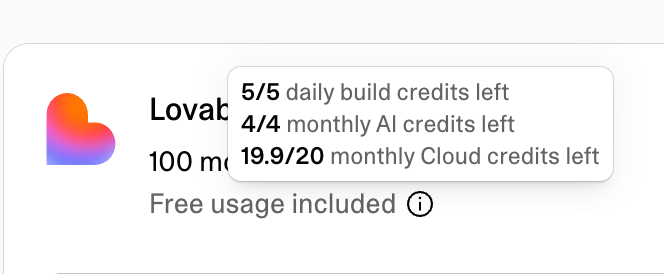
To see what is left of your daily build credits, monthly Cloud grant, and monthly AI grant, hold the pointer over the info icon next to Free usage included above the credit bar.
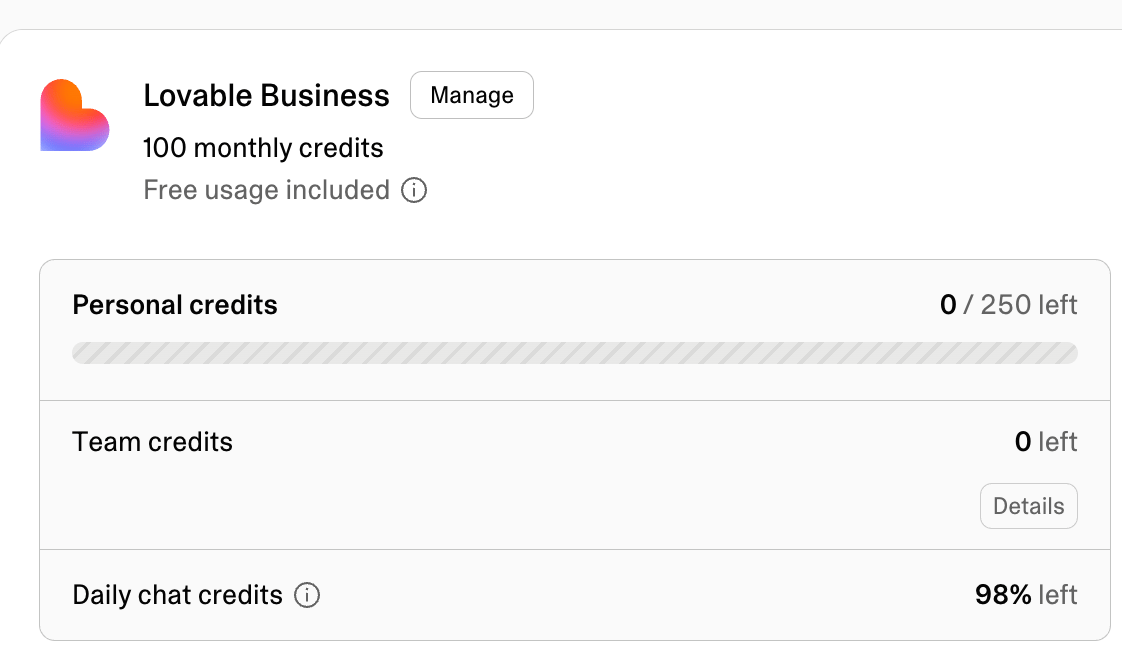
The daily chat allowance is not part of that breakdown or of the credit bar. The Daily chat credits row on the same page shows the percentage of today’s allowance left. See View your credit balance.For the full plan comparison and paid subscription tiers, see Subscription plans.
General credits can be used after usage-specific grants run out to build your app, chat with Lovable, host your app and run its built-in backend (Cloud), and power AI features in deployed apps.
Credit source
When it is added
Expiry
Monthly plan credits
Start of billing period
Monthly plans: 2 months from issue date
Annual plans: 1 month after the annual billing period ends
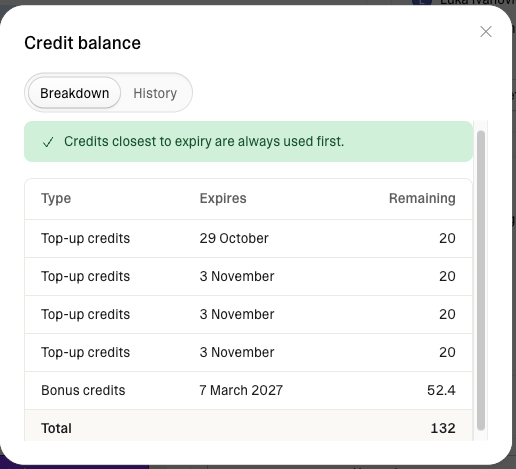
You can see a breakdown of your general credit types and their expiry dates in the Credit balance dialog.All unused monthly plan credits automatically roll over at the end of each billing cycle, as long as your subscription remains active. Rollover credits still expire on the schedule in the table above: 2 months after they were issued on monthly plans, and 1 month after the annual billing period ends on annual plans.
Credits are used across four areas: building your app, chatting with Lovable, hosting your app and running its built-in backend (Cloud), and powering AI features in deployed apps. Each area uses credits differently, based on the type of work performed or resources consumed.To see where your credits are going over time, use Usage details.
Build usage covers Plan mode and Build mode messages in the project chat, work a chat sends to a project, and the images and videos Lovable generates, in a project or in a chat. Messages in Chat mode, the third mode in the project chat, are chat usage and follow the chat pricing model. See Chat costs.
Mode
How credits are charged
Plan mode
1 credit per message, plus the cost of any subagent research Lovable runs while planning
Build mode
Cost depends on the complexity of the request and the work completed
Use Plan mode to think through an idea, investigate a problem, compare approaches, or create a plan before changing code. Plan mode never modifies your code. A Plan mode message costs 1 credit, plus the cost of any subagent research Lovable runs while planning, so a message that needs deep research costs more than 1 credit. See How Plan mode messages are priced.Use Build mode when you want Lovable to implement changes directly in your project. Build mode pricing is usage-based. Small, focused edits usually cost less than larger generations, multi-step changes, or requests that require more codebase exploration, verification, browser checks, web search, or image and video generation.Here are some illustrative Build mode examples:
User prompt
Work done
Credits used
Make the button gray
Changes the button styles
0.50
Remove the footer
Removes the footer component
0.90
Add authentication
Adds login and authentication logic
1.20
Build a landing page with images
Creates a landing page with generated images, a theme, and sections
2.00
Credit costs shown are illustrative examples. Actual credits used vary depending on the complexity and scope of your specific project.
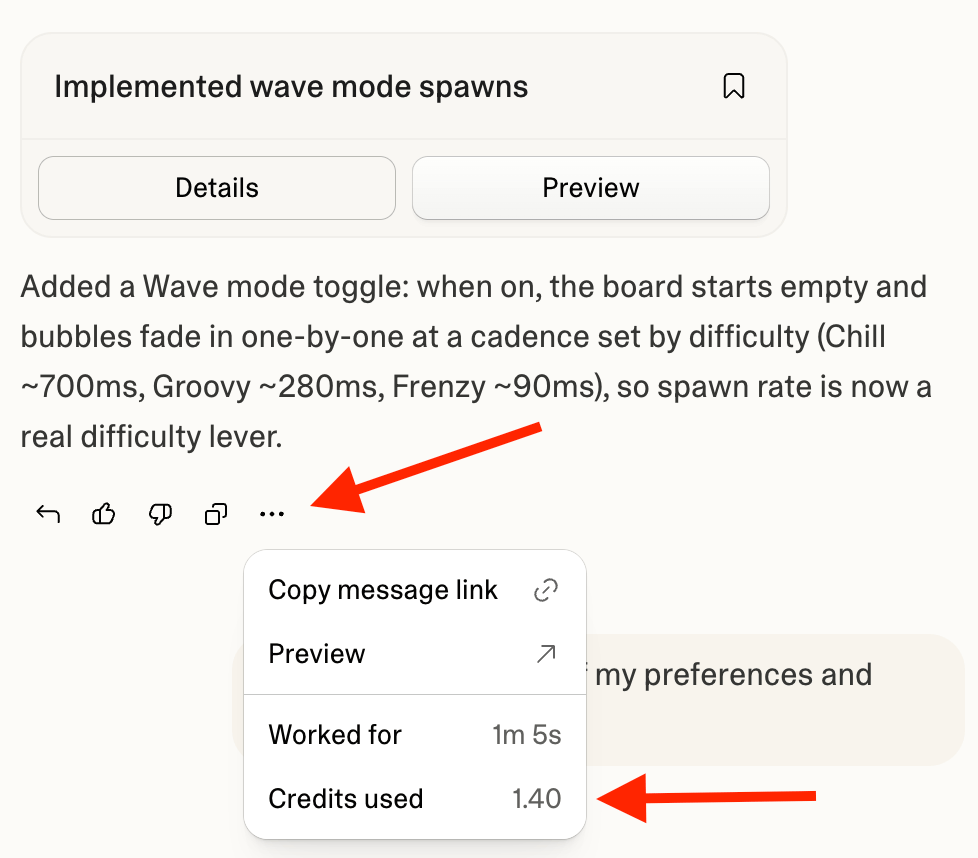
Open the More options menu below any Lovable response in the project chat to see its exact cost under Credits used. The menu is available while Lovable is still working as well as after it finishes, so you can follow the cost of a long message as it runs. Stopped Build mode requests are charged based on the work completed so far. A request you stop before Lovable has made any change to your project is not charged.To review build usage over time, go to Workspace settings → Plans & credit usage → Usage details and select Build credits. You can filter by time range and view usage by project or person. The chart splits the view into four groups: Build for Plan mode and Build mode messages and other work in your projects, Chat for chat usage, and Image generation and Video generation for the images and videos Lovable generates while it works. See Reading the chart.For long-running Build mode messages, Lovable checks in when a single message crosses your credit check-in level, 20 credits by default. The run pauses with a card showing what the message has cost so far. Choose Continue to keep going, optionally typing a new check-in level first (it becomes your default), or Finish up to have Lovable finish the work in progress and stop. If the message keeps running after you continue, Lovable checks in again each time it costs another level’s worth of credits. A check-in is a notification threshold, not a hard cap: a run can go slightly past the level before pausing, and sending a new message resets the count. A single message can run for up to 10 hours, so a long run can check in several times along the way.Manage check-ins in account settings: set the level (a whole number between 20 and 100,000 credits, applied to your account in every workspace) or disable them, either with Don’t ask again on the check-in card or with the Long-running credit check-ins setting. Wrapping up itself uses credits like any other work. The feature is in beta.If your workspace balance reaches zero while Lovable is working, the message pauses regardless of your check-in settings, and you can add credits to resume or have Lovable wrap up. See What happens when you run out of credits.A Build mode message you set as a goal with the /goal command is also billed on the work Lovable does, but costs noticeably more: the same work uses more credits, and Lovable keeps working until the goal is achieved.Build costs are the same wherever you build. A Build mode message you send in a draft costs the same as one in the main version of your project, and creating, updating, accepting, and deleting a draft don’t use credits.
Chat usage follows its own pricing model, including a per-message price and a daily chat allowance. It covers messages in Chats, in Chat mode inside a project, and to Lovable in Slack or Telegram, including each request you make in a voice conversation. Lovable prices each message on the work it does to answer, typically a fraction of a credit.Chat usage draws from the daily chat allowance first, then from your daily build credits, then from your general credits, at the same per-message price. Enterprise plans do not include a daily chat allowance, so chat usage in an Enterprise workspace uses the workspace’s credits from the first message.
Temporary offering, subject to change. The current chat pricing model, including the per-message price and the daily chat allowance, applies through October 31, 2026. Pro and Business workspaces receive a larger daily chat allowance than Free workspaces. This pricing applies to messages in Chats and Chat mode, including messages sent through Slack or Telegram and requests made by voice.Build mode, Plan mode, image and video generation, and Cloud and AI usage follow their standard pricing and are not part of this offer.
Work that starts in a chat but runs in a project is build usage. A project Lovable creates or edits from a chat, the messages you send after switching from Chat mode to Build mode, and images and videos Lovable generates in a chat all use build credits at standard pricing. Lovable shows a card before a chat edits or creates a project. See Chat pricing and daily chat allowance and How Chat mode messages are priced.To see what a message cost, open the More options menu on Lovable’s reply. The row reads Chat credits used in Chats and Credits used in Chat mode, and a Free badge replaces the amount when the daily chat allowance covered the message.To follow chat usage and the allowance:
Allowance left today: The Daily chat credits row on Plans & credit usage shows the percentage of today’s allowance left. See View your credit balance.
Inside Chats: The mode picker, a chat’s title menu, and the menu on each reply also show the allowance state. See Track your allowance and usage for each place, with screenshots.
Cloud usage is measured based on the hosting and built-in backend resources your deployed app consumes. It draws from your available credits, starting with any monthly Cloud grant included in your plan.
Usage driver
What affects cost
Database server
The instance size your database runs on, how long it stays active, and how much traffic or querying it handles. Larger instances support more users, traffic, queries, and data, but use more credits. Paid plan users can choose a larger instance size from More → Cloud → Overview → Advanced settings. The Manage instance dialog shows estimated monthly Cloud costs for each size to help you compare. Free plan users can upgrade their plan to move beyond the default instance. See Upgrade instance for more information.
Database storage
The amount of data your database stores, such as users, orders, messages, and app records
Network
Data sent or received by your app, such as API responses, downloads, uploads, images, and media
Storage
The amount of uploaded or generated files your app stores, such as images, documents, and videos
Compute
Your app’s code running behind the scenes, such as processing payments or sending emails
Realtime
Live updates sent through your app, such as chat messages, notifications, or collaborative updates
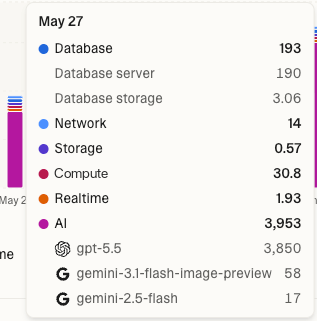
Images Lovable generates or edits for you while building, such as changing an image’s style or removing its background, are build usage and appear under Image generation. Image files your app stores and serves are Cloud usage: they count toward Storage while stored and toward Network when your app sends them to visitors.Cloud usage usually increases when more people visit your app, your app stores more data or files, users upload or download larger files, your app sends more API responses or media, your app runs more code behind the scenes, or Realtime features send more messages. For more information, see the built-in backend (Cloud).To reduce a project’s usage, work through the checklist in Reduce a project’s usage: pausing, right-sizing the instance, fixing slow queries, cleaning up storage, or removing the built-in backend entirely.To review Cloud usage, go to Workspace settings → Plans & credit usage → Usage details, then select Run credits. You can filter by time range and view usage by project. The More → Cloud → Usage view inside a project shows the same breakdown, already filtered to that project, so you can see which categories drive its usage while you work on it.The Run credits view includes Cloud, AI gateway, and connector usage. The usage chart breaks Cloud usage into categories such as Database, Network, Storage, Compute, and Realtime. Database usage includes both database server and database storage.
AI gateway usage is measured when AI features inside your deployed app make model calls. These requests are separate from the Lovable agent that helps you plan, build, and edit your project.The built-in AI connector runs on a usage-based pricing model, so credit usage scales with how much your app uses AI features. Each model call deducts credits based on the model used and the amount of work performed, such as text tokens, generated images, or seconds of generated video or voice conversation.On Free, Pro, and Business plans, AI gateway usage draws from the monthly AI grant first. After that, it draws from general credits if available.AI gateway usage rates are based on the underlying provider model costs. To estimate relative model costs, refer to the official provider pricing sources linked from the supported model list.
Usage driver
What affects cost
Model choice
More capable models usually cost more than smaller or faster models
Input tokens
Longer prompts, documents, chat history, or retrieved context increase usage
Output tokens
Longer AI responses increase usage
Call volume
More users or more frequent AI actions create more model calls
Feature type
Chatbots, document question answering, image generation, embeddings, and automations can have different usage patterns
For more information, see AI features for your app.To review AI gateway usage, go to Workspace settings → Plans & credit usage → Usage details and select Run credits. You can filter by time range and view usage by project.The Run credits view includes Cloud, AI gateway, and connector usage. The usage chart shows the top models used (see image in Cloud costs).
Some connectors, such as Perplexity, Firecrawl, and Parallel, offer a Managed by Lovable option that bills usage through Lovable credits instead of a provider account. Lovable charges requests through such a connection to the workspace the connection belongs to, at the rate on the connector’s page.Connector usage draws from the monthly connector grant included in your plan first, then from your general credits. The monthly Cloud and AI grants do not cover it.To review connector usage, go to Workspace settings → Plans & credit usage → Usage details and select Run credits. The usage chart breaks connector usage down by connector.
You can check your credit balance from the dashboard, the project editor, or Workspace settings → Plans & credit usage. You can also ask Lovable in the project chat.
To quickly check your credit balance, click your workspace name at the top of the sidebar, on the dashboard or inside the project editor. The workspace menu shows a credit bar with your remaining credits. The bar empties as you use credits.Click the credit bar to open Plans & credit usage for more details.
The credit bar shows your remaining daily build credits, monthly credits, personal credits, team credits, or commitment credits, depending on your plan. The filled part of the bar is what you have left, so the bar gets shorter as you use credits.On Enterprise plans, the credit balance panel on Plans & credit usage shows numbers in place of a bar. Workspace admins and owners see how many workspace credits remain and the workspace total, for example 6,400 remaining of 10,000. When the workspace has used more than its commitment, the panel shows a Limit reached warning and an Overage credits row. Other members see only their own personal credits.The daily chat allowance is not part of the credit bar. On Plans & credit usage, the Daily chat credits row at the bottom of the credit balance panel shows the percentage of today’s allowance left, and its info tip shows when it resets. Once the allowance is used up, the row reads Used up for today. Chats now use your build credits., which means chat usage now draws on your daily build credits, then your general credits. The row can also note that no build credits are left or that a credit limit paused chats. The row does not appear on Enterprise plans.
Workspace admins and owners on paid plans can also open the Credit balance dialog for a detailed view of workspace credits, including credit types, expiry dates, and recent credit activity.Select Details to open the Credit balance dialog. On Pro and Business plans, the dialog has two tabs: Breakdown and History. On Enterprise plans, the dialog is titled Credit history and shows the history only.
Available on Pro and Business plans. Not shown for Enterprise.The Breakdown tab lists your general credit grants, including each grant’s type, expiry date, and remaining amount. Grants expiring soonest appear first.A note at the top of the tab confirms that Lovable uses the general credits closest to expiry first.
Credit type*
Description
Monthly credits
General credits included with your plan. Issued at each billing cycle renewal.
Rollover credits
Unused monthly plan credits carried forward from a previous billing period. They keep their original expiry date.
Bonus credits
One-off promotional credits from Lovable support, a referral, or an affiliate program.
Top-up credits
Credits purchased through one-time top-ups or auto top-ups.
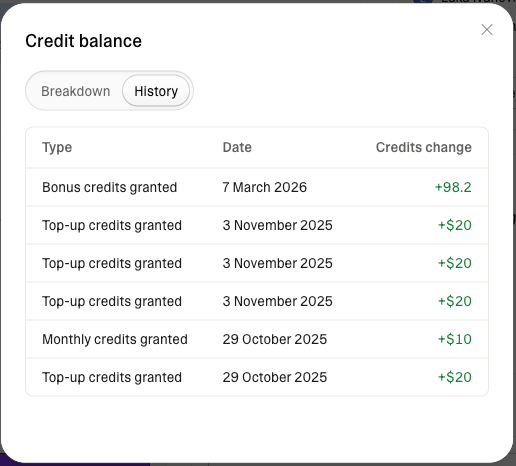
Available on Pro, Business, and Enterprise plans.The History tab shows credit activity for up to the past 12 months, sorted newest first.
Because credit history recording started on March 8, 2026, early history may show less than 12 months of activity. Over time, the tab will show a full 12 months of credit history.
Each row shows the event type, date, and credit change. Positive values mean credits were added, and negative values mean credits were removed or expired.
Event type
Description
Monthly credits granted
Monthly plan credits were issued at renewal or plan start.
Monthly credits expired
Unused monthly plan credits expired at the end of their validity window.
Bonus credits granted
Promotional credits were added to your account, for example from Lovable support, a referral, or an affiliate program.
Bonus credits expired
Promotional credits expired unused.
Top-up credits granted
Credits purchased through a one-time top-up or auto top-up were added to your account.
Top-up credits expired
Purchased top-up credits expired unused.
Commitment credits granted
Enterprise only. Your committed credit balance was issued or renewed.
Converted balance
A one-time entry created during the transition to credits as the single balance, reflecting the conversion of your previous Cloud and AI balance into credits.
Go to Workspace settings → Plans & credit usage → Usage details to see a detailed breakdown of where your credits go across build, chat, Cloud, and AI gateway usage.The Usage card on the Plans & credit usage page shows recent usage at a glance. Select More usage details to open the full Usage details page.
Ask Lovable about your workspace’s credit usage, plan, and subscription directly in the project chat.Ask a question about credits, spend, cost, or your plan, and Lovable looks up the answer and replies in the conversation, using the same information shown in Workspace settings → Plans & credit usage.For example, ask How many credits did this workspace use this month?, How many credits have I used?, Which project used the most Run credits?, What’s driving my Run credit usage?, What plan are we on?, or Has my subscription activated?Everyone can ask about their own usage. Workspace-wide totals and breakdowns by project or member are available to admins and owners. Plan and subscription answers are available to editors, admins, and owners. Asking is treated as standard build usage and consumes credits.Lovable can tell you which plan you are on, but it cannot change it. To upgrade, downgrade, or cancel, see Change or cancel your subscription.
Usage visibility depends on your workspace plan, workspace role, the usage type, and whether you have access to the project.
View
Who can see it
Notes
Your own usage
Editors, admins, and owners
You can see your own usage under Build credits.
Total usage
Admins and owners
Shows total workspace usage across the selected filters. Editors see a narrower view: usage in the projects they own, plus their own usage anywhere in the workspace.
Project usage
Editors, admins, and owners
Admins and owners see every project. Editors see only the projects they own, in a My projects tab.
Other members’ usage
Admins and owners
Only admins and owners can view usage under Build credits for other workspace members.
On Enterprise workspaces, editors see usage for the projects they can edit, plus their own usage. Workspace totals, other members’ usage, and projects they cannot edit are visible to admins and owners only.
Credit type: switch between All credits, Build credits for build and chat usage, or Run credits for Cloud, AI gateway, and connector usage.
Project: see usage per project across All credits, Build credits, or Run credits. Admins and owners see every project. Editors see the projects they own, or on Enterprise the projects they can edit. Selecting a project updates the chart to show that project’s usage for the selected credit type. Clear the selected project to return to the full view.
People: see your own usage under Build credits, or, if you are an admin or owner, see it per workspace member. This filter is only available when viewing Build credits. Selecting a person updates the chart to show that person’s usage. Select View details to open User insights for that member. Clear the selected person to return to the full view.
Group: admins and owners can see usage under Build credits per group. This filter is only available when viewing Build credits, and is available to Business and Enterprise workspaces. Selecting a group updates the chart to show that group’s usage. Clear the selected group to return to the full view.
Time range: view the last 30 days, last 90 days, all time, or a custom range of up to 90 days.
The heading above the chart shows your total credits for the current filter and time range, such as 5,352 credits in last 30 days. The chart shows daily credit consumption. Hover over a bar to see the details for that day.Usage data may be up to a minute behind your most recent activity. New Run credit usage can take up to 24 hours to appear.Each bar breaks down by the credit type you selected:
All credits shows usage under Build credits and Run credits.
Build credits shows Build, which covers Plan mode and Build mode messages and other work in your projects, Chat, which covers chat usage, and Image generation and Video generation, which cover images and videos Lovable generates while it works. Chat usage covered entirely by the daily chat allowance or your daily build credits does not appear. Only chat usage that drew on your general credits counts. Images and videos that your published app generates through its AI features are AI gateway usage and appear under Run credits instead.
Run credits shows Cloud usage, AI gateway usage, and connector usage. Cloud usage breaks down into Database (server and storage), Network, Storage, Compute, and Realtime. AI gateway usage shows a breakdown by the top three models used. Connector usage shows a breakdown by connector.
Select a category in the legend below the chart to hide or show it. In the Build credits and Run credits views, a table below the chart lists each category’s total for the selected time range.
Usage history under Run credits, which includes Cloud, AI gateway, and connector usage, starts on the date your workspace switched to the unified credit balance (June 1, 2026 at the earliest). Dates before then show usage under Build credits only.
This helps you answer questions such as Which project is driving my hosting costs? or Which member used the most credits this month? directly from Usage details.
Next to the total above the chart, Usage details shows how many of those credits your free allowances covered, for example 42 credits covered by free allowance. The free allowances are your plan’s usage-specific grants: the daily chat allowance, daily build credits, and the monthly Cloud, AI, and connector grants. The covered total appears only when the free allowances covered some usage in the selected time range.The chart has two views:
By category (default): each bar is split by usage category. Hover over a bar to see how many credits the free allowances covered in each category.
By coverage: each bar is split into Covered by free allowance and Other usage, so you can see when your usage drew on your general credits.
The covered total also appears in a project’s Usage view. Enterprise plans do not include these grants, so Enterprise workspaces do not see free allowance coverage.
Below the chart, usage is broken down in two tabs:
Projects (My projects for editors): credits used per project across the selected credit type. Search and sort projects by usage, then select a project to apply the filter and update the chart.
People: usage under Build credits per workspace member, including chat usage. This tab is available when viewing Build credits. Search and sort members by usage, then select a person to apply the filter and update the chart.
Admins and owners see every project. Editors see the projects they own, or on Enterprise the projects they can edit.Editors, admins, and owners can view their own usage under Build credits. Usage for other workspace members is visible to admins and owners only.On Enterprise workspaces, workspace totals and other members’ usage are visible to admins and owners only.
Credit top-ups are available on Pro and Business plans. Use them to add credits to your workspace balance so you can continue building your app, chatting with Lovable, hosting your app and running its built-in backend (Cloud), and using AI features in deployed apps.Workspace owners and admins on paid plans can add credits in two ways:
Auto top-up: add credits automatically when your balance runs low
One-time top-up: buy credits manually when you need them
You can buy credit top-ups from:
Workspace settings → Plans & credit usage
The low-credits alert in the project chat when you’re running out of credits
Pricing depends on your plan. Top-up credits are purchased outside your monthly subscription, so they have their own price per credit.
Plan
Top-up price
Price per credit
Pro
$15 per 50 credits
$0.30 per credit
Business
$30 per 50 credits
$0.60 per credit
Credit top-ups are billed as one-time payments through Stripe. An invoice or receipt is generated for every purchase.Top-up credits are valid for 12 months from the purchase that added them.
If you consistently need more credits each month, upgrading your plan is usually better value. See Upgrade your plan or credit tier.
Auto top-up automatically purchases credits when your balance reaches or falls below a threshold you set. Use it to keep building your app, hosting it and running its built-in backend (Cloud), and using AI features in deployed apps when your balance gets low.Top-ups run as often as needed, as long as the next top-up would not exceed your monthly spend limit.
1
Open Plans & credit usage
Go to Workspace settings → Plans & credit usage.
2
Open the auto top-up flow
Select Add credits → Auto top-up → Set up.
3
Set the auto top-up rules
Choose when auto top-up runs, how many credits it adds, and the maximum amount it can add each month.
Top-up amount: the number of credits added to your workspace each time auto top-up runs.
When my balance falls below: the credit threshold that triggers the auto top-up. Auto top-up runs when your balance reaches or falls below this amount.
Monthly spend limit: the maximum number of credits auto top-up can add in a calendar month. You are charged only for credits actually added. Use this to control monthly top-up charges, or leave it at No limit.
100, 200, 400, 1,000, 2,000, 5,000, 10,000, 25,000, 50,000, 100,000 credits, or No limit
4
Turn on auto top-up
Select Enable auto top-up.The UI shows the cost for each top-up and, if you set a monthly spend limit, the maximum monthly cost.
Your default payment method is charged only when a top-up is triggered. Auto top-up runs only if both conditions are met:
Your balance reaches or falls below your selected threshold.
The top-up would not exceed your monthly spend limit.
The monthly spend limit resets on the 1st of each calendar month at 00:00 UTC, displayed in your timezone. It is not tied to your subscription billing cycle.
Auto top-up is paused when you upgrade from Pro to BusinessIf you upgrade from Pro to Business, Lovable pauses auto top-up, because the price per credit changes with your plan. Review your auto top-up settings after upgrading and re-enable it if the new pricing works for you. Re-enabling auto top-up or saving new auto top-up settings clears the pause.
Use a one-time top-up to add credits manually without changing your subscription. This is useful if you run out of credits mid-cycle or have occasional spikes in usage.
1
Open Plans & credit usage
Go to Workspace settings → Plans & credit usage.
2
Open the top-up flow
Select Add credits, then select Buy once.
3
Choose the credit amount
Choose between 50, 100, 150, 200, 250, 300, 400, 500, 1,000, 2,000, 3,000, 5,000, or 10,000 credits.The UI shows the cost before you buy.
4
Confirm payment
Select Buy credits and confirm payment.
Credits are added to your workspace instantly. Multiple purchases are allowed.
Lovable shows alerts when your workspace is close to a limit, runs out of credits, or needs billing attention. Alerts can appear as nudges in the project chat, in-app banners, blocking dialogs, inline messages, or emails to workspace owners and admins.You may be notified when:
Your workspace is running low on credits. A nudge appears above the chat input with your remaining credits and an option to add more.
Your daily chat allowance is used up. In a chat, Lovable shows Chats may now use your credits, and further chat usage draws on your daily build credits, then your general credits. See Chat costs.
Your workspace runs out of credits. When you try to continue building your app, Lovable shows a blocking dialog and building stops until credits are available. If Lovable is working on a message at the time, it pauses and shows a card in the project chat instead. See What happens when you run out of credits.
A deployed app is paused because your workspace has no available credits. Lovable shows an in-product message when a deployed app that relies on the built-in backend (Cloud) or AI features pauses.
Your credits are likely to run out before your monthly credits refill. On Free, Pro, and Business plans, workspace admins and owners see a warning on the Plans & credit usage page and in Usage details. The warning shows the date your credits are expected to run out, the date your monthly credits refill, and a button to add credits. Lovable bases the estimate on your workspace’s recent Run credits usage. Credits you spend building are not part of the estimate. Lovable does not show the warning while auto top-up is enabled.
Cloud or AI gateway usage approaches a limit. Lovable shows an in-app alert on the Plans & credit usage page.
Credits are expiring soon. A nudge in the project chat may appear when top-up or rollover credits are nearing expiry.
Auto top-up fails. Lovable emails workspace owners and admins and shows an in-app banner with options to retry the charge or update the payment method.
Auto top-up reaches its monthly spend limit. Lovable emails workspace owners and admins when auto top-up reaches the monthly spend limit you set.
A non-admin runs out of credits. They can send a credits ping to workspace owners asking them to add credits.
Running out of credits affects each part of Lovable differently:
Building stops. When you try to continue building, Lovable shows a blocking dialog until credits are available.
Chats and Chat mode continue while the daily chat allowance lasts. The allowance does not depend on your credit balance, so messages in Chats and Chat mode keep working until it is used up for the day. After that, Lovable shows Chat credits unavailable and pauses chats until you add credits or the allowance resets at 00:00 UTC.
Work in progress pauses. If Lovable is working on a message when your workspace runs out of credits, it pauses and shows a card in the project chat. Choose Add credits to resume the message where it left off, or Finish up to have Lovable finish what’s in progress and stop instead of starting anything new. If you can’t manage billing for the workspace, the card shows Ask an admin instead, and once credits are available again the card offers Resume. Paused work waits until you decide.
AI features in deployed apps stop working. App features that call AI at runtime need available credits, so they fail while your balance is at zero.
Built-in backend services will pause. If your app uses a backend service such as a database, storage, or authentication, those services pause shortly after you run out of credits.Your database, storage, and authentication data stays safe while the services are paused. You cannot access or export it until the services run again. Adding credits may not restart them by itself: if they are still paused once credits are available, open More → Cloud → Overview in the project and click Wake up. To learn how to get a copy of your data, see Export Lovable Cloud data.To reduce costs, ask Lovable to optimize your project, or pause projects you don’t use. Check your usage page for more information on backend spend.
To keep your workspace and apps running:
Free plan: upgrade to a paid plan to get more credits and unlock top-ups.
Paid plans: enable auto top-up, or add credits with a one-time top-up.
To prevent pauses and failing AI features from an empty balance, enable auto top-up on Pro or Business plans. Lovable then adds credits automatically when your balance falls below a threshold you set.For busier apps, set a higher trigger threshold, such as 50 or 100 credits, so credits are added before your balance gets close to zero. You can also review Usage details over a 90-day range to see whether your usage is trending up. Lovable also warns you on the Plans & credit usage page when your recent usage is likely to use up your credits before they refill. See Alerts and notifications.
How were Cloud and AI balances converted into credits?
Previous Cloud and AI balances were converted using each workspace’s plan credit rate.Pro and Business use different plan credit rates because Business plans include additional functionality, such as advanced controls and governance features. For the full feature comparison, see Subscription plans.
Plan
Plan credit rate
Example conversion
Pro
$0.25 per credit
$10 converts to 40 credits
Business
$0.50 per credit
$10 converts to 20 credits
Because Pro and Business use different plan credit rates, the same previous Cloud and AI balance can convert into a different number of credits depending on the workspace plan.This does not mean Cloud or AI gateway usage is cheaper on Business. It means fewer credits are deducted because each Business credit represents more dollars.The number of credits is different, but the Cloud and AI gateway value is the same.
What happens if credits run out?
Building stops until credits are available. If Lovable is working on a message at the time, the message pauses, and you can add credits to resume where it left off or have Lovable wrap up. Your published site stays live, and its pages keep serving. AI features in deployed apps stop working, and apps that rely on the built-in backend (Cloud) can pause. Pausing only happens when your workspace has no available credits at all. Chats and Chat mode keep working while the daily chat allowance lasts, because the allowance does not depend on your credit balance. See What happens when you run out of credits for the full breakdown.Building, chatting, and AI features in deployed apps resume when credits become available again, either through a one-time top-up, auto top-up, or the next applicable grant refresh. A paused backend may not resume by itself when credits come back. If it is still paused, open More → Cloud → Overview in the project and click Wake up. Daily build credits and the daily chat allowance refresh every day at 00:00 UTC. Free plan monthly grants refresh on the 1st of each calendar month at 00:00 UTC. Pro and Business monthly Cloud and AI grants refresh with the subscription billing cycle.
Does the backend pause if I still have credits?
No. Apps that rely on the built-in backend (Cloud) pause only when your workspace has no available credits at all.Lovable spends the monthly Cloud grant first, but the grant is not a separate budget for your backend. When the grant runs out, Cloud usage draws from your general credits, including unused monthly plan credits, rollover credits, and top-up credits. As long as your workspace has credits available, your backend keeps running.
How do I get more credits?
Go to Workspace settings → Plans & credit usage. From there you can upgrade your plan or, on Pro and Business plans, buy credit top-ups without changing your subscription. The low-credits alert in the project chat opens the same options. Workspace admins and owners can top up in one of two ways:
One-time top-up: select Add credits, then Buy once, and choose an amount. The credits are added to your workspace immediately.
Auto top-up: Lovable buys credits automatically when your balance reaches or falls below a threshold you set, up to an optional monthly limit.
Top-up credits are billed separately from your subscription and are valid for 12 months. You can also earn bonus credits by inviting people to Lovable. See Credit top-ups, Share Lovable, and Subscription plans.
Do my credits expire?
Yes. Different credit types expire at different times:
Monthly plan credits expire 2 months after issue on monthly plans. On annual plans, monthly plan credits are issued monthly and expire 1 month after the annual billing period ends.
Top-up credits expire 12 months after purchase.
Monthly Cloud grants expire at the end of the calendar month on Free plans, and at the end of the billing cycle on Pro and Business plans.
Monthly AI grants expire at the end of the calendar month on Free plans, and at the end of the billing cycle on Pro and Business plans.
The daily chat allowance expires at the end of the day.
Daily build credits expire at the end of the day.
Your balance breakdown shows the expiry date of each general credit grant. Lovable spends soonest-expiring general credits first to minimize what you lose.
Do unused monthly plan credits roll over?
Yes. Unused monthly plan credits roll over at the end of each billing cycle, as long as your subscription remains active. Rollover credits stay available until their original expiry date: 2 months after issue on monthly plans, and 1 month after the annual billing period ends on annual plans.Rollover applies to monthly plan credits only. Usage-specific grants, such as the daily chat allowance, daily build credits, and the monthly Cloud and AI grants, expire on their own schedule instead. See Do usage-specific grants roll over? for details.
Do usage-specific grants roll over?
No. Unused usage-specific grants do not roll over.
The daily chat allowance refreshes every day at 00:00 UTC.
Daily build credits refresh every day at 00:00 UTC.
On Free plans, monthly Cloud and AI grants refresh on the 1st of each calendar month at 00:00 UTC.
On Pro and Business plans, monthly Cloud and AI grants refresh with the subscription billing cycle.
Which plans include a monthly AI grant?
Free, Pro, and Business plans all include a 4-credit monthly AI grant for AI gateway usage in deployed apps. On Free, the grant refreshes on the 1st of each calendar month at 00:00 UTC. On Pro and Business, it refreshes with the subscription billing cycle. Unused AI grant credits do not roll over.Enterprise plans do not include the monthly AI grant. Contact your account team for account-specific details.
Which plans include a daily chat allowance?
Free, Pro, and Business plans include a daily chat allowance, part of the chat pricing model, for chat usage: messages in Chats, Chat mode, and Lovable in Slack and Telegram. Pro and Business workspaces receive a larger daily chat allowance than Free workspaces. The allowance refreshes every day at 00:00 UTC and does not roll over.Enterprise plans do not include a daily chat allowance. Chat usage in an Enterprise workspace uses the workspace’s credits from the first message.
Do messages in Chats and Chat mode use credits?
Yes. Messages in Chats and Chat mode, like messages to Lovable in Slack and Telegram, are chat usage, which follows its own pricing model, including a per-message price and a daily chat allowance. Each message is priced on the work Lovable does to answer it, typically a fraction of a credit. The daily chat allowance covers chat usage first. When it is used up for the day, chat usage draws on your daily build credits, then your general credits, at the same per-message price. Work a chat sends to a project, and Build mode messages, are build usage. See Chat costs.
Why doesn't my chat usage appear in Usage details?
Usage details shows credits your workspace spent from its balance. Chat usage covered entirely by the daily chat allowance or your daily build credits does not appear. Chat usage that drew on your general credits appears under Chat in the Build credits view. To check a single message, open the More options menu on Lovable’s reply. See Chat costs.
When do monthly plan credits reset?
Monthly plan credits are granted at the start of each billing period. This happens every month on the same date your subscription started.On annual billing, monthly plan credits are still issued monthly and expire 1 month after the annual billing period ends.To see your billing period, go to Workspace settings → Plans & credit usage.
Can I see my balance without opening Settings?
Yes. You can quickly check your credit balance from the dashboard or from a project.From the dashboard, click your workspace name in the top-left. From a project, click the project name in the top-left of the editor.The credit bar does not include the daily chat allowance. To see how much of it is left, hold the pointer over the Free badge on the Chat option in the mode picker, on the dashboard or in the project chat, or select a chat’s title inside the chat.
Does the credit bar show credits used or credits left?
Credits left. The filled part of the bar is what you have left, and it empties as you use credits. On Enterprise plans, Plans & credit usage shows the credits remaining as a number instead of a bar.
Can I see which project or member is using the most credits?
Yes. Open Usage details from Plans & credit usage.You can filter by project across All credits, Build credits, and Run credits. You can filter by member or group (on Business and Enterprise) when viewing Build credits.
Can I limit how many credits members can spend?
Yes. Workspace owners and admins can set monthly credit limits for workspace members. Member credit limits apply to usage shown under Build credits: build usage, chat usage, and image and video generation. Usage shown under Run credits (Cloud, AI gateway, and connector usage) does not count against a member’s monthly limit.Create limits from Workspace settings → Usage limits & alerts: a default limit for all members, limits for specific members, and limits for groups, projects, or the whole workspace. Each limit can send an alert or block further usage when the threshold is reached. See Usage limits and alerts.You can also set a monthly credit limit for a specific member directly from Workspace settings → People:
Click the three-dot menu at the end of the member’s row.
Select Set credit limit.
Enter the monthly credit limit and save.
Both places manage the same limit. Saving it in the People tab updates the member’s limit in Usage limits & alerts, and a change there shows in the People tab as long as the limit blocks usage.Member credit limits reset on the 1st of each month at 00:00 UTC, independent of your workspace billing cycle.When a member reaches their limit, Lovable pauses their build usage and chat usage until the limit resets or an owner or admin raises it. Chats show Credit limit reached, even while the daily chat allowance has credits left.
Who can manage billing and top-ups?
Workspace owners and admins can manage the plan, top-ups, and auto top-up.Editors can view their own usage and the usage of the projects they own. Workspace totals, every project, and other members’ usage are visible to admins and owners.On Enterprise workspaces, editors see the projects they can edit instead of the projects they own.
How do I cancel my subscription?
Go to Workspace settings → Plans & credit usage, select Manage on your plan card, then select Downgrade to free in the Manage plan dialog and complete the downgrade flow. Your current plan remains active until the end of the current billing period. After that, your workspace moves to the Free plan. See Cancel your subscription.
If an auto top-up fails, Lovable shows a banner in the workspace dashboard and in Workspace settings → Plans & credit usage. This can happen if your card is declined, expired, or no longer available.Use Retry now to run the auto top-up again with your current default payment method. The banner is dismissed once the retry succeeds.Use Update payment method to open the Stripe customer portal and add or change your card. The next auto top-up attempt uses your updated payment method.Workspace owners and admins also receive an email when an auto top-up is declined.If your credit balance reaches zero before the charge succeeds, building stops, AI features in deployed apps stop working, and apps that rely on the built-in backend (Cloud) can pause until credits are added. Your published site stays live. See What happens when you run out of credits.
My auto top-up paused after I upgraded to Business. What should I do?
When you upgrade from Pro to Business, Lovable automatically pauses auto top-up because the per-credit top-up price changes. This prevents your next top-up from being charged at the new Business price without confirmation.After the upgrade, Lovable shows a prompt in the workspace dashboard and in Workspace settings → Plans & credit usage.You can re-enable auto top-up at the new Business price. Your previous top-up amount and monthly spend limit are preserved, so you only need to confirm.You can also keep auto top-up off and use one-time top-ups instead.Auto top-up stays paused until you choose one of these options. Re-enabling auto top-up or saving new auto top-up settings clears the pause.
My deployed app stopped working. What should I do?
Check Workspace settings → Plans & credit usage for your credit balance.If your balance and any applicable monthly Cloud or AI grants are at zero, add credits, enable auto top-up, or wait for the next applicable grant refresh. On Free plans, monthly Cloud and AI grants refresh on the 1st of each calendar month at 00:00 UTC. On Pro and Business plans, monthly Cloud and AI grants refresh with the subscription billing cycle.To prevent this in the future, consider enabling auto top-up on Pro or Business plans and reviewing Usage details to understand which projects or usage types are consuming credits.
Chat credits unavailable
Your workspace has used up today’s daily chat allowance and has no daily build credits or general credits left, so Chats and Chat mode are paused. Add credits, ask a workspace admin or owner to add them, or wait for the allowance to reset at 00:00 UTC. Building is paused for the same reason. See What happens when you run out of credits.If chats are paused with Chat credit limit reached while credits remain, a workspace or member credit limit applies. A workspace admin or owner can raise it. See Can I limit how many credits members can spend?
I stopped receiving daily build credits. What happened?
You may have reached your monthly cap for daily build credits.Daily build credits are capped per calendar month on Free plans only. Free workspaces receive 5 daily build credits, up to 30 per calendar month. After a Free workspace reaches the cap, the daily 5 credits stop being granted for the rest of that calendar month. Daily build credits resume on the 1st of the next calendar month at 00:00 UTC. For example, on Free, you receive daily build credits for the first 6 days each month (6 × 5 = 30), then none until the next month starts.Pro and Business workspaces receive 5 daily build credits every day at 00:00 UTC, with no monthly cap.If you need more credits before then, upgrade your plan or add credits with a one-time top-up on a Pro or Business plan.
Was this page helpful?
Assistant
Responses are generated using AI and may contain mistakes.