

@Lovable, your prompt and conversation context are transformed into the initial build of a working application.
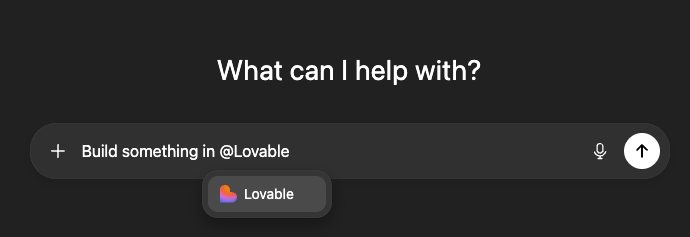
@Lovable and ask it to turn the conversation into a working application. This workflow lets you focus on product thinking in ChatGPT while Lovable handles the technical implementation.
Key capabilities
- Build full-stack applications directly from ChatGPT conversations
- Turn ideas, notes, and discussions into interactive prototypes
- Create landing pages, internal tools, and MVPs without writing code
- Go from concept to working app in minutes
How to use it
Follow these steps to start building with the Lovable ChatGPT app:1
Plan in ChatGPT
Log in to ChatGPT and describe what you want to build. Outline the purpose, target users, key screens, and core functionality to clarify your product idea.
2
Invoke the Lovable app
Tag
@Lovable in your message and ask it to build your app. For example:3
Connect the app (first time only)
The first time you use Lovable in ChatGPT, you will be prompted to connect the app so it can access your conversation context and start the build.
4
Iterate in Lovable
The ChatGPT app creates the initial project from your conversation. Open Lovable to edit, customize, and publish your application.
FAQ
How do I connect the Lovable app in ChatGPT?
How do I connect the Lovable app in ChatGPT?
Tag
@Lovable in ChatGPT and ask something like Turn this into a real working website. The first time you do this, ChatGPT prompts you to connect the Lovable app so it can use your conversation context and start the build.When do I get charged Lovable credits?
When do I get charged Lovable credits?
You are not charged Lovable credits until you send the prompt to Lovable and it begins to build from the prompt. Exploring ideas and tagging
@Lovable in ChatGPT doesn’t use Lovable credits.Can I continue editing my Lovable project in ChatGPT?
Can I continue editing my Lovable project in ChatGPT?
No, for the initial release you need to open Lovable to continue editing your project. The ChatGPT integration creates your starting point, and iteration happens in Lovable.