

- Enterprise workspaces billed under a contract do not use the Stripe billing portal. Ask your account team for invoices.
- Purchases made in the iOS app are billed by Apple, which handles receipts and refunds for App Store purchases. See Lovable mobile app.
Find or download an invoice
In Plans & credit usage you can view your upcoming invoice, payment history, and billing information. Past invoices and receipts are in the Stripe billing portal.1
Open Plans & credit usage
2
Open the Manage plan dialog
Select Manage on your plan card.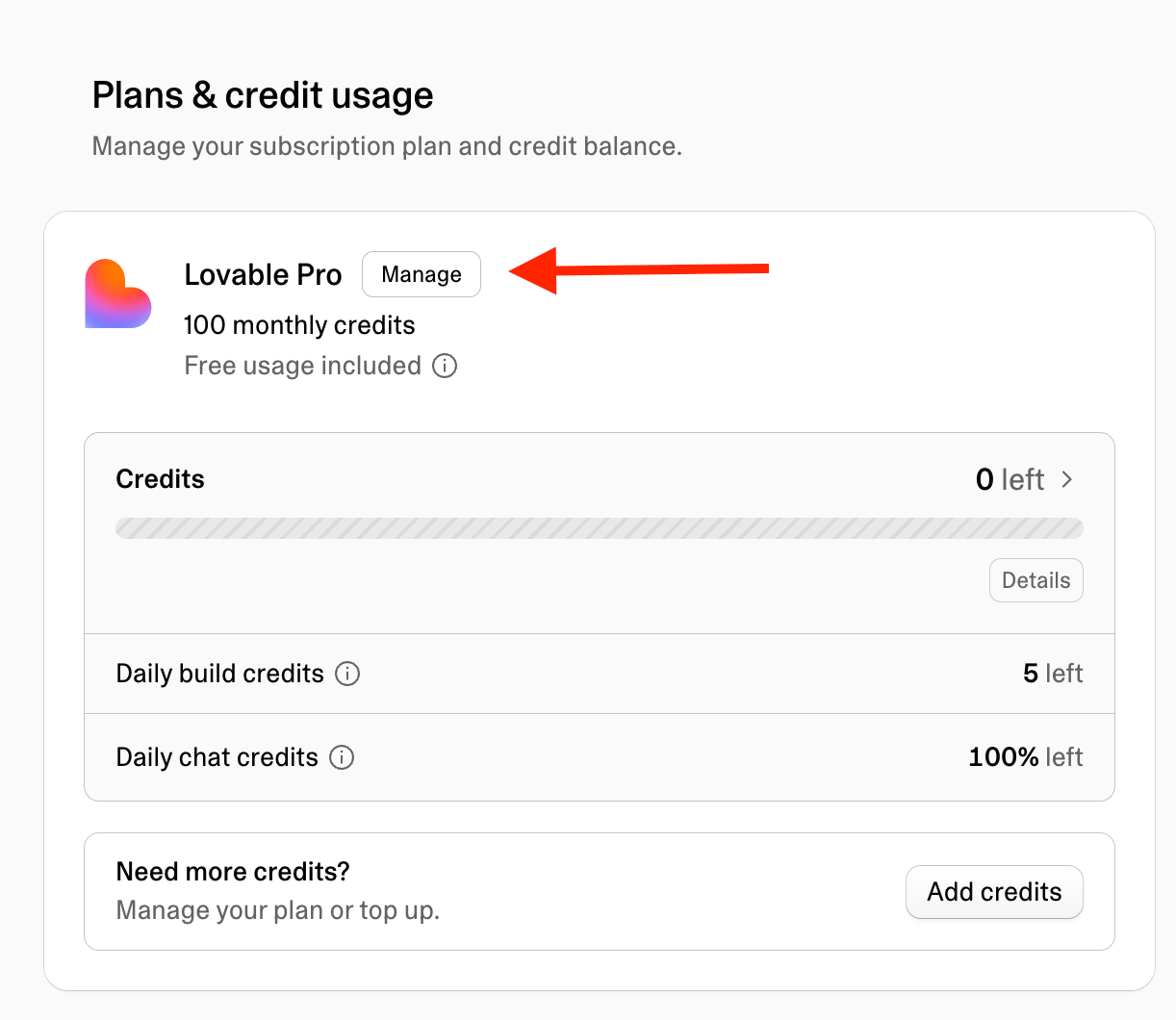
3
Open the Stripe billing portal
Select Invoices & payments. Lovable opens the Stripe billing portal.
4
Download the invoice
In the Stripe billing portal, find the invoice or receipt you need and download it.
Update your payment method
Use the Stripe billing portal to change or add a credit card or another payment method, and to choose which one Lovable charges for renewals and top-ups.1
Open Plans & credit usage
2
Open the Stripe billing portal
Select Manage on your plan card, then Invoices & payments. Lovable opens the Stripe billing portal.
3
Change your payment method
In the Stripe billing portal, add, replace, or remove a card or other payment method, and set the default payment method used for renewals and top-ups.
Update your billing details or tax information
Your billing name, address, and tax details appear on your invoices. You edit them in the Stripe billing portal.1
Open Plans & credit usage
2
Open your billing information
Select Manage on your plan card, then Edit billing information. Lovable opens the Stripe billing portal.
3
Update your details
In the Stripe billing portal, update your billing name, address, and tax details.
Redeem a gift card or coupon
The Manage plan dialog has a Gift card balance card where you redeem a gift card. Open Workspace settings → Plans & credit usage and select Manage on your plan card to find it. Coupon codes are applied at checkout when you upgrade.FAQ
Where do I find or download my invoices?
Where do I find or download my invoices?
Go to Workspace settings → Plans & credit usage, select Manage on your plan card, then Invoices & payments. Lovable opens the Stripe billing portal, where you find past invoices and receipts. See Find or download an invoice.
Where do I find or update my credit card or payment method?
Where do I find or update my credit card or payment method?
Payment methods are stored in the Stripe billing portal, not in Lovable. Go to Workspace settings → Plans & credit usage, select Manage on your plan card, then Invoices & payments. In the portal, you can add, replace, or remove a card and change the default payment method used for renewals and top-ups. See Update your payment method.
How do I change my billing address or tax ID?
How do I change my billing address or tax ID?
Go to Workspace settings → Plans & credit usage, select Manage on your plan card, then Edit billing information. Lovable opens the Stripe billing portal, where you update your billing name, address, and tax details. See Update your billing details or tax information.
Where is my receipt for a purchase made in the iOS app?
Where is my receipt for a purchase made in the iOS app?
Apple handles receipts and refunds for purchases made in the iOS app, so they do not appear in the Stripe billing portal. See Lovable mobile app.
Can I get a refund?
Can I get a refund?
Subscription fees and credits are non-refundable, except where the law requires a refund. If you believe you were charged in error, for example a subscription that renewed after you canceled, contact the support team with your workspace and the charge in question. See the Billing and subscription FAQ in the Support policy.
Who can I talk to about my plan or billing?
Who can I talk to about my plan or billing?
On paid plans, contact the support team through the support form. The support team handles billing issues, refund reviews, and plan questions.On the Free plan, the support form is not available. Use the docs assistant on any docs page or ask the community on Discord.For Enterprise pricing and contracts, contact sales.See the Support policy for all support options by plan.
Troubleshooting
I cannot pay for my subscription. What should I do?
I cannot pay for my subscription. What should I do?
Payment setup may occasionally fail because of an issue with Stripe.Check your payment details and retry. If the problem persists, try a different payment method. See Update your payment method.
I paid but still do not have access to my plan. What should I do?
I paid but still do not have access to my plan. What should I do?
First check whether the subscription has come through. Your current plan and subscription status are shown in Workspace settings → Plans & credit usage, and you can also ask Lovable in the project chat, for example Has my subscription activated?If your plan still has not changed, contact support at support@lovable.dev.